English
33
The product makes
noise during
operation.
The product is not
installed correctly.
Always ensure that the product is installed
on a at, stable and level surface.
The product suddenly
stops dehumidifying.
The temperature in the
room is higher than
35°C.
This is normal. The product will restart once
the temperature has dropped.
Clothing is not drying
properly.
The clothing is not
hanging in the
product’s air ow.
Make sure the product’s air ow is directed
toward the clothes you want to dry.
The temperature in the
room is too low.
Drying clothes in a cold room is more
difcult. Make sure the temperature rises
or be patient.
There is a bad smell
coming from the
product during use.
The room is not clean.
The product extracts air from the room,
walls and stuff around the product. The
smell is caused by this.
There is water/
moisture in the
collection tray before
I have used it.
The product has been
tested.
Because the product is pre-tested in
production, there may be water/moisture
in the collection tray before you have used
it.
The product gives a
sound signal.
The collection tray is full
or has been removed.
See “Instructions for use > Sound signal”.
5. MAINTENANCE AND CLEANING
5.1 Maintenance
If the air vents are dirty, it may affect the
operation of the product. We recommend
cleaning the air vents regularly.
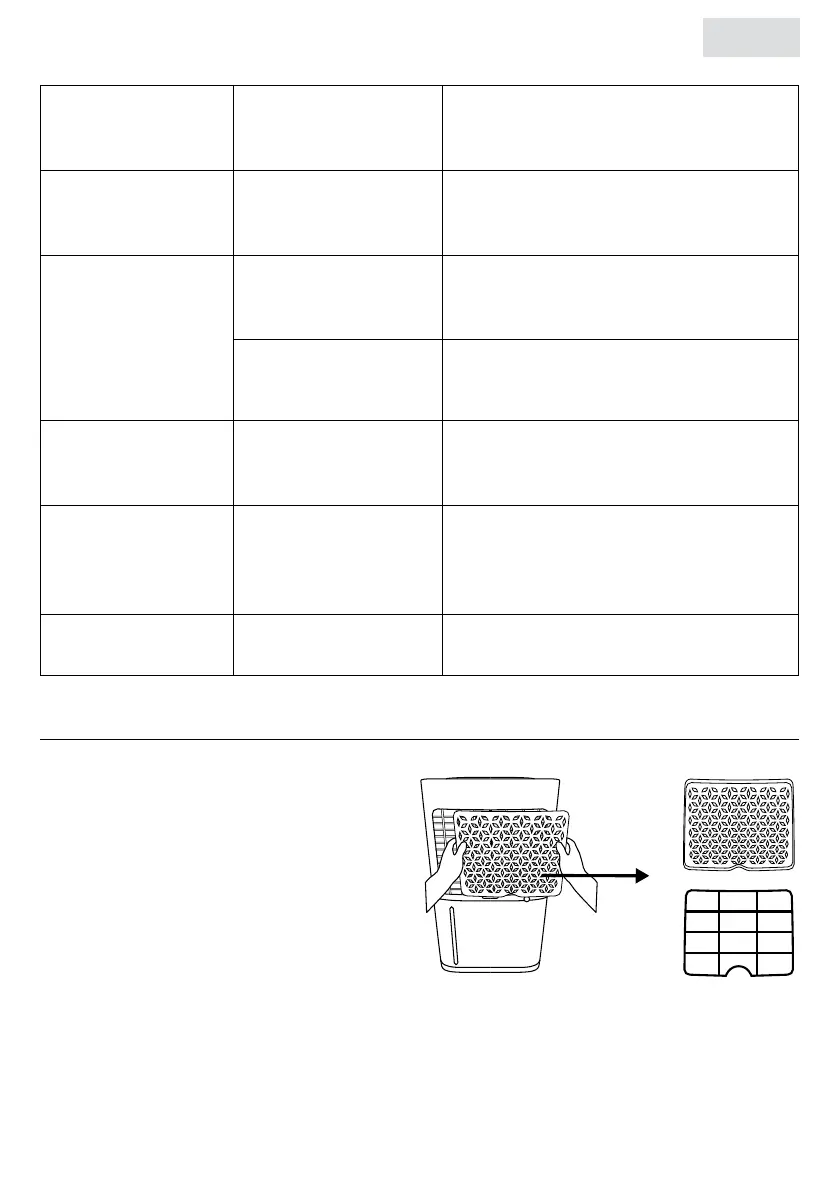
1. Remove the air vents on the back of the
product.
2. Clean the air vents with a vacuum cleaner
to make it dust-free.
3. If the air vents are very dirty, you can wash
them with water and a mild detergent. Do
not use abrasive or harsh cleaning agents.
4. Rinse the air vents thoroughly and let them dry.
5. Carefully place them back into the product before turning the product back on.



 To Next Page