EasyManua.ls Logo

Austroflamm Mo Duo - Configuring Heating Time Schedules

Austroflamm Mo Duo
33 pages
Print Icon
To Next Page IconTo Next Page
To Previous Page IconTo Previous Page
Loading...
7 english
Setting a new heating time or editing the heating time
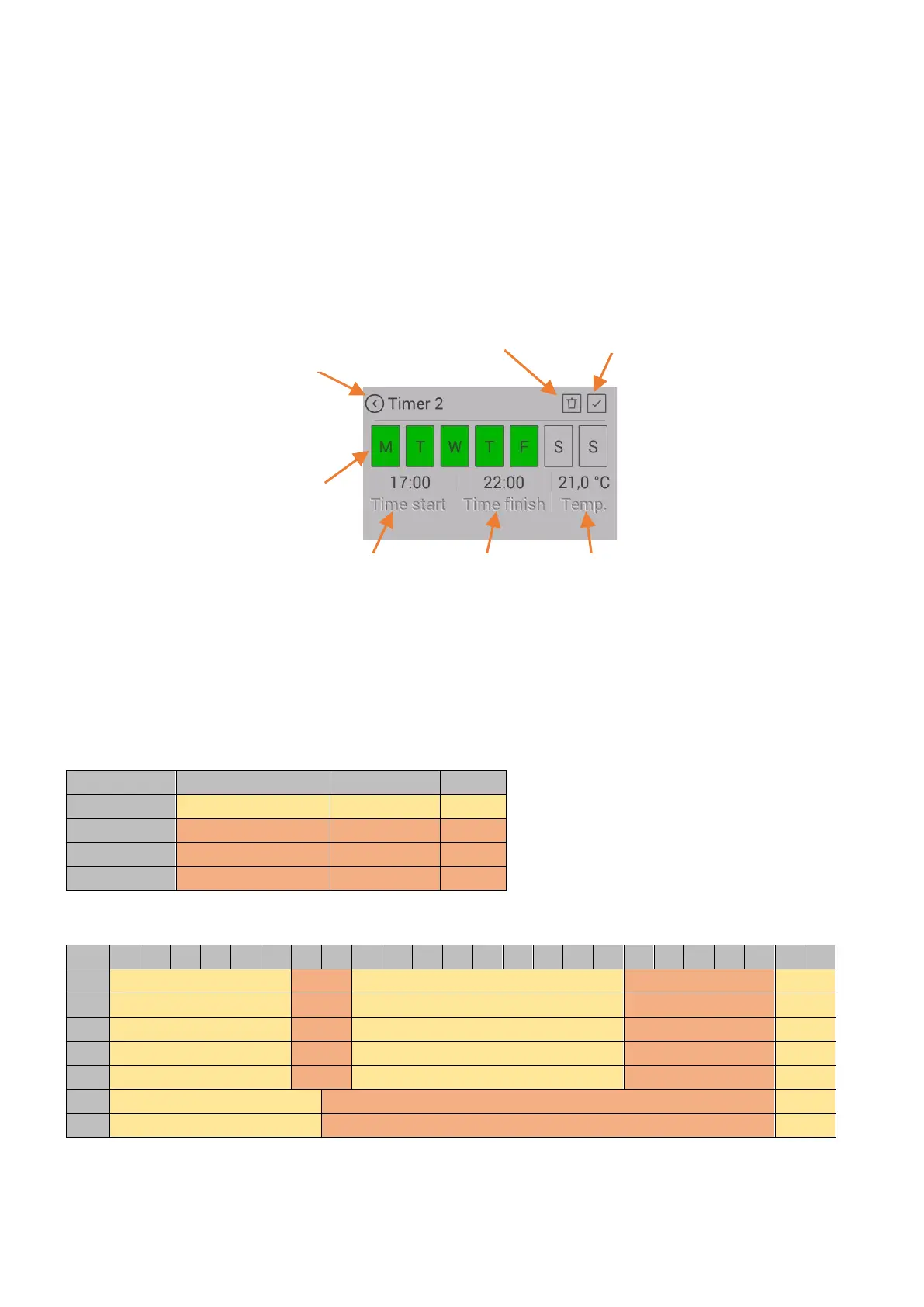
Set the weekdays, heating time start, heating time end and room temperature as required.
Save the heating time by pressing the "Save" icon. You will then return to the heating time list.
To delete an existing heating time, proceed as follows: Highlight the heating time and press the "Delete heating
time" icon.
The timer function may only be activated after specifying the desired heating period. When specifying the heat-
ing period, please note: The timer must be set for the future.
It is possible for specified heating periods to overlap in time.
If individual heating times overlap, the heating time of a higher set temperature is activated with different tem-
perature settings.
Example of heating times for an entire week

Weekday
Times
Temp.
TIMER 1
Monday Sunday
00:00 23:59
18°C
TIMER 2
Monday Friday
06:00 08:00
22°C
TIMER 3
Monday Friday
17:00 22:00
22°C
TIMER 4
Saturday Sunday
07:00 22:00
22°C
Note: Only 3 heating periods may be specified for each day of the week.
00
01
02
03
04
05
06
07
08
09
10
11
12
13
14
15
16
17
18
19
20
21
22
23
Mon
18°C
22°C
18°C
22°C
18°C
Tue
18°C
22°C
18°C
22°C
18°C
Wed
18°C
22°C
18°C
22°C
18°C
Thu
18°C
22°C
18°C
22°C
18°C
Fri
18°C
22°C
18°C
22°C
18°C
Sat
18°C
22°C
18°C
Son
18°C
22°C
18°C
Back without saving
Delete heating time
Save
Desired
temperature
End of heating
time
Start of heating time
Weekdays