
 Need help?
Do you have a question about the Autel Robotics EVO Max Series and is the answer not in the manual?
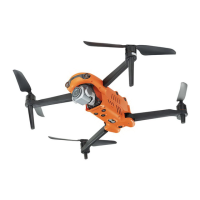
Overview of the EVO Max series aircraft's features, capabilities, and design.
Details the items included in the rugged case for the EVO Max series aircraft.
Steps to verify the aircraft and accessories match the packing list upon receiving.
Introduction to UAS and an overview of aircraft components and payload.
Information on legal requirements and registration for operating the aircraft in different regions.
Guidelines for safe and legal operation of the aircraft, including restrictions and conduct.
Specifies suitable flight environments and conditions for the aircraft, including weather and terrain.
Requirements for maintaining stable wireless communication between the aircraft and remote controller.
Information on the maximum take-off mass (MTOM) and its importance for safe flight.
Details the aircraft's obstacle avoidance system, including visual and radar sensing.
Explains the auto-return function, its activation methods, and the mechanism.
How to manually activate the auto-return function using the remote controller.
Automatic return triggered by low battery levels to ensure safe landing.
Auto-return activation based on specific flight conditions or events like signal loss.
Details the auto-return process based on aircraft distance from the home point.
How obstacle avoidance works during the auto-return process.
Function that assesses ground suitability before landing.
Process for re-establishing the C2 link after disconnection.
Information on geofencing, restricted zones, and how to unlock them.
How to set and understand altitude and distance limits for safe flight.
Procedures for calibrating the aircraft's compass and IMU.
Step-by-step guide for compass calibration to ensure accurate navigation.
Instructions for calibrating the Inertial Measurement Unit (IMU) for flight stability.
How to calibrate the gimbal for stable camera operation.
Function to stop propellers in emergencies to mitigate damage or injury.
Explains the ADS-B receiver for manned aircraft monitoring.
Information on the Direct Remote Identification (DRI) system for UAS registration.
Comprehensive pre-flight checklist and basic flight procedures.
Essential checks before every flight to ensure safety and readiness.
Step-by-step guide for basic aircraft operation, including takeoff and landing.
Steps to activate the EVO Max series aircraft before first use.
Detailed identification and description of the aircraft's various components.
Diagram and details of the aircraft's front view components.
Diagram and details of the aircraft's rear view components.
Diagram and details of the aircraft's top-down view components.
Diagram and details of the aircraft's bottom-up view components.
Information on propeller installation, replacement, and storage.
Step-by-step guide for replacing damaged or worn propellers.
Proper methods for storing propellers when not in use.
Explains the function of arm lights for indicating aircraft status and direction.
Details the aircraft's strobe light for night visibility and safety.
Function of auxiliary bottom lights for landing assistance and visual positioning.
Overview of the aircraft's camera systems, including Fusion 4T and 4N.
Structural details of the gimbal cameras for EVO Max series aircraft.
Information on the aircraft's three-axis stabilized gimbal and its structure.
Diagram and details of the gimbal's structural components.
Mechanical rotation ranges for the gimbal's pitch, yaw, and roll axes.
How to control gimbal pitch and recenter using the remote controller.
Instructions for safely removing and mounting the gimbal.
Overview of the intelligent flight control system and its modules.
Explains the different flight modes (GNSS, Visual Positioning, ATTI) and their characteristics.
Details the performance characteristics of different flight modes like Slow, Smooth, Standard, Ludicrous.
Guide to installing or replacing the microSD card for data storage.
How to connect the aircraft to a PC or MAC for data transfer via USB-C.
Information about the PSDK extension interface for adding functional mounts.
Details the IP43 protection rating of the aircraft and its limitations.
Information about aircraft noise levels and local regulations.
Overview of the Autel SkyLink 3.0 image transmission technology.
Introduction to the Autel Smart Controller V3 and its capabilities.
Identification and description of the various components of the remote controller.
Diagram and details of the remote controller's top-down view components.
Instructions for installing the optional remote controller lanyard.
How to install and store the removable command sticks for convenience.
Steps for powering the remote controller on and off.
How to check the remaining battery level of the remote controller.
Instructions for charging the remote controller using the provided charger.
Guidance on adjusting antenna position for optimal signal quality.
Overview of the remote controller's main interface and navigation.
Description of the main interface of the Autel Enterprise App on the controller.
Accessing and using the shortcut menu for quick settings adjustments.
Steps for pairing the remote controller with the aircraft.
Pairing procedure using the Autel Enterprise App.
Method for forced frequency pairing using combination keys.
Explanation and selection of different stick modes (Mode 1, 2, 3).
Details the differences and operations of each stick mode.
How to set the preferred stick mode in the controller's settings.
Procedures for starting and stopping the aircraft motors.
Explanation of customizable keys like C1 and C2.
How to customize the functions of C1 and C2 buttons.
Usage of the take-off/RTH button and pause button for flight control.
How to adjust the prompt sounds on the remote controller.
Steps for calibrating the remote controller's dials and sticks.
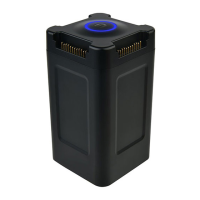
Introduction to the smart battery, its type, and charging capabilities.
Detailed explanation of smart battery features like self-heating, power saving, and protection.
Guidelines for safe and proper usage of the smart battery, including temperature and environment.
Step-by-step instructions for installing and removing the smart battery.
How to turn the smart battery on and off.
Method to check the current battery level using the indicator status.
Explanation of the self-heating function for low-temperature operation.
Instructions for charging the smart battery using the official charger.
Guidelines for safe storage and transportation of the smart battery.
Recommendations for battery maintenance and checking battery health.
When and how to perform battery maintenance.
Procedure for a standard battery charge and discharge cycle.
Criteria for determining when to replace the smart battery.
Recommended procedures for recycling the smart battery.
Introduction to the Autel Enterprise App for flight control and mission planning.
Overview of the main interface elements and navigation within the Autel Enterprise App.
Detailed breakdown of icons and their functions on the main interface.
How to switch between dual, triple, and four-screen display modes.
Explanation of the status notification bar and its displayed information.
How to customize and use the shortcut toolbar for quick access to functions.
Accessing and navigating the main settings interface for various configurations.
Setting flight parameters like RTH altitude, limits, flight modes, and lost actions.
Configuring the Obstacle Avoidance (OA) system, including brake distance and mode.
Adjusting remote controller settings like stick modes, custom buttons, and calibration.
Settings for image transmission mode, frequency band, and split screen effect.
Viewing battery information and configuring battery settings like warning thresholds and hot swap.
Adjusting gimbal sensitivity, pitch angle, calibration, and parameters.
Accessing advanced settings like unit settings, light controls, and language.
Explanation of the attitude ball for displaying flight status and safety data.
Navigating and using the map interface for flight planning and location tracking.
Overview of different camera interfaces and their functions.
Details on camera controls, settings, and properties for various camera types.
Navigating and adjusting the zoom camera interface and settings.
Using the thermal camera interface, including color palettes and radiometric settings.
Operating the night vision camera interface for low-light conditions.
Using the wide angle camera interface for broader field of view capture.
Introduction to flight missions, including waypoint, rectangle, and polygon types.
Setting up and executing waypoint missions for automated flight paths.
Creating and executing rectangle missions for aerial surveys.
Planning and executing polygon missions for area coverage.
Performing the pre-flight check before starting any mission.
Resuming a mission after an abnormal exit or interruption.
Managing saved flight missions and favoriting them for quick access.
Accessing personal flight data and purchasing services.
Steps to update firmware for aircraft and remote controller via the app.
Information on regular maintenance for aircraft parts and lists of wearable/replaceable parts.
Common troubleshooting steps for issues with the aircraft and remote controller.
Technical specifications for the EVO Max series aircraft.
Technical specifications for the gimbal cameras (Fusion 4T, Fusion 4N).
Detailed specifications for the Fusion 4T gimbal camera.
Detailed specifications for the Fusion 4N gimbal camera.
Technical specifications for the Autel Smart Controller V3.
Technical specifications for the smart battery and its charger.
Official declaration of conformity with relevant directives and regulations.
 General
| Max Flight Time | 42 minutes |
|---|---|
| Ingress Protection Rating | IP43 |
| Gimbal | 3-Axis (pitch, roll, yaw) |
| Thermal Camera Frame Rate | 30 Hz |
| Laser Rangefinder Range | 3-1200 m |
| Charging Time | 90 minutes |
| Max Wind Resistance | 12 m/s |
| Operating Temperature | -10°C to 40°C |
| Satellite Positioning | GPS, GLONASS, BeiDou |
| Hovering Accuracy Range (Vertical) | ±0.1 m (when vision positioning is enabled); ±0.5 m (when GPS positioning is enabled) |
| Hovering Accuracy Range (Horizontal) | ±0.3 m (when vision positioning is enabled); ±1.5 m (when GPS positioning is enabled) |
| Operating Frequency | 2.4 GHz, 5.8 GHz |
| Transmitter Power (EIRP) 2.4 GHz | <26 dBm |
| Transmitter Power (EIRP) 5.8 GHz | <26 dBm |
| Camera | Triple Camera System (Wide, Zoom, Thermal) |
| Wide Angle Camera Sensor | 1/1.28" CMOS |
| Wide Angle Camera ISO Range | 100-6400 |
| Zoom Camera Sensor | 1/2" CMOS |
| Zoom Camera ISO Range | 100-6400 |
| Thermal Camera Resolution | 640 × 512 |
| Laser Rangefinder Accuracy | ±0.2 m |
| Sensing Range | 0.5-20 m |
| Remote Controller Operating Frequency | 2.4 GHz, 5.8 GHz |
| Remote Controller Max Transmission Distance | 15 km (FCC), 8 km (CE) |
| Sensor Size | 1/1.28" (wide-angle), 1/2" (zoom) |
| Obstacle Avoidance | Omnidirectional Binocular Vision System |


 To Next Page
