15
Top Toolbar Buttons
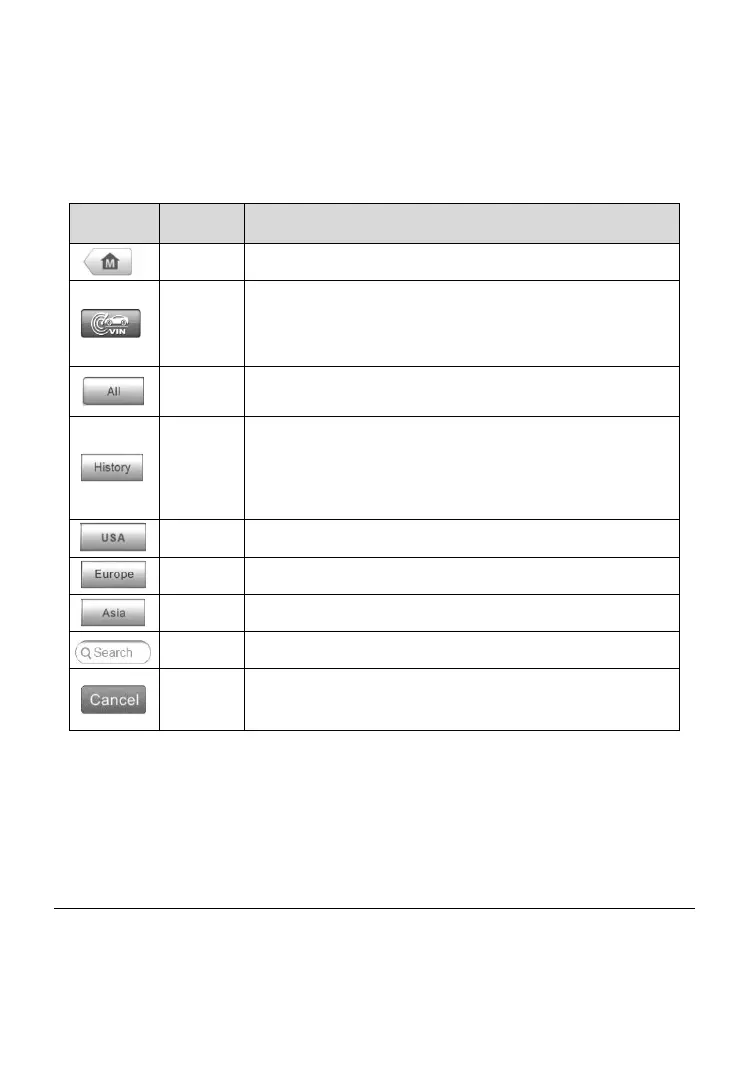
The operations of the toolbar buttons at the top of the screen are listed and
described in the table below:
Table 4-1 Top Toolbar Buttons
Returns to the MaxiCOM Job Menu.
Displays a dropdown list; tap Auto Detect for auto
VIN detection; tap Manual Input to enter VIN
manually.
Displays a menu of vehicle manufacturers.
Displays stored test vehicle history records. Tap
record to review record in detail. See Vehicle History
on page 70.
Displays the USA vehicle menu.
Displays the European vehicle menu.
Displays the Asian vehicle menu.
Searches for a specific vehicle make.
Tap to exit the search screen, or cancels an
operation.
Manufacturer Buttons
The vehicle manufacturer buttons display the vehicle brands currently
compatible with the tool. After establishing communication with the vehicle.
Tap the desired manufacturer button to start a diagnostic session.
Vehicle Identification
The MaxiCOM diagnostic system supports four methods for Vehicle
Identification.



 To Next Page