27
2. Identify the test vehicle by selecting from the menu options.
3. Select the Diagnosis section.
4. Locate the required system for testing by Auto Scan or through
menu driven selections in Control Units.
5. Select the desired diagnostic function from the Function Menu.
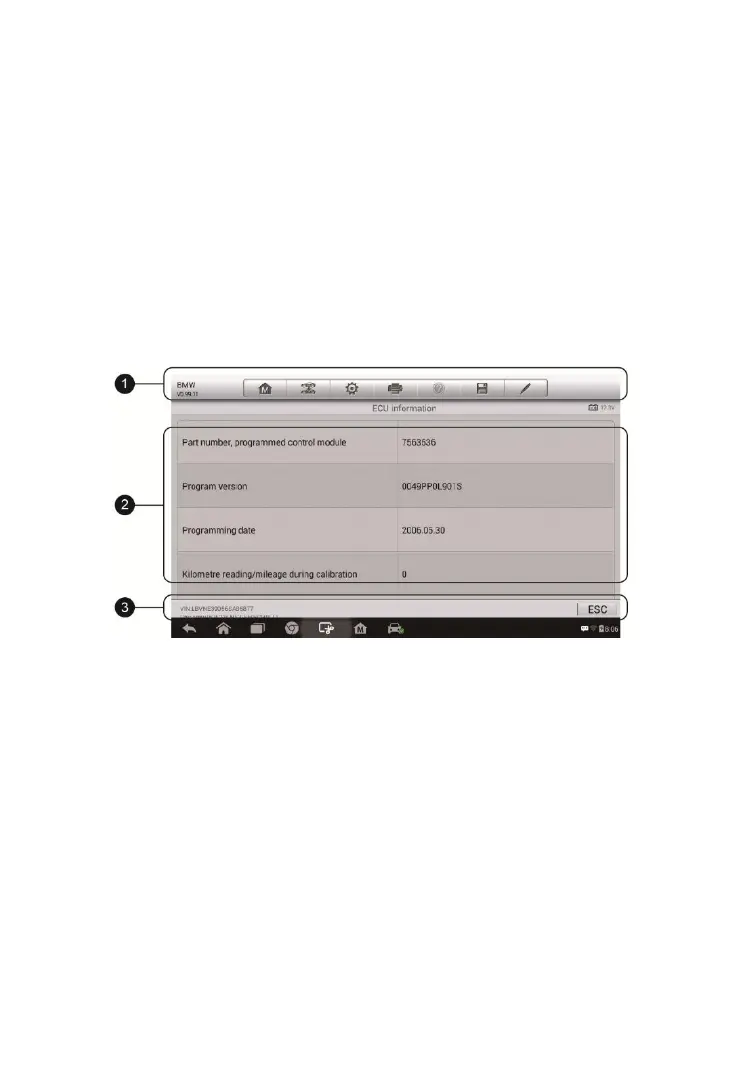
ECU Information
This function retrieves and displays the specific information for the tested
control unit, including unit type, version numbers and other specifications.
The sample ECU Information screen displays as below:
1. Diagnostics Toolbar Buttons – see Table 4-2 Diagnostics Toolbar Buttons
on page 21 for detailed descriptions of the operations for each button.
2. Main Section – the left column displays the item names; the right column
shows the specifications or descriptions.
3. Functional Button – in this case, only an ESC (or sometimes a Back)
button is available; tap it to exit after viewing.
Read Codes
This function retrieves and displays the DTCs from the vehicle’s control
system. The Read Codes screen varies for each vehicle being tested. On
Figure 4-10 Sample ECU Information Screen


 To Next Page
 Loading...