
 Need help?
Do you have a question about the Autel MaxiDAS DS900BT and is the answer not in the manual?
Safety messages provided to prevent personal injury and equipment damage.
Covers Autel's awareness of hazards and user responsibility.
Explains formatting like bold text, notes, hyperlinks, illustrations, and procedures.
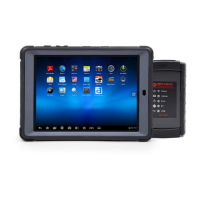
Overview of the tablet's features, processor, and operating system.
Details the vehicle communication interface and its functions.
Lists additional accessories available for the system.
Instructions for turning on the tablet and entering the job menu.
Procedures for safely shutting down the tablet.
Steps to connect the tablet and VCI to the vehicle for diagnosis.
Methods for identifying the test vehicle (Auto Detect, Manual Input, Scan).
How to navigate diagnostic screens and make selections.
Accessing diagnostic functions like Auto Scan and Control Unit.
Overview of functions like ECU Info, Trouble Codes, Live Data, etc.
Using OBDII/EOBD diagnostic functions.
Handling pre-scan, post-scan, and report saving/viewing.
Procedures for safely closing diagnostic sessions.
Resets the engine oil life system.
Manages electronic braking system functions like pad replacement.
Looks up tire sensor IDs and performs TPMS replacement.
Evaluates battery charge state and registers battery replacement.
Calibrates the steering angle sensor and stores position data.
Manages DPF regeneration and component replacement.
Manages the anti-theft immobilizer system.
Stores and reviews test vehicle records and diagnostic sessions.
Allows editing and saving of workshop details for printed documents.
Creates and organizes customer accounts correlated with vehicle history.
Manages captured screenshots.
Stores and displays diagnostic reports, with cloud sharing options.
Stores and displays saved PDF files.
Allows playback of recorded live data frames.
Views feedback and no feedback data loggings for support.
Manages installed software applications on the diagnostic system.
Adjusts measurement units (Metric/Imperial) for the diagnostic system.
Adjusts the display language for the MaxiDAS system.
Configures the tablet to print via network connection.
Configures scan report and cloud upload options.
Manages device notifications preferences.
Configures automatic updates for OS and system software.
Sorts vehicles by alphabetical order or frequency of use.
Accesses Android system settings for wireless, sound, display, etc.
Displays product information like model, version, and serial number.
Pairs the MaxiVCI V150 with the tablet via Bluetooth.
Pairs the BT506 battery tester with the tablet via Bluetooth.
Updates the MaxiVCI V150 firmware through the tablet.
Updates the BT506 battery tester firmware via the tablet.
Introduction to the BT506 tester, its components, and LEDs.
Search for supported functions by vehicle brand, model, and year.
Search for functions across vehicles and software versions.
Steps to register the MaxiDAS tablet for online services and updates.
Overview of the support application interface and navigation.
Displays user and device info synchronized with the online account.
Records and manages feedback or no feedback data loggings for support.
Access to Autel's online video library for tutorials.
Frequently asked questions about accounts, shopping, and payment.
Procedure to unlock gateway ECUs for advanced diagnostics on certain vehicles.
Instructions for receiving remote assistance via TeamViewer.
Steps to log into the Autel User Center and register the diagnostic device.
Guidelines for cleaning and maintaining the diagnostic tablet.
Common issues and their solutions for the diagnostic tablet.
Information about the tablet's Lithium-ion battery and its usage.
Information on technical support, repair, and parts replacement.
Device compliance with FCC and Industry Canada regulations.
Information on Specific Absorption Rate and RF exposure limits.
Device compliance with the European RoHS Directive.
Product conformity to essential EU directives with CE mark.
Details the warranty terms, coverage, and exclusions for the device.











 To Next Page
 General