Home
Autel
Diagnostic Equipment
MaxiTPMS TS508K
Page 44
Autel MaxiTPMS TS508K - Page 44
79 pages
Manual
Save Page as PDF
To Next Page
To Next Page
To Previous Page
To Previous Page
Loading...
39
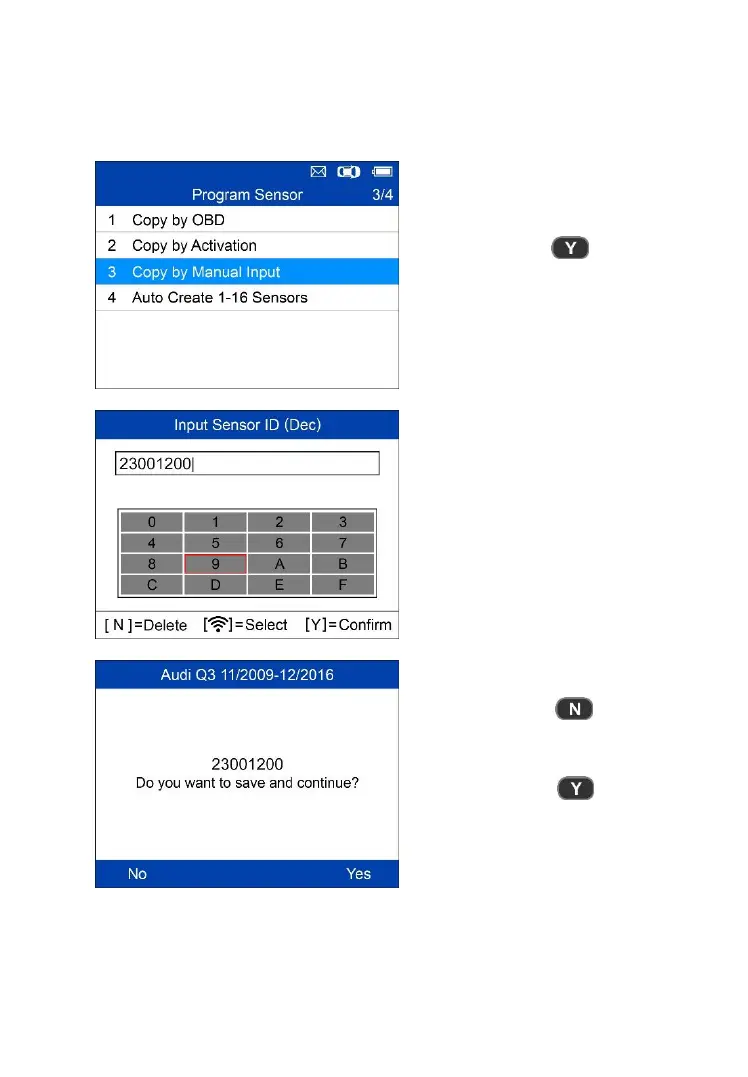
Copy by Manual Input
This
function is
used to
manually
input the
original sensor
ID and
program
it
to a new MX-Sensor.
= Confirm
Press
Trigger
to
select
th
e
numbers,
press
N
to
exit and
once a
number is
selected,
the
N
button
can
be
used
to
delete
the
e
ntered
number.
After
all the numbers are entered, p
ress
Y
to confirm.
= E
xit
= Confirm and Program
43
45
Table of Contents
Main Page
Table of Contents
4
Using this Manual
6
Conventions
6
Tool Information
8
Functional Description
8
Specifications
9
Accessories Included
10
Icons
10
Keyboard
10
Battery Charging
11
Tpms Quick Mode
13
Vehicle Identification
13
Scan Sensor
15
Program Sensor
17
Relearn Procedure
25
Sensor Information
26
Tpms Advanced Mode
28
Vehicle Identification
28
Tpms Diagnose
30
Program Sensor
36
Position Relearn
48
Information
54
Miscellaneous
59
Toolkit
59
Latest Test
60
Review Data
60
My Device
60
Print
72
Product Troubleshooting
73
Compliance Information
75
Warranty and Service
77
Related product manuals
Autel MaxiTPMS TS508
77 pages
Autel MaxiTPMS TS401
33 pages
Autel MaxiTPMS TS608
8 pages
Autel MAXITPMS ITS600
141 pages
Autel MaxiAP AP200
2 pages
Autel MaxiVCI V100
17 pages
Autel MaxiPro MP808
111 pages
Autel MaxiAP AP200M
30 pages
Autel MaxiLink ML519
2 pages
Autel MaxiDiag MD808
2 pages
Autel MaxiLink ML629
2 pages
Autel Maxiscan MS509
73 pages














 To Next Page