3
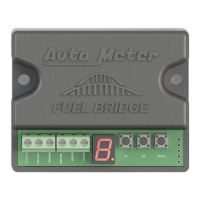
1. While power is off, push and hold the Enter button and turn power on. Once power is on, you can release the button. The display will
indicate which number calibration was last used.
2. Press the Up or Down button to select the sender being used (use the chart above), then press Enter. If the sender is not listed, or is
unknown, skip these steps and proceed to step 4B.
3. The Fuel Bridge display will show a ashing F. Use the up or down button to adjust the pointer on your fuel gauge slightly above the Full
mark. Press Enter.
4. Now you should see a ashing 3 on the Fuel Bridge display. Use the up or down buttons to adjust the pointer on your gauge to the 3/4
mark. Press Enter.
5. Now you should see a ashing 2 on the Fuel Bridge display. Use the up or down buttons to adjust the pointer on your gauge to the 1/2
mark. Press Enter.
6. Now you should see a ashing 1 on the Fuel Bridge display. Use the up or down buttons to adjust the pointer on your gauge to the 1/4
mark. Press Enter.
7. Now you should see a ashing E on the Fuel Bridge display. Use the up or down buttons to adjust the pointer on your gauge to the E mark
(or slightly below E). You will now push & hold Enter for 2 seconds, or until the display on the Fuel Bridge goes dark.
8. Upon the button push in the previous step, the fuel gauge will now raise to Full, then will drop to the current reading (if below Full). You are
now nished. The unit can now be powered down.
Step 5, Low Fuel Level:
Using the low fuel level warning is optional, and is not able to be set. It is intended to turn on at, or below 1/8 tank. When you are adjusting
the fuel level settings on the gauge during programming, the low fuel level warning will depend on where you set your E to on the gauge.
If you set it directly on E, your low fuel level warning will turn on close to 1/8 tank. If you set you’re E setting to below E, the low fuel warning
will likely not turn on until you get even further below 1/8.
In order to help keep you from running out of fuel, we do recommend that you set your E setting during programming to a little below E, so
that you do not potentially run out of fuel at the same moment that your gauge reads E. This would give you a little reserve.
**If you choose to use the low fuel light, you must use an LED that draws less than 12ma. The low fuel warning will NOT function with an
incandescent bulb.
Step 4B, Programming (unknown or custom sender):
Power must remain on during this process.
This step is if you do not know your fuel sender resistance range, or if it is not listed in options 1 thru 8 in the above chart. While it is rare for
a sender to have a resistance range that exceeds 1,000 ohms, some do exist. The Auto Meter Fuel Bridge will NOT accommodate a sender
range in excess of 1,000 ohms.
The fuel sender must be accessible for this particular set up as the Fuel Bridge will have to learn what position on the sender is Full, and what
position on the sender is Empty.
1. While power is off, push and hold the Enter button and turn power on. Once power is on, you can release the button. The display will
indicate which number calibration was last used.
2. Press the Up or Down button to select “A” for sender learning then press Enter. The Fuel Bridge display will show a ashing F. At this
time, the sender oat position needs to be in the upmost (Full) position. Use the up or down button to adjust the pointer on your fuel
gauge slightly above the Full mark. Press Enter.
3. Now you should see a ashing 3 on the Fuel Bridge display. Use the up or down buttons to adjust the pointer on your gauge to the 3/4
mark. Press Enter.
4. Now you should see a ashing 2 on the Fuel Bridge display. Use the up or down buttons to adjust the pointer on your gauge to the 1/2
mark. Press Enter.
5. Now you should see a ashing 1 on the Fuel Bridge display. Use the up or down buttons to adjust the pointer on your gauge to the 1/4
mark. Press Enter.
6. Now you should see a ashing E on the Fuel Bridge display. At this time the sender oat position needs to be at the lowest (Empty)
position. Use the up or down buttons to adjust the pointer on your gauge to the E mark (or slightly below E). You will now push & hold
Enter for 2 seconds, or until the display on the Fuel Bridge goes dark.
7. Upon the button push in the previous step, the fuel gauge will now raise to Full. You may now exercise the oat on your sender to
various positions, and the gauge should follow, though it will have a delay. This delay is intended to help with not seeing as much “fuel
slosh” that occurs in some tanks.
8. You may now install your sender. You are now nished. The unit can now be powered down.


 To Next Page
 Loading...