Device
Layout
Definition
Function
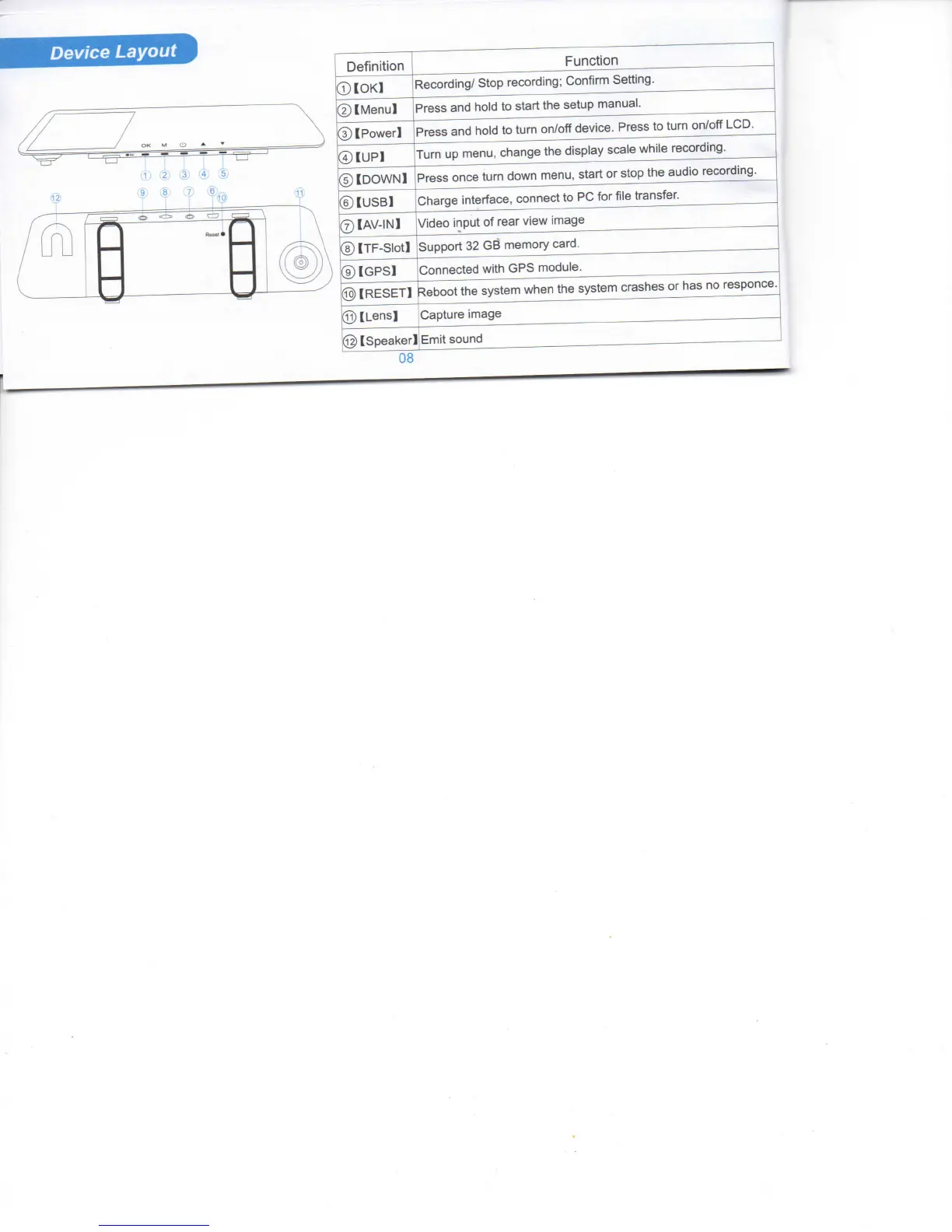
®[OKl
Recording/
Stop recording; Confirm Setting.
@[Menul
Press
and
tiold
to start the setup manual.
©[Power!
Press
and
hold
to
turn
on/off
device.
Press
to
turn
on/off
LCD.
®[UP1
Turn
up menu, change the display
scale
while recording.
©[DOWN!
Press
once
turn
down menu, start or stop the audio recording.
®[USB]
Charge
interface, connect to
PC
for file transfer.
® [AV-IN]
Video
input
of rear view image
® [TF-Siotl
Support 32 GB memory card.
®[GPS1
Connected
with
GPS
module.
@[RESET!
Reboot the system when the system
crashes
or has no responce.
©[Lens!
Capture
image
@
[Speaker]
Emit
sound
08



 To Next Page