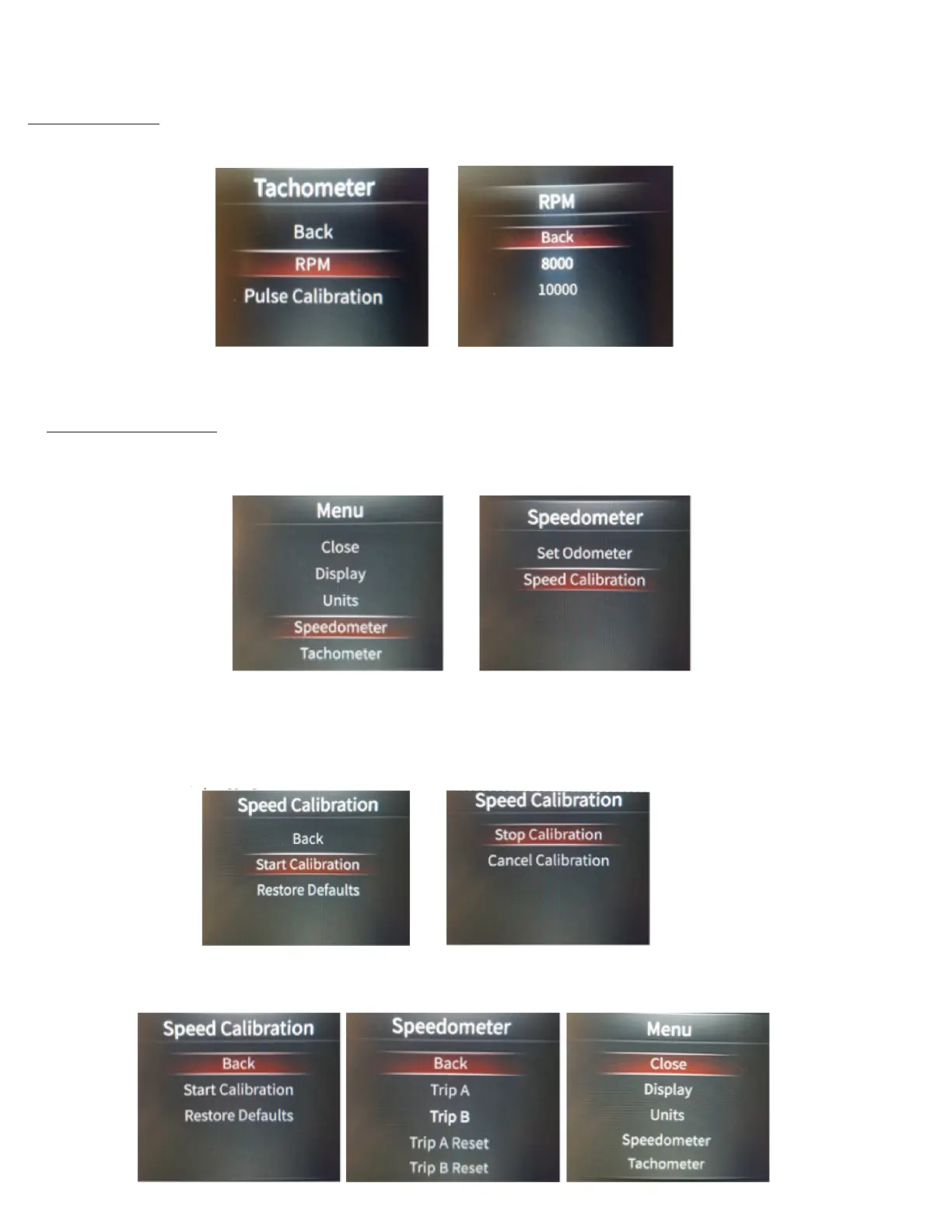
Once you have chosen the Tachometer Scaling, simply scroll up to Back, and press Enter. Then, scroll to the top until Back and press
Enter. Next, once you are back into the Main Menu, scroll up to Close and press Enter.
Speedometer Calibration Speedometer calibration will be required for an accurate speedometer reading. You will need a 2 mile pre-
marked distance.
To calibrate the speedometer, Enter into the Main Menu, then scroll to Speedometer and press Enter. Next, scroll to Speed Calibration, and
press Enter.
Drive to the beginning of your 2 mile distance (this could be at your driveway, or elsewhere). Choose Start Calibration and press Enter. The
display will now show “Stop Calibration” (don’t press Enter yet). Now drive 2 miles. At the end of 2 miles, you will come to a stop, and press
Enter on Stop Calibration.
*You technically do not have to come to a complete stop when pressing Stop Calibration, though it helps to insure that you have a more
accurate 2 mile distance by stopping. The more accurate your 2 miles are, the more accurate your speedometer will be.
If speed sender/sensor is functioning, and your calibration successful, you may now scroll up to Back, and press Enter, then on the
Speedometer Menu, scroll up to Back, press Enter, then on the Main Menu, scroll up to Close and press Enter.
Once you have chosen the correct PPR, simply scroll up to Back, and press Enter. Then, scroll up to Back again, and press Enter. Next,
once you are back into the Main Menu, scroll to Close and press Enter.
Tachometer Scaling The standard scale is 0-10,000 RPM, though you can adjust the tachometer scale to be 0-8,000 RPM if desired.
To adjust the scaling, enter into the Main Menu. Scroll to Tachometer, and press Enter. Next, scroll to RPM and press Enter. Now you can
choose from either 8000, or 10000 RPM Scale. Scroll to the desired scale, and press Enter.


 To Next Page
 Loading...