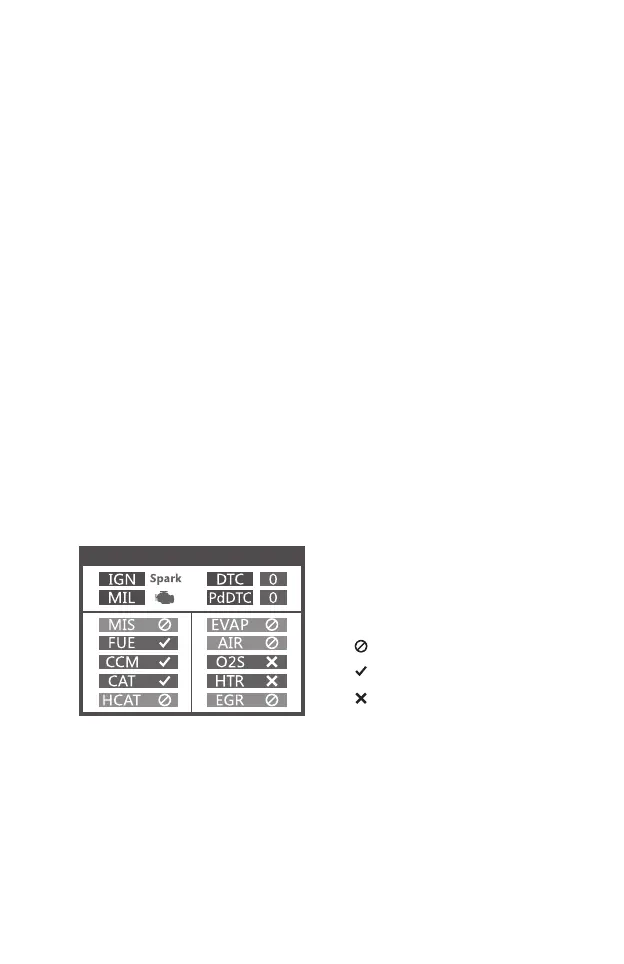
I/M Readiness
10. [READ DTC] BUTTON-Quick read the vehicle’s fault codes.
4. [LEFT ]SCROLL BUTTON –in the menu mode through the
menu and sub menu move to the left, when rolling in a data
interface, use the left button can be moved to the last screen.
5. [RIGHT] SCROLL BUTTON –In the menu mode through the
menu and sub menu item move to the right, when rolling in the
data interface, use the right button can be moved to the next
screen.
6. [UP] SCROLL BUTTON –in the menu mode through the
menu and sub menu item moving up. When retrieving data for
more than a screen by moving up the screen to the previous
screen for more data.
7. [DOWN] SCROLL BUTTON –In the menu mode through the
menu and sub menu item moves down. When retrieving data
more than one screen, by moving down the screen to the next
screen for more data.
8. OBD-16PIN CONNECTOR – Connects the scan tool to the
vehicle’s Data Link Connector (DLC).
9. [I/M] BUTTON - Quick State Emissions readiness check and
drive cycle verification.
3
Remarks:
MIL Yellow- Dashboard MIL ON
MIL Gray-Dashboard MIL OFF
-not support
-complete
-not complete


 To Next Page