10
Operation
1. Make sure the WB-IP and WC-IP are
both powered on. The status light on both
devices will ash.
2. The WB-IP and WC-IP will pair in a range
up to 100m/300ft (line of sight).
3. To pair the WB-IP with the WC-IP follow
the instructions in WP-IP software guide
A9009-4983 to select the controller from
within the software, the unique identier
(MAC address) will be required, it is
located on the underside of the controller.
4. When paired the WB-IP status light will
show solid blue.
5. When paired the WC-IP status light will
show solid blue.
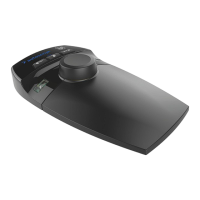
The WC-IP will perform the current functions as
default:
• Joystick: Scroll through text, control speed
of scroll.
• Button 2: Press to skip to previous story.
• Button 3: Press to skip to the next story.
• Button 4: Function 1 (assignable in
Winplus-IP).
• Button 5: Function 2 (assignable in
WinPlus-IP).
• Button 6: Press to skip to the top story.
(See Device Conguration / General tab
of WC-IP in WP-IP software application for
options).
To force the WC-IP to unpair from its current
WB-IP press and hold the F1 button for 3
seconds.
To put the WC-IP into deep sleep (to conserve
battery life) then press and hold the F1 button
for 5 seconds.
Sensitivity and dead band range can be
adjusted. (See Device Conguration/Speed
Prole tab of WC-IP in WinPlus-IP software
application for options).


 To Next Page