EasyManua.ls Logo

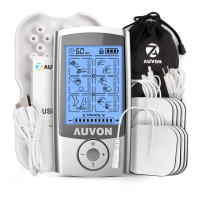
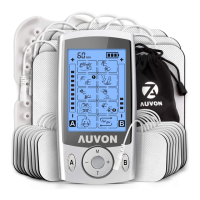
Auvon AS8012 - User Manual

Auvon AS8012
32 pages
Print Icon
To Next Page IconTo Next Page
Loading...
Attention
The purpose of this Quick Guide is to help you
understand the operation of the TENS unit
much more quickly, and the contents of the
quick guide are not a substitute for the user
manual. Please read the user manual careful-
ly before use to understand the contraindica-
tions and warnings. Please consult your doctor
before use if you’re not sure whether you can
use this device.
OPERATION STEPS
Note: Do not use it while charging.
1. Clear and dry the
application areas.
2. Connect the lead
wire to a pair of
pads and the de-
vice(keep the unit
off).
Quick Guide

Other manuals for Auvon AS8012

Questions and Answers

  • D
    Dr. Teresa HudsonAug 5, 2025
    Why is the intensity not felt on my Auvon AS8012 at a low level?
    • J
      John MorrisAug 5, 2025
      If you barely feel the intensity on your Auvon Massager, ensure the pads are firmly attached to your skin and that you've peeled off the transparent films. Avoid stacking or overlapping the pads. Check that the cord is correctly connected to the unit. If the intensity setting feels weak, increase the intensity level. A low battery can also cause this, so charge the device.
  • J
    Jennifer MillerAug 10, 2025
    What to do if my Auvon AS8012 power cuts off during use?
    • J
      Jordan BoydAug 10, 2025
      If your Auvon Massager is cutting off during use, it could be due to a weak battery. Try charging the battery. Alternatively, the cord might be broken and need replacement. In case pads get deteriorative, contact the vendor for replacements.
  • C
    Corey DukeAug 14, 2025
    Why does one pad feel stronger than the other on my Auvon AS8012?
    • V
      Veronica FitzpatrickAug 14, 2025
      It's normal for one pad to feel stronger than the other on your Auvon Massager, as different body areas react differently. Ensure the pads are moist and making good contact. If the adhesive surface is dirty or dry, gently wash it with your fingertips under slow running water for about 3 seconds. Also, reduce the application time or intensity if it's set too high.
  • K
    Kathryn FieldsAug 20, 2025
    What to do if I don't feel the intensity on my Auvon Fitness Equipment?
    • M
      Monica ParkerAug 20, 2025
      If you're not feeling the intensity even at a low setting on your Auvon Fitness Equipment, here are a few things to check: * Make sure the pads are firmly attached to your skin. * Remove any transparent films from the adhesive surface of the pads. * Ensure the pads aren't stacked or overlapping. * Verify the cord is correctly connected to the unit. * Try increasing the intensity level. * Charge the battery, as a low battery can weaken the intensity.
  • T
    Timothy MillerAug 25, 2025
    Why does my Auvon Fitness Equipment power off during use?
    • L
      Luis JohnsonAug 25, 2025
      If your Auvon Fitness Equipment is cutting off during use, it could be due to a few reasons: * The battery may be weak, so try charging it. * The cord might be broken, in which case you should replace it. * The pads may be deteriorating; contact the vendor for replacements.
  • A
    Amanda DouglasAug 29, 2025
    Why does one pad feel stronger than the other on my Auvon Fitness Equipment?
    • D
      Dan GarciaAug 30, 2025
      It's normal to feel a difference in intensity between pads because different areas of your body react differently. Ensure the pads are moist and making good contact. If the adhesive surface of the pads is dirty or dry, gently wash it with your fingertips under slow running water for about 3 seconds. If the therapy time is too long or the intensity is set too high, reduce the application time or the intensity.

Summary

TENS Device Attention and Usage Disclaimer

Quick Guide Purpose and Limitations

Explains the Quick Guide's role and its status as a supplement, not replacement, for the user manual.

Medical Consultation Advisory

Advises users to consult a doctor if unsure about using the device, especially regarding contraindications.

AUVON TENS Unit Operation Steps

Initial Setup and Connection

Steps 1-2: Prepare application areas, connect lead wires to pads and the TENS unit.

Device Activation and Mode Selection

Steps 3-6: Attach pads, power on, select channel, and choose a therapy mode.

Intensity, Time, and Screen Lock

Steps 7-9: Adjust intensity, set therapy time, and lock/unlock the device screen.

Completing the Session

Step 10: Turn off the TENS unit after the massage session concludes.

Proper Pad Removal

Step 11: Remove electrode pads carefully from the skin without pulling the wires.

Electrode Pad Placement Recommendations

Upper Body Electrode Placement

Guide for placing electrode pads on the neck, shoulder, elbow, and upper back for pain relief.

Lower Body and Torso Electrode Placement

Guide for placing electrode pads on the lower back, buttock, sciatica, abdomen, knee, thigh, calf, and ankle.

Auvon AS8012 Specifications

General IconGeneral
BrandAuvon
ModelAS8012
CategoryMassager
LanguageEnglish