This will allow direct audio from your wireless mic system and from your music player to be mixed
together and recorded or streamed directly through the streaming or recording software of your choice.
For maximum speech intelligibility and to minimize the possibility of feedback, this setup guide will also
demonstrate how to send music to speakers in the room for instructor reference without sending the
microphone signal to the speakers.
POWER
DC 12V
POWER
ON
USE ONLY
STUDIOMASTER
EXTERNAL PSU
TYPE C2-PSU
MIC
1
MIC
2
3
1 2 3/4 5/6
5
4 6
C2S-2
LINE
MIC
+15
+25
-20
-15 +15
-15 +15
0 10
0 10
L R
0 10
0 10
0 10
0 10
0
PLAYBACK
MAIN MIX
PLAYBACK
TO MAIN MIX
CLIP
AUX SEND
PHONES
PLAYBACK
MAIN MIX
0
-10
-30
GAIN
HI
12KHz
LO
80Hz
AUX
PRE
PAN
LEVEL
MIC
+15
+25
-20
-15 +15
-15 +15
0 10
0 10
L R
0
GAIN
HI
12KHz
LO
80Hz
AUX
PRE
PAN
LEVEL
-15 +15
-15 +15
0 10
0 10
L R
HI
12KHz
LO
80Hz
AUX
PRE
LEVEL
-15 +15
-15 +15
0 10
0 10
L R
HI
12KHz
LO
80Hz
LEVEL
BAL
PLAYBACK
RECORD
CD/MP3
INPUT
LINE
RIGHT
LEFT/
MONO
LEFT/
MONO
RIGHT RIGHT AUX SEND
PHONES
LEFT
MAIN MIX
POWER
L
L
R
R
2 MIC 2 STEREO COMPACT MIXER
WITH USB
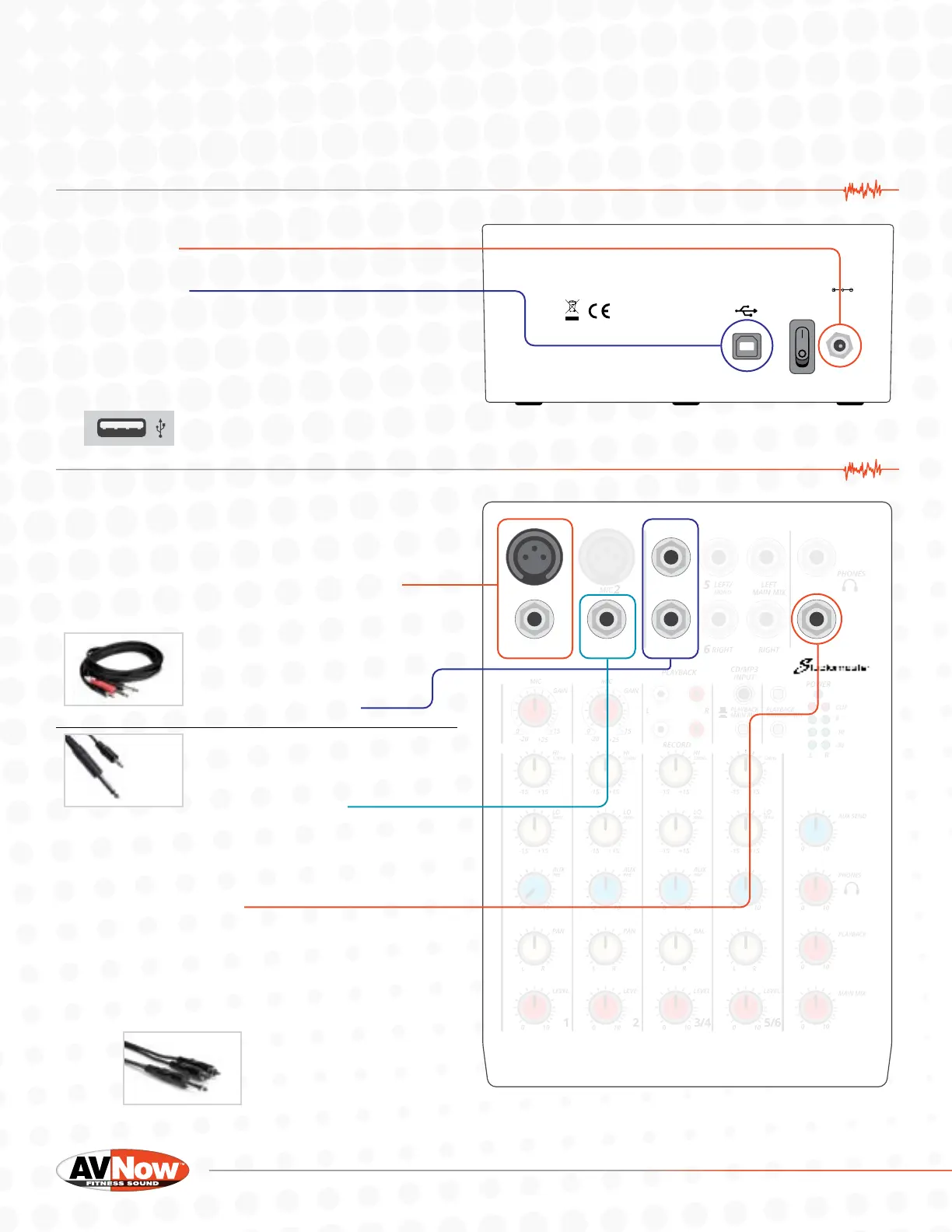
1. Connect the included power cable to the rear
of the mixer
2. Attach a USB cable to the USB port on the rear
of the mixer
3. Connect the other end of USB cable to your
streaming or recording device.
If your device does not have a USB A port (below) you
will need an adapter. This unit has been tested on
Mac, Windows, iOS, and Android systems.
4. Cable connection information:
A. Connect your microphone receiver to one of
the inputs on channel one. Either the 3-pin XLR
input or the ¼” input will work. Use the cable
supplied with your wireless mic system.
B. Music player connection
(Part #CMP-153)
Option A - Recommended Method
If you have a 3.5mm to dual
¼” cable connect your music
player to Channel 3/4
(Part #55-936-6)
Option B
If you have a 3.5mm to Tip-Sleeve
¼” cable connect your music
player to Channel 2
C. In order to send just the sound of the music to
speakers in the room (for instructor reference
only), connect the AUX SEND to your speakers
or sound system.
i. If your speakers/sound system have a
3.5mm input jack, use a 55-936-6 cable.
ii. If you speakers/sound system have
RCA input jacks, use a ¼” Tip-Sleeve
to dual RCA cable (part # CYR-102)
(part #CYR-102)


 To Next Page
 Loading...