POWER
DC 12V
POWER
ON
USE ONLY
STUDIOMASTER
EXTERNAL PSU
TYPE C2-PSU
MIC
1
MIC
2
3
1 2 3/4 5/6
5
4 6
C2S-2
LINE
MIC
+15
+25
-20
-15 +15
-15 +15
0 10
0 10
L R
0 10
0 10
0 10
0 10
0
PLAYBACK
MAIN MIX
PLAYBACK
TO MAIN MIX
CLIP
AUX SEND
PHONES
PLAYBACK
MAIN MIX
0
-10
-30
GAIN
HI
12KHz
LO
80Hz
AUX
PRE
PAN
LEVEL
MIC
+15
+25
-20
-15 +15
-15 +15
0 10
0 10
L R
0
GAIN
HI
12KHz
LO
80Hz
AUX
PRE
PAN
LEVEL
-15 +15
-15 +15
0 10
0 10
L R
HI
12KHz
LO
80Hz
AUX
PRE
LEVEL
-15 +15
-15 +15
0 10
0 10
L R
HI
12KHz
LO
80Hz
LEVEL
BAL
PLAYBACK
RECORD
CD/MP3
INPUT
LINE
RIGHT
LEFT/
MONO
LEFT/
MONO
RIGHT RIGHT AUX SEND
PHONES
LEFT
MAIN MIX
POWER
L
L
R
R
2 MIC 2 STEREO COMPACT MIXER
WITH USB
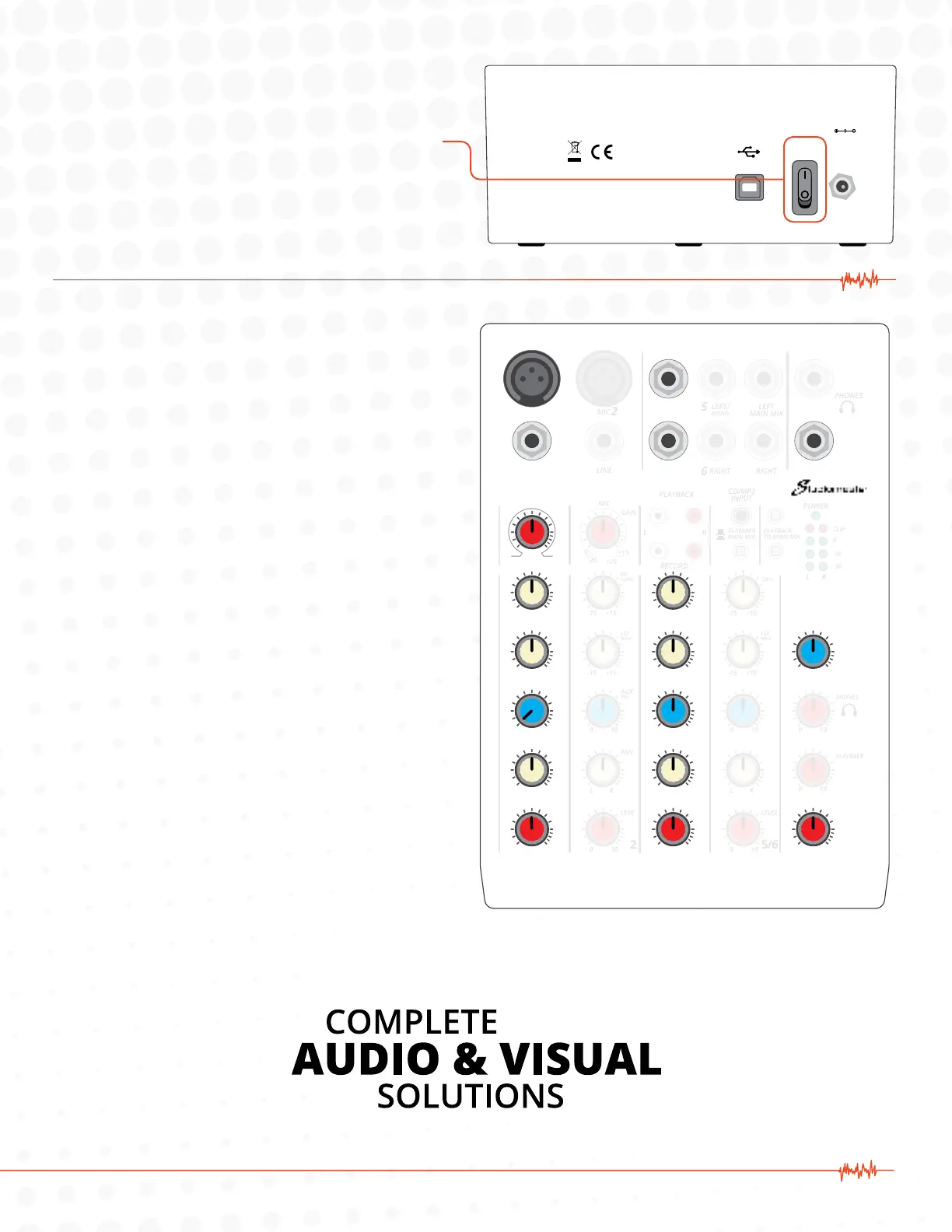
5. Power on the mixer using the switch on the rear.
6. Information on knob settings:
A. In this diagram, the knobs shown are the only
ones that aect the sound. The rest can be
ignored. The knobs directly below the MIC 1
input jack only control the microphone signal.
The knob positions shown here are an ideal
starting place.
Generally, the red LEVEL knobs across the bottom control
the level that go to your video. From left to right, the LEVEL
1 knob will control the MIC level. LEVEL 3 / 4 controls the
MUSIC level. The MAIN MIX knob controls the overall level
of the MIC and MUSIC blended together.
With the MAIN MIX and the LEVEL 1 knobs in the straight
up (noon) position, speak into your microphone and use
the red GAIN knob on channel 1 to set the general level for
your microphone.
Pay attention to the red CLIP lights. If they light up when
you speak into your microphone, the GAIN is set too high.
The blue AUX knobs control the level of sound going to the
speakers in the room. This only aects what the instructor
hears and does not aect the sound going into the video
stream for the audience to hear.
The AUX PRE knobs adjust how much of each sound source
go to the speakers. The AUX SEND knob on the right aects
the overall level of sound going to the speakers.
Starting with the AUX SEND knob in the straight up (noon)
position, play music from your music player. Slowly bring
up the AUX PRE knob on channel 3 / 4 until you get the
desired sound level in the room.
If microphone signal is needed in the speakers, turn up
the AUX PRE knob on Channel 1 slowly while talking into
the microphone until the desired level is achieved through
the speakers. In most cases, we recommend leaving this
turned down as low as possible to avoid feedback or echo.


 To Next Page
 Loading...