EasyManua.ls Logo

Ava 20 Series - User Manual

Ava 20 Series
10 pages
To Next Page IconTo Next Page
Loading...
Join the orange and grey revolution
AVA 20 Series Overview
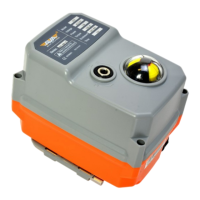
The AVA Basic is an entry level electric actuator designed where only minimal
features are required for on-o applicaons. The basic version is constructed tradionally
with internal cams striking micro-switches to stop the reversible motor in the required
posions. The lower torque models are available failsafe using capacitors.
Fully weatherproof to IP67 Dome style local visual indicator Hand operaon
End of travel conrmaon switches Female octagon drive output
Mulple ISO5211 mounngs An-condensaon heater
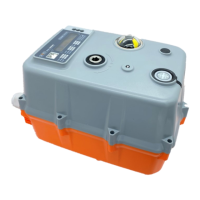
The AVA Smart
is a truly smart electric actuator designed to cover a wide range of funconal applica-
ons, is fully electronic using digital magnec posioning and enrely run by rmware.
The smart version is recognisable by the introducon of a bright OLED screen and exter-
nal push buons that are used to set and adjust the AVA Smart actuator. Available in
ON OFF, Modulang, Failsafe, Failsafe Modulang, Timer, Wireless and BUS. Standard
features include:
OLED Screen User friendly local buon controls Brushless motors
An-condensaon heater Electronic torque limiter Many funconal opons
Standard Specicaons 20Nm
B20 Basic S20 Smart
Max Rated torque Nm output (in.lbs) Run 20Nm (178) / 25Nm Break (221) Run 20Nm (178) / 25Nm Break (221)
Voltage range 12VDC, 24VAC/DC, 95-265VAC 12VDC, 24VAC/DC, 95-265VAC
Mounng (ISO5211) x drive (female octagon) F03/04/05 x 14mm F03/04/05 x 14mm
Ingress Protecon IP67 IP67
Electrical connecon Pre Wired 0.8m Flying Lead Pre Wired 0.8m Flying Lead
End of travel conrmaon (dry contact/volt-free) 2 x Mechanical micro-switches 2 x Electronic relays
Local visual posion indicator Dome style Dome style
LED Status light - Coming Q3 2020 LED open/close/fault LED open/close/fault
Housing material ABS (Aluminium Opon) ABS (Aluminium Opon)
Weight ABS (Aluminium) 0.8Kg (1.2Kg) 0.8Kg (1.2Kg)
Revision: 002 Date: 05/06/20
Note that our smart and basic actuators, regardless of funcon, are all the same size per series.
Dimensions:
X
Question and Answer IconNeed help?

Do you have a question about the Ava 20 Series and is the answer not in the manual?

Ava 20 Series Specifications

General IconGeneral
BrandAva
Model20 Series
CategoryController
LanguageEnglish

Summary

AVA Basic and Smart Actuator Overview

AVA Basic Actuator

Entry level electric actuator for on-off applications with minimal features.

AVA Smart Actuator

Smart electric actuator with digital positioning, OLED screen, and firmware control.

AVA Actuator Wiring

Basic Actuators Wiring

Standard wiring for basic actuators including failsafe using internal super capacitor.

Smart Actuators Wiring

Wiring for smart actuators using digital encoder and electronic relays with firmware control.

Smart Modbus Actuators Wiring

Actuators for Modbus RS485 or CANBUS communication, available as on/off, failsafe, modulating.

Smart Timer Actuators Wiring

Actuators with onboard firmware for scheduling opening and closing operations 24/7.

Smart RF;Wireless Actuators Wiring

Actuators controlled via RF Fob for installations where wired control is not feasible.

Pre-Wired Actuators

Actuators supplied with pre-wired, typically 0.8m long cables, often with a 7-pin connector.

Wiring Box Terminal Strip Actuators

Larger actuators with wiring box exposing terminal strip for cable termination.

Aviation Plug IP68 Connector Option

IP68 weatherproof connector for plug-and-play, weather-proof connection, ideal for external use.

Additional Wiring Configurations

Details on various additional wiring diagrams for smart actuators including 3 and 4 position options.

AVA Basic Series CAMS Adjustment

Adjusting Full Close Position

Procedure to adjust the valve to its full close position using internal cams and micro switches.

Adjusting Full Open Position

Procedure to adjust the valve to its full open position using internal cams and micro switches.

Electrical Test

Checking the on/off consistency and full close status between actuator and valve body.

Smart Actuator User Guide

OLED Screen User Guide - Basics

Guide to the OLED screen, status display, alerts, and basic operation.

Menu Mode and Passwords

Using M, K2, K3 buttons to enter Menu, Local Control, or Reset modes with specific passwords.

Navigation and Settings

Navigating menus using buttons, setting positions, and configuring failsafe parameters.

Installation, Operation & Maintenance

General Instructions

Instructions for installation, operation, and maintenance of AVA electric actuators.

Frequently Asked Questions

Commonly asked questions and common fault diagnosis for AVA actuators.

Related product manuals