16En
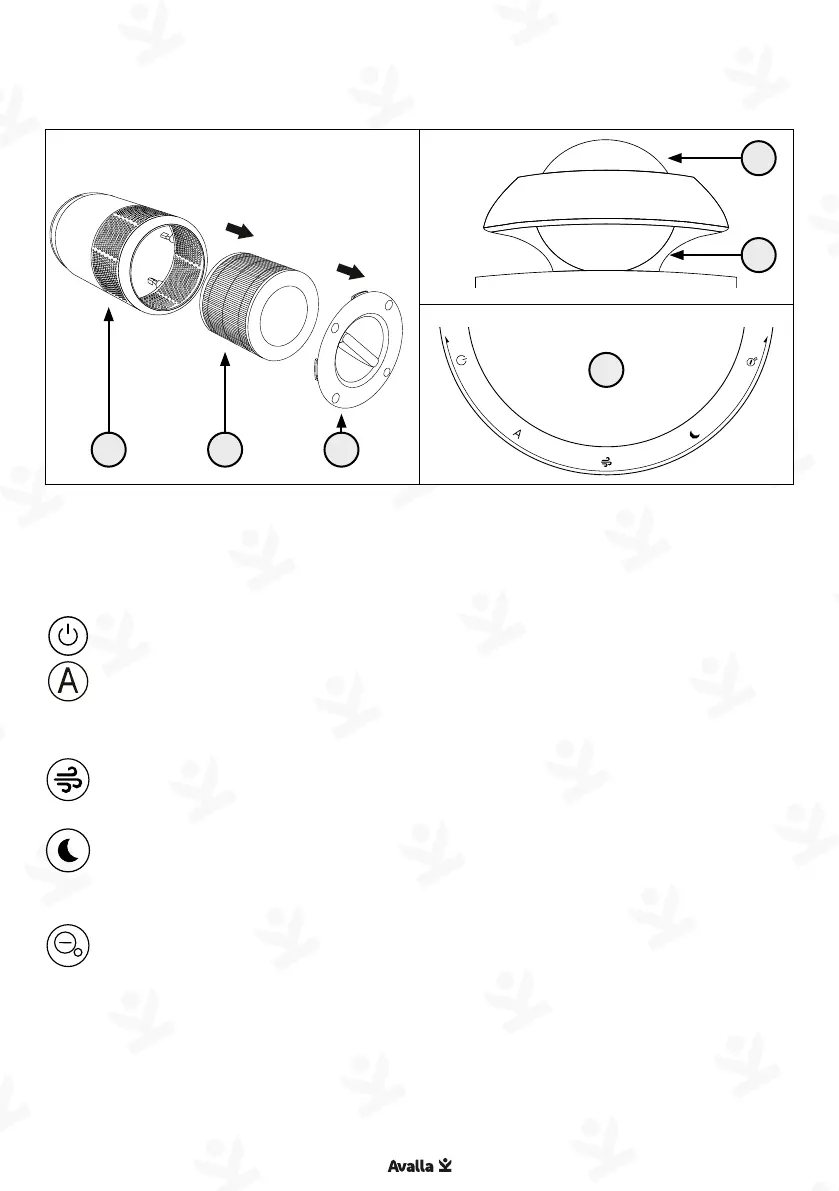
Parts guide Controls
Quick start guide: R-4000 / R-4200
Power - Turn the ‘Dome’ to this position to turn the unit off.
Auto mode – Turn the ‘Dome’ to this position to select Auto
mode. The unit will adjust fan speed according to the air
quality.
High speed - Turn the ‘Dome’ to this position to select high
speed. The fan will run at maximum speed.
Sleep mode – Turn the ‘Dome’ to this position to select sleep
mode. The fan will run at low speed and the lights on the unit
will dim.
ION - Turn the ‘Dome’ to this position and press to toggle ION
on or off in any mode. Turn the ‘Dome’ back to your selected
mode.
Filter reset – If the ‘Air quality indicator’ flashes orange,
replace the ‘Air filter’, press and hold the ‘Dome’ for five
seconds to reset the timer.
07
04
06
01
02
03
01. Main body
02. Air filter
03. Air filter cover
04. Dome
06. Air quality indicator
07. Control panel (on top of unit)


 To Next Page