06En
Quick start guide: R-120
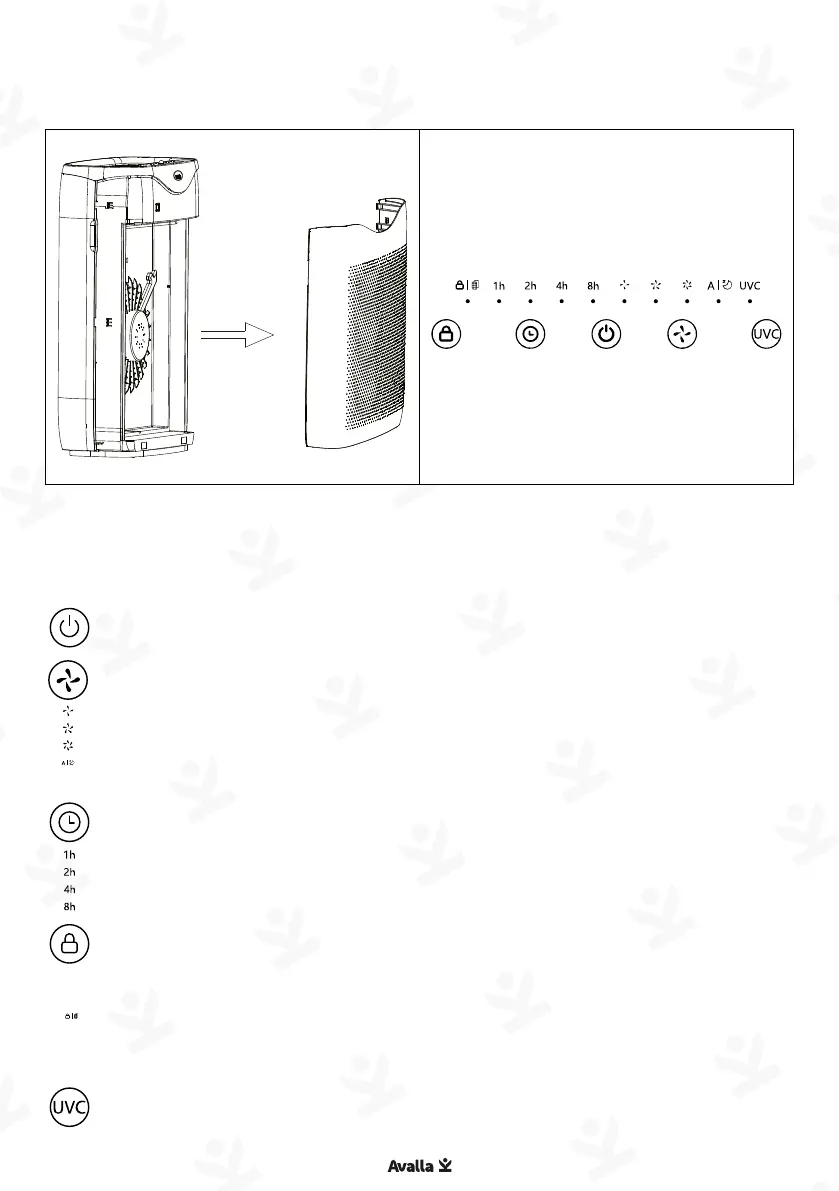
Power - Press to turn the unit on / off.
Fan speed – Press to select your preferred fan speed. The
options are low, medium, high, sleep or auto. In auto, the fan
speed will adjust automatically depending on the air quality.
Sleep mode will use the quietest fan speed and switch off the
display. Tap any button to wake.
Timer – Press to select how many hours until you would like
the air purifier to automatically turn off. If no timer indicator
light is on, the timer is disabled.
Lock / Filter reset – Press and hold for 3 seconds to enable /
disable child lock function.
When the filter needs to be replaced, the filter symbol
illuminates. Replace filter then press and hold the Lock button
for 3 seconds to reset. Normal Lock function will resume.
UVC - Press to enable / disable the UVC function.
Parts guide Touch control panel
Make sure your purifier is switched off and unplugged from the
mains power supply. Open the air filter cover, remove all packaging
from the new filter, and insert.
Re-attach the air filter cover and reset the filter timer.


 To Next Page