6 En
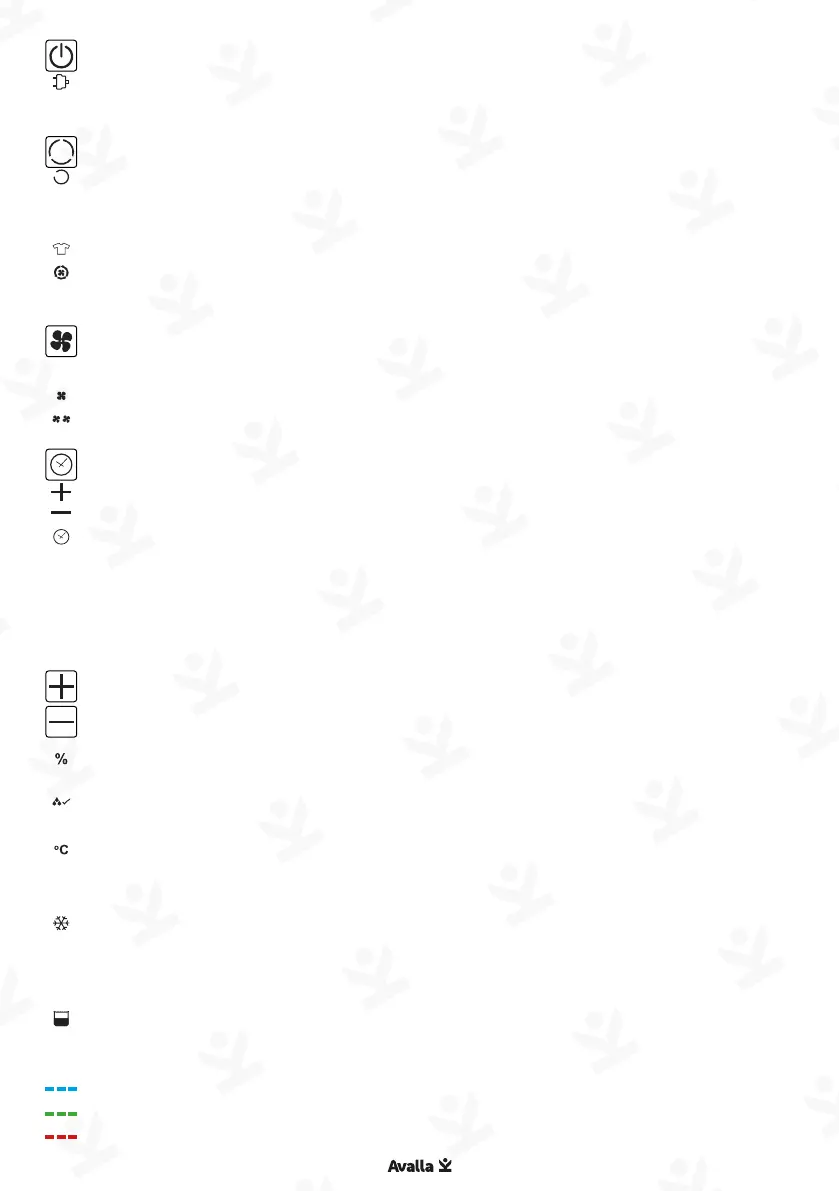
Power: Press to toggle power on/off.
• Power indicator illuminates when on and ashes when in
standby mode.
Mode: Press to cycle between operation modes:
• Dehumidier: The unit will stop operation when it has
reached target humidity level and will automatically
resume if humidity rises again.
• Clothes dryer: Operates at a higher fan speed.
• Aeration: The fan circulates air without dehumidifying
function.
Fan speed: Press to change fan speeds when using
dehumidier and aeration modes:
• Low speed
• High speed
Timer: Adjusts the shut down timer for the unit.
• Press timer button followed by plus / minus buttons to
increase / decrease timer. The timer icon will illuminate.
• Press timer button when display is ashing to disable timer
mode.
• Press and hold for 3 seconds to enable ‘child lock’ function.
Note: The timer will stop when the water tank is full and will
resume once emptied.
Humidity setting:
• Press either plus or minus button to set the target humidity
level. The display will ash to show the desired target
percentage, then return to show the current humidity
which is indicated when the percentage light is on.
• When the room reaches target humidity, the icon will
illuminate.
• Press and hold the plus button for 3 seconds to display
current room temperature.
Defrost light: Illuminates when the unit goes in to self-
defrost mode. The dehumidier will go in to standby. Normal
operation will resume when the compressor has defrosted.
Tank full: Illuminates when the tank is full and needs emptying.
Air humidity indicator:
• Blue: Low indoor humidity - below 50%
• Green: Medium indoor humidity - between 51-70%
• Red: High indoor humidity - above 71%


 To Next Page