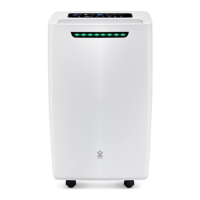
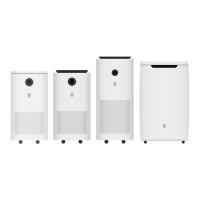
The Avalla Dehumidifier is a household appliance designed to reduce humidity levels in indoor environments, thereby preventing issues such as mold growth, musty odors, and dampness. The product line includes models X-95, X-125, X-150, and X-200, catering to various room sizes and humidity control needs.
Function Description:
The primary function of the Avalla Dehumidifier is to extract excess moisture from the air. It operates by drawing in humid air, passing it over a cooling coil where moisture condenses into water, and then releasing drier air back into the room. The collected water is stored in a removable water tank or can be continuously drained via a hose.
Key Features and Usage:
Operation Modes:
- Dehumidifier Mode: The unit operates until a target humidity level is reached, then automatically stops. It resumes operation if humidity rises again.
- Continuous Dehumidifier Mode: The unit operates continuously, unrestricted by target humidity levels, ideal for very damp conditions.
- Clothes Dryer Mode: Operates at a higher fan speed to assist in drying clothes.
- Aeration Mode: The fan circulates air without dehumidifying, useful for general air movement.
Control Panel (X-95, X-125, X-150):
- Power Button: Toggles power on/off.
- Mode Button: Cycles through operation modes (Dehumidifier, Continuous Dehumidifier, Clothes Dryer, Aeration).
- Fan Speed Button: Adjusts fan speed (Low/High) in Dehumidifier and Aeration modes.
- Night Mode Button: Toggles the display and lights on/off for undisturbed sleep.
- Timer Button: Sets a delay for start-up (when power is off) or shut-down (when power is on) from 0-24 hours. The timer stops if the water tank is full and resumes when emptied.
- Humidity Setting: A slider allows users to increase or decrease the target humidity percentage. The display flashes the desired percentage before returning to the current humidity.
- Defrost Light: Illuminates when the unit enters self-defrost mode, indicating a temporary standby. Normal operation resumes after defrosting.
- Tank Full Light: Indicates when the water tank is full and needs emptying.
Control Panel (X-200):
- Power Button: Toggles power on/off. The power indicator illuminates when on and flashes in standby.
- Mode Button: Cycles through operation modes (Dehumidifier, Clothes Dryer, Aeration).
- Fan Speed Button: Changes fan speeds (Low/High) in Dehumidifier and Aeration modes.
- Timer Button: Adjusts the shut-down timer using plus/minus buttons. Pressing the timer button when the display is flashing disables timer mode. Press and hold for 3 seconds to enable 'child lock'.
- Humidity Setting: Plus/minus buttons set the target humidity level. The display flashes the desired percentage and then shows the current humidity. An icon illuminates when the room reaches the target humidity. Press and hold the plus button for 3 seconds to display current room temperature.
- Defrost Light: Illuminates when the unit enters self-defrost mode, going into standby. Normal operation resumes after defrosting.
- Tank Full Light: Illuminates when the tank is full and needs emptying.
Air Humidity Indicator:
Both series feature an LED indicator that changes color based on indoor humidity:
- Blue: Low humidity (below 50%)
- Green: Medium humidity (between 51-70%)
- Red: High humidity (above 71%)
Water Management:
- Empty Water Tank: When the tank full light illuminates, the unit stops. Users must switch off the power, remove the tank from the back, drain it, and then replace it to resume operation.
- Continuous Drainage: For prolonged operation without manual emptying, a drainage hose can be attached to the drainage outlet, leading to a suitable drain. This bypasses the water tank, but the automatic 'water tank full' shutdown is disabled. The water tank must still be installed for the machine to run.
Maintenance Features:
- Cleaning the Air Filter: Regular cleaning of the air filter is crucial for maintaining maximum airflow and efficiency. This involves switching off the power, removing the air intake cover and filter, vacuuming the filter with a soft head attachment, and then replacing the filter and cover.
- Storage: If the unit is not used for an extended period, it should be completely drained of water, dried by leaving the drainage cap off, and the water tank dried with a cloth or towel. Store in a well-ventilated, dry area. If the tank is dirty, wash with warm water only, avoiding chemicals.
Technical Specifications (General Safety):
- Refrigerant: The unit uses R-290 propane gas, a flammable refrigerant. Servicing involving the refrigerant loop should only be performed by qualified technicians.
- Room Size: The unit should only be used in rooms that exceed 4m² in size.
- Electrical Safety: The unit is Class I Construction (Earthed) and must be operated from a grounded power outlet of equal voltage, frequency, and rating as indicated on the product identification plate. The supply cord, if damaged, must be replaced by the manufacturer or a qualified service agent. Do not use extension cords.
- Placement: Avoid operating near combustible/explosive materials, heat sources, or objects blocking air inlet/outlet. Do not place in direct sunlight or near objects causing mechanical vibration/shock. Position on an even, flat surface, away from excessive dust.
- User Safety: Do not touch the air inlet or evaporator surface. Do not insert fingers or other objects into the air outlet. Do not unplug or tilt the unit while in operation. Do not leave unattended.
- Defrosting: Do not use means to accelerate the defrosting process.
- Storage: Store in a manner to prevent mechanical damage. Do not pierce or burn the unit.
Servicing Safety Precautions:
Any servicing must be carried out by a suitably qualified and registered individual. Prior to work, safety checks are necessary to minimize ignition risk, especially when dealing with the refrigerant system. This includes ensuring the work area is ventilated, checking for refrigerant presence with appropriate detectors, having fire extinguishing equipment on hand, and ensuring no ignition sources are present. Electrical components must be fit for purpose, and safety checks (capacitor discharge, no exposed live components, earth bonding continuity) must be performed.


 To Next Page
 General