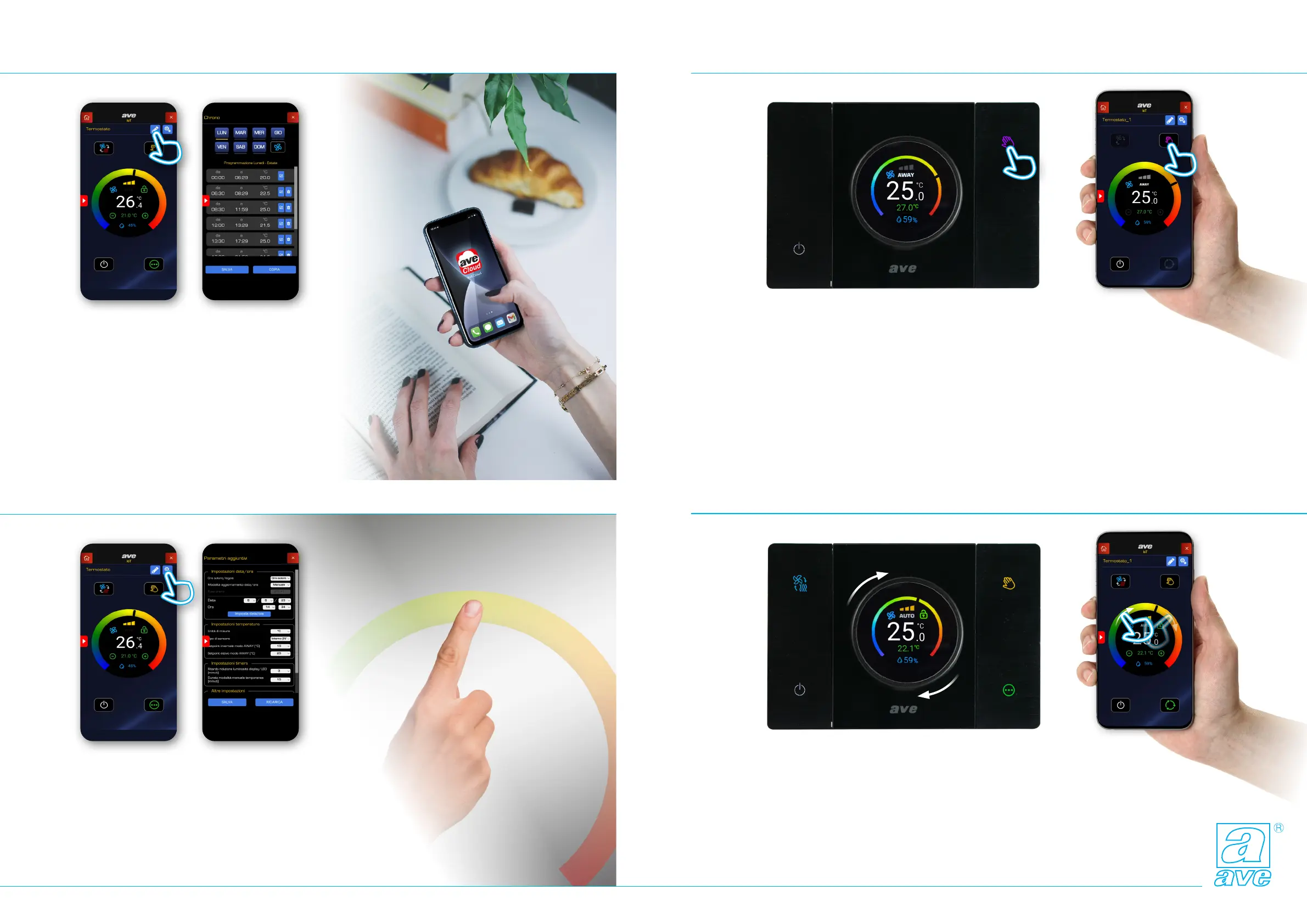
Programmazione/Programming Funzione away/Away function
Funzione manuale temporaneo/Temporary manual functionParametri aggiuntivi/Additional parameters
8
Funzione away
La pressione prolungata del tasto mano permette di
attivare la “modalità fuori casa”, verrà così impostata
sul termostato la temperatura che preferisci mantenere
in tua assenza, senza modicare la programmazione
standard.
In questa modalità sono possibili due set di temperatu-
ra distinti, uno per l’estate e uno per l’inverno.
Per tornare alla programmazione standard basterà te-
nere premuto per 5 sec. il tasto mano.
Quando la funzione è attiva appare sul display la scritta
Away ed il simbolo della mano diventa di colore viola.
Away function
Holding down the hand button activates the “away from
home mode”, thus setting the temperature you prefer
to maintain in your absence on the thermostat, without
modifying the standard programming.
In this mode, two distinct temperature sets are possi-
ble, one for summer and one for winter.
To return to the standard programming, simply hold the
hand button down for 5 seconds.
When the function is active, the word Away appears on
the display and the hand symbol turns purple.
Funzione Manuale Temporaneo
Ruotando la ghiera centrale è possibile modicare il set
di temperatura, anche se siamo in modalità Automati-
ca. Il termostato entra in modalità “manuale tempora-
nea” e la scritta “AUTO” sul display inizia a lampeggiare,
questa funzione aggiuntiva ci permette di denirne la
durata. Trascorso infatti l’intervallo di tempo, che ab-
biamo impostato nei parametri aggiuntivi, il termostato
ritorna in modalità di funzionamento automatica.
Temporary Manual Function
By turning the central dial it is possible to change the
temperature set, even if we are in Automatic mode. The
thermostat enters “temporary manual” mode and the
word “AUTO” on the display starts ashing. This ad-
ditional function allows us to dene its duration. In fact,
once the time interval that we have set in the additional
parameters has elapsed, the thermostat returns to au-
tomatic operating mode.
Impostazioni avanzate
L’applicazione AveCloud permette di personalizare i parametri
aggiuntivi:
• impostazioni di data e ora
• impostazioni relative alla temperatura
(unità di misura - tipo di sensore - set di temperatura away)
• impostazione relative ai timers
(riudzione luminosità del display - durata modalità manuale
temporaneo)
Advanced settings
The AveCloud application is used to customise the additional
parameters:
• date and time settings
• temperature settings
(unit of measurement - type of sensor - away temperature set)
• timer settings
(display brightness reduction - temporary manual mode
duration)
Impostazione programmi
L’applicazione AveCloud permette di impostare il set di
temperatura in base alla stagione, al giorno della settimana
e alle fasce orarie.
Grazie alla funzione copia è possibile utilizzare le impostazioni
salvate su più giorni della settimana.
Program setting
The AveCloud application is used to determine the temperature
set based on the season, on the day of the week
and on the time slots.
Thanks to the copy function it is possible to use the saved
settings on several days of the week.


 To Next Page
 Loading...