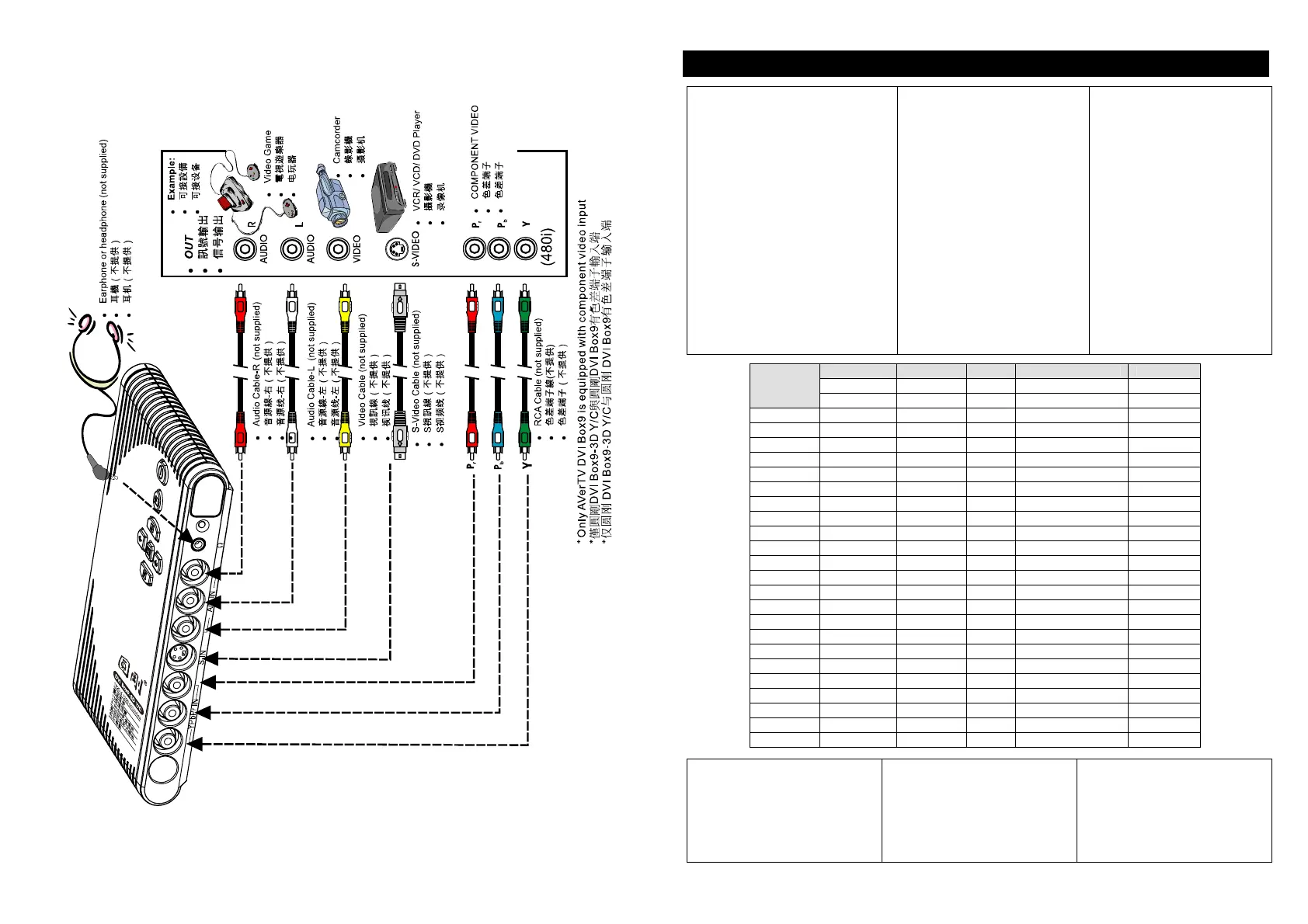
Using the AVerTV DVI Box / /如何操作
Different countries have different
TV systems, for example, PAL-BG,
PAL-DK, NTSC-J, NTSC-M…etc.
AVerMedia TV Box functions only
with the TV system of the country it
is manufactured for and originally
distributed in.
Each column in the table below
corresponds to a different type of
TV system. Only one of these TV
systems (only one column) will
appear as your SET AREA. Make
sure that you select the correct
country signal from the menu. To
change the area setting, refer to
SET AREA (page 6).
不同的国家有不同的电视系
统,圆刚电视盒只适用于您购
买当地的电视系统。当您初次
激活圆刚电视盒时,它会按照
内定频率表(按照您所购买国
家地区的电视系统及频率,台
湾地区已内建台湾地区频率)
自动扫描并记忆有效的电视频
道。若您需要进入调整不同地
区设定,请参考区域设定(6 页)
由于世界各国电视系统不一,
圆刚电视盒仅适合购买当地或
采用相同系统的国家使用,关
于各国电视系统请参照下表:
SECAM-DK SECAM-L PAL-I PAL-BG PAL-DK
BULGARIA FRANCE UK AUSTRALIA CHINA
PAL-N
PAL-M
NTSC-M
UKRAINE HK AUSTRIA CZECH
ARGENTINA BANGLADESH HUNGARY
BRAZIL BELGIUM POLAND-1
KOREA DENMARK POLAND-2
TAIWAN EGYPT POLAND-3
USA-STD GERMANY
USA-HRC GREECE
USA-IRC INDIA
INDONESIA
IRAN
ITALY
NETHERLANDS
NETHERLANDS_1
NETHERLANDS_2
ROMANIA
PORTUGAL
SINGAPORE
SLOVAKIA
SLOVENIA
SPAIN
SWEDEN
SWITZERLAND
TURKEY
UAE
To ensure that you can select
and watch all ac-tive channels,
refer to section CH SCAN
(page 6) on how to
automa-tically scan and
memo-rize all active TV
chan-nels in your area.
( 6 )
为了确保您可以选择并收看到可
接收的节目频道,请参考频道扫
描(第 6 页)以便自动扫描及记忆
所有在您地区可接收的频道
3











 To Next Page