Accessing TV Controls /
/
如何能操作所有功能
To access various TV controls,
open up the menu displays or
press on the remote control
buttons.
”MENU”
进入遥控器的"MENU"菜单选
项,使用遥控器上的任一按
键。
The Remote Control/
/
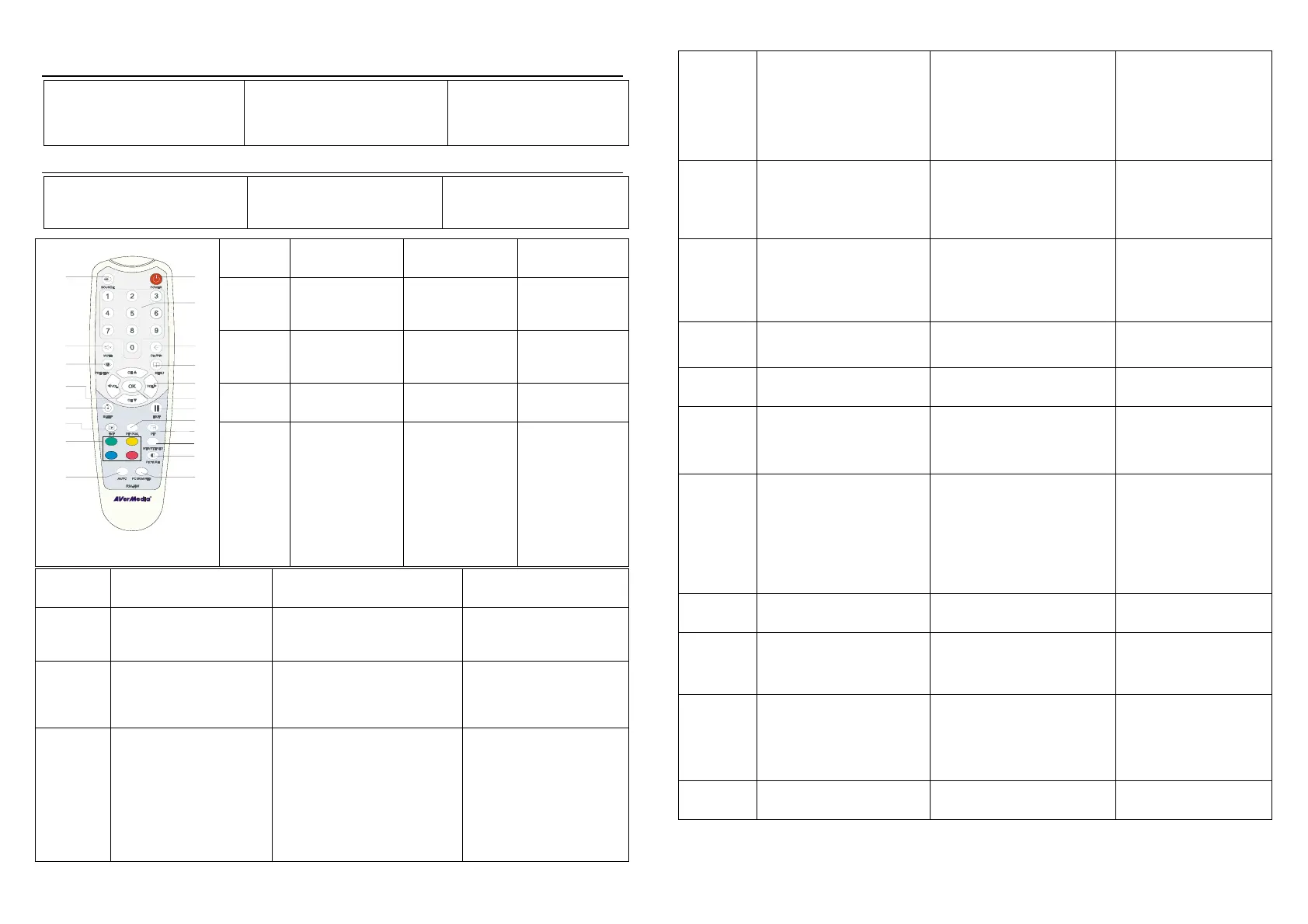
The diagram below shows the
remote control unit layout.
您可以使用遥控器进行各种的
电视功能操作。下图显示了遥控
器详细的图解说明。
1
POWER
Turn the unit on/off
/
开机/关机
2
NUMBER
BUTTONS
To select a TV
channel
选择某电视频道
3
CHANNEL
RETURN
Go to the previously
selected channel
回到上一个频道
4
MENU
To call up the menu
display
唤出工作菜单显示
1
2
3
4
5
6
7
8
9
11
12
13
14
15
16
17
18
19
20
10
5
VOL ◄/►
* To increase and
decrease volume level
* Use these button to
adjust the menu or
picture setting
* In adjusting the PIP
window position, use
these buttons to
move the menu
display to the left and
right of the screen
*
*
* PIP
* 增加或减少音量
* 使用这些按钮调
整菜单或画面设
定
*在调整屏幕上操作
画面位置时,使用
这些按钮来进行
上下的调整
6
OK
In the menu, press this button
to confirm the selection.
使用此按键在菜单中确认选择
7
To temporarily freeze the image
on the screen. Press the
button again to unfreeze the
image.
画面暂停,再按一次取消画面
暂停功能
8
PIP Pos.
To move the small TV/Video
screen using the CH▲, CH ▼,
Vol◄, and Vol► buttons in PIP
mode. Press this button again
to exit the adjusting mode.
在 窗口模式中调整
位置
9
PIP
Switch between PIP* and Full
Screen mode
* To watch TV/Video in a small
screen on an always on top of
the PC display.
用小屏幕收看电视/影片且
永远在最上层
* 要使用 PIP 模式时,电视
盒本身需与电脑(VGA IN)
连接才能使用此功能
** PIP
电脑
10
MTS/
STEREO
If the channel offers the
multi-language feature, press
this button to toggle between
languages.
(*Only AVerTV DVI Box9
supports this function.)
11
PICTURE
To adjust brightness, contrast,
color, tint or sharpness
Note: The Tint control will not
work with a PAL/SECAM source.
PAL/SECAM
调整亮度、对比、颜色、
色调或锐利度
注意:色调功能无法在信
号来源为 PAL/SECAM 时
调整
12
PC BGM/
Res.
- Switch the audio source when in
PC display mode
- Switch display resolution setting
to 1024x768 when in TV/Video
mode
-
-
1024x768
- 使您在电脑上工作时可以
持续收听电视或外接影音
设备的声音
- 在收看电视时可快速切换
分辨率为 1024x768
13
SOURCE
Switch between TV or external
video sources
在电视信号或外部影音信
号间切换
14
MUTE
To turn off /on the sound
/ 关闭/开启声音
15
PREVIEW
Display 13 consecutive TV
channels on-screen
(*for AVerTV DVI Box7 can only
continuously display the next
consecutive TV channels)
13
同时预览 13 个电视频道
(*圆刚 DVI Box7-PIP 只
能持续显示下一个电视频
道)
16
CH▲/▼
*Go to the next or previous TV
channel line up
*Use these buttons to make the
selection in the menu or picture
setting
* In adjusting the PIP window
position, use these buttons to
move the menu display up and
down of the screen
*
*
* PIP
*进入下一个或前一个电视
频道
*使用这些按键在菜单中进
行选择或者画面设定
*在调整屏幕上操作画面位
置时,使用这些按钮来进行
上下的调整
17
SLEEP
To automatically turn off the unit
after 0:30,1:00, 1:30, 2:00 or 2:30.
30,60, 90, 120 or 150
在 30,60, 90, 120 or 150
分钟后自动关机
18
TELETEXT
(option)
This function is not available for
this product.
本产品不支持这个功能
19
FASTTEXT
LINK
buttons
(option)
This function is not available for
this product.
本产品不支持这个功能
20
AV/PC
To toggle between TV/ Video or
PC display
/
在电视/影音信号源或电
脑信号显示间切换
4


 To Next Page
 Loading...