Need help?
Do you have a question about the Avermedia D131L Series and is the answer not in the manual?
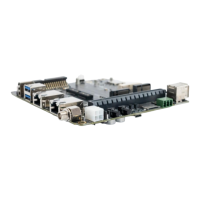
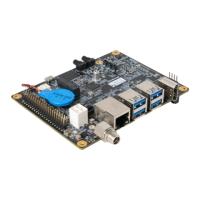
The AVerMedia D131L is a fully featured carrier board designed for NVIDIA® Jetson Orin™ NX and Orin™ Nano modules, providing a compact, high-performance AI edge computing platform for intelligent video analytics applications. It operates with NVIDIA® BSP and offers a rich set of I/O functions.
The D131L acts as a carrier board for NVIDIA® Jetson Orin™ NX/Orin™ Nano modules, enabling access to a wide range of interfaces and enhancing functionality with additional expansion options. It supports BSP installation as a recovery mode via a USB 2.0 Micro-B connector. The board includes a fan power connector for thermal management and a 40-pin GPIO expansion header for general-purpose input/output. It also features a PSE Board Connector for power sourcing equipment (PoE) functionality, supporting a maximum of 15W. Debugging is facilitated through a dedicated debug port. Out-of-band (OOB) board connectors are provided for 5V power, reset, and power control, allowing for remote management and monitoring. The device incorporates a Dip Switch button for fan PWM control and auto power-on settings, as well as power and recovery buttons with integrated LEDs for user interaction.
The D131L is designed for ease of use and flexibility. Installation involves downloading the BSP and flashing it to the target device, either through the NVIDIA SDK Manager or by manually downloading the BSP/ROOTFS from the NVIDIA official website. The SDK Manager provides an intuitive interface for selecting the target operating system (Linux JetPack 5.1.1 rev. 1 is the latest supported version) and target components, including CUDA, NvSci, Computer Vision, and Developer Tools. It also allows for automatic detection and setup of the Jetson module.
The board supports various power modes, which can be modified via the Ubuntu UI or command-line tools (nvpmodel). For MIPI CSI camera usage, the D131L supports 1x 2-lane MIPI CSI camera, with default support for Raspberry Pi v2 (IMX219). Users can test camera functionality using gst-launch-1.0 commands with different sensor modes and resolutions. GPIO expansion is available through a 40-pin header, allowing users to check status, export, set direction (input/output), and control values (low/high) using command-line instructions.
The force recovery mode is a critical feature for re-programming the NVIDIA® Jetson Orin™ NX. This is initiated by connecting a USB cable from the Jetson platform USB port to a host system, pressing and holding the Force Recovery Button, and then powering on the carrier board. After three seconds, releasing the button will make the Orin NX appear as a new NVIDIA target device on the host system, ready for re-programming.
The D131L emphasizes safety and proper handling. Users are advised to keep the circuit board in its antistatic package until installation and use a grounded wrist strap when handling to prevent electrostatic discharge (ESD). The board should be handled by its edges, avoiding contact with components, and in ESD-safe areas. For safety, the device should not be opened by unqualified personnel and must be placed on a solid surface to prevent falls. It should be kept away from humidity and un-controlled environments with temperatures outside its permitted storage range. Only AVerMedia-supplied adapters and cables should be used to prevent malfunctions or fires. The power source must match the device's rating, and the power cord should be placed to avoid being stepped on. It is recommended to disconnect power when the device is not in use or idle for extended periods. Before cleaning, the device should be disconnected from the AC supply, and a damp cloth should be used instead of liquid or spray detergents. The device should be installed near an easily accessible power outlet. To ensure optimal heat dissipation, openings should not be covered, and care should be taken around the heatsink/heat spreader when the system is running. Liquids should never be poured into openings to prevent fire or electric shock. Static electricity precautions, such as using a grounding wrist strap and static-shielded containers for electronic parts, are important during internal component installation. In case of damage, liquid intrusion, or unexpected behavior, users are advised to contact service personnel. The limited product warranty covers repairs or replacements for failures under normal use, provided the product has not been subjected to abuse, misuse, accident, disaster, or unauthorized modification. Disassembling the box PC is not recommended as it may impact the warranty.
 General
| Brand | Avermedia |
|---|---|
| Model | D131L Series |
| Category | Computer Hardware |
| Language | English |

 To Next Page