8
C
C
o
o
n
n
n
n
e
e
c
c
t
t
i
i
n
n
g
g
a
a
C
C
o
o
m
m
p
p
u
u
t
t
e
e
r
r
v
v
i
i
a
a
U
U
S
S
B
B
c
c
o
o
n
n
n
n
e
e
c
c
t
t
i
i
o
o
n
n
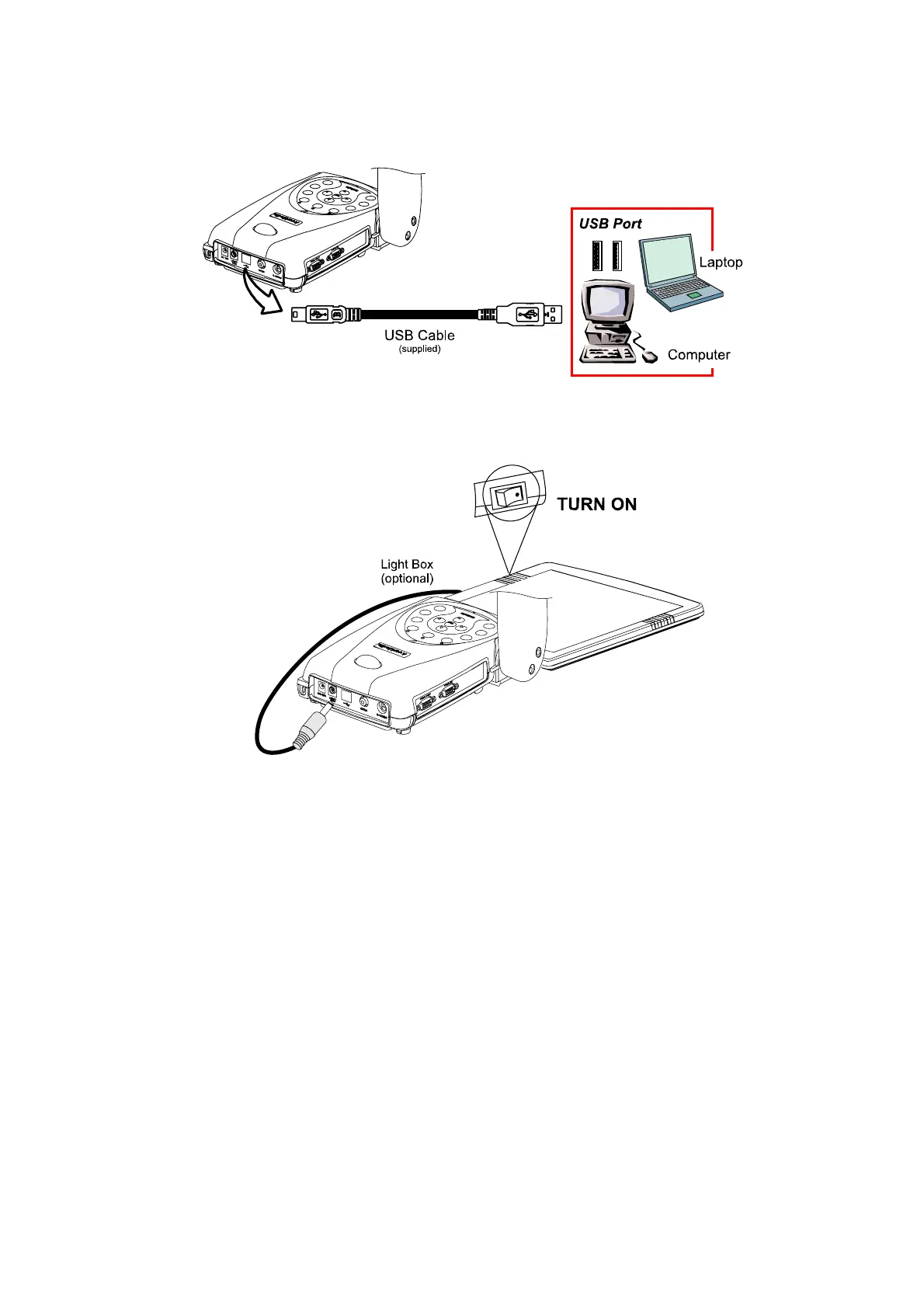
Download the saved images from AVerVision300p’s built-in memory to your computer or
access the software application as a PC cam via the USB cable. Select the function
through OSD, then connect it. (Refer to the section, Using the AVerVision Application,
for more details.)
I
I
n
n
s
s
t
t
a
a
l
l
l
l
i
i
n
n
g
g
t
t
h
h
e
e
O
O
p
p
t
t
i
i
o
o
n
n
a
a
l
l
L
L
i
i
g
g
h
h
t
t
B
B
o
o
x
x
Connecting an optional light box enables you to view x-rays, transparencies and
negative slides.
PLUG IT HERE


 To Next Page