Features
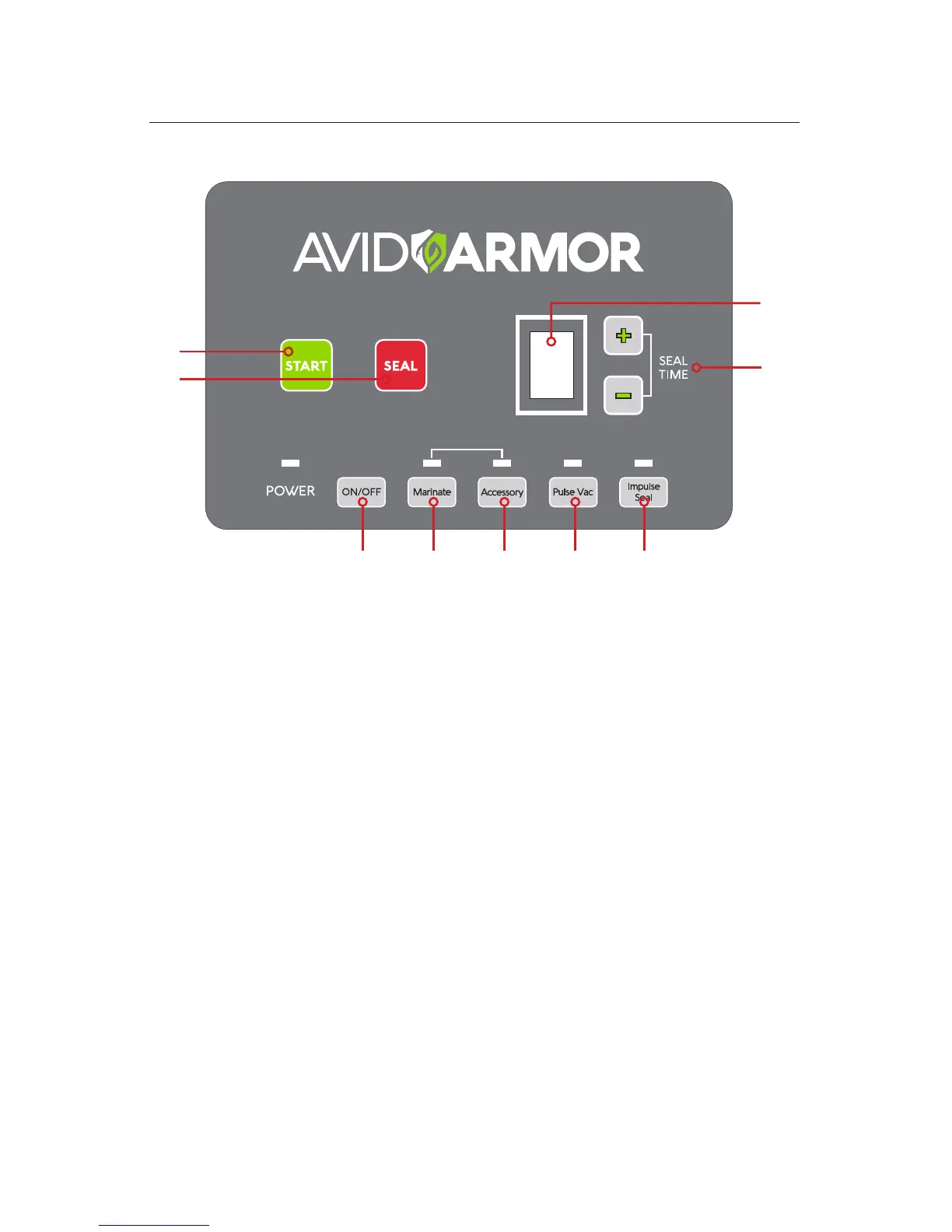
1. Start Button - Press to start the vacuum cycle. This button is only used
for vacuum bags.
2. Seal Button - Press to seal only and/or stop the vacuum process and
begin sealing. Use to make customer sized bags from rolls.
3. On/O Button - Turns the vacuum sealer on and o.
4. Marinate Mode Button - Press for marinating option. See “Marinating
Food” section.
5. Accessory Mode Button - Press to vacuum canisters. See “Vacuum
Packaging with Canisters” section
6. Pulse Vacuum Button - Used to prevent crushing of delicate items.
Press once and then press again and hold to control the vacuum
process.
7. Impulse Seal Button - This feature is for sealing bags only, no vacuum.
Press Impulse Seal button, machine becomes an impulse sealer. Seal
bags by opening and closing lid.
8. Seal Time Adjusting Button – default setting 3
Press to adjust the seal time. Increase the seal time if the seal is not
complete or if spotty. Reduce seal time if the seal is white or milky.
Setting of zero (0), the machine will not seal. Last used seal time is
stored in memory.
9. Digital Display - Displays the progress of the vacuum and sealing
cycles.
Control Panel


 To Next Page