EN
8
C - CONFiGurATiON
BLUETOOTH SPEAKER LIGHT BULB
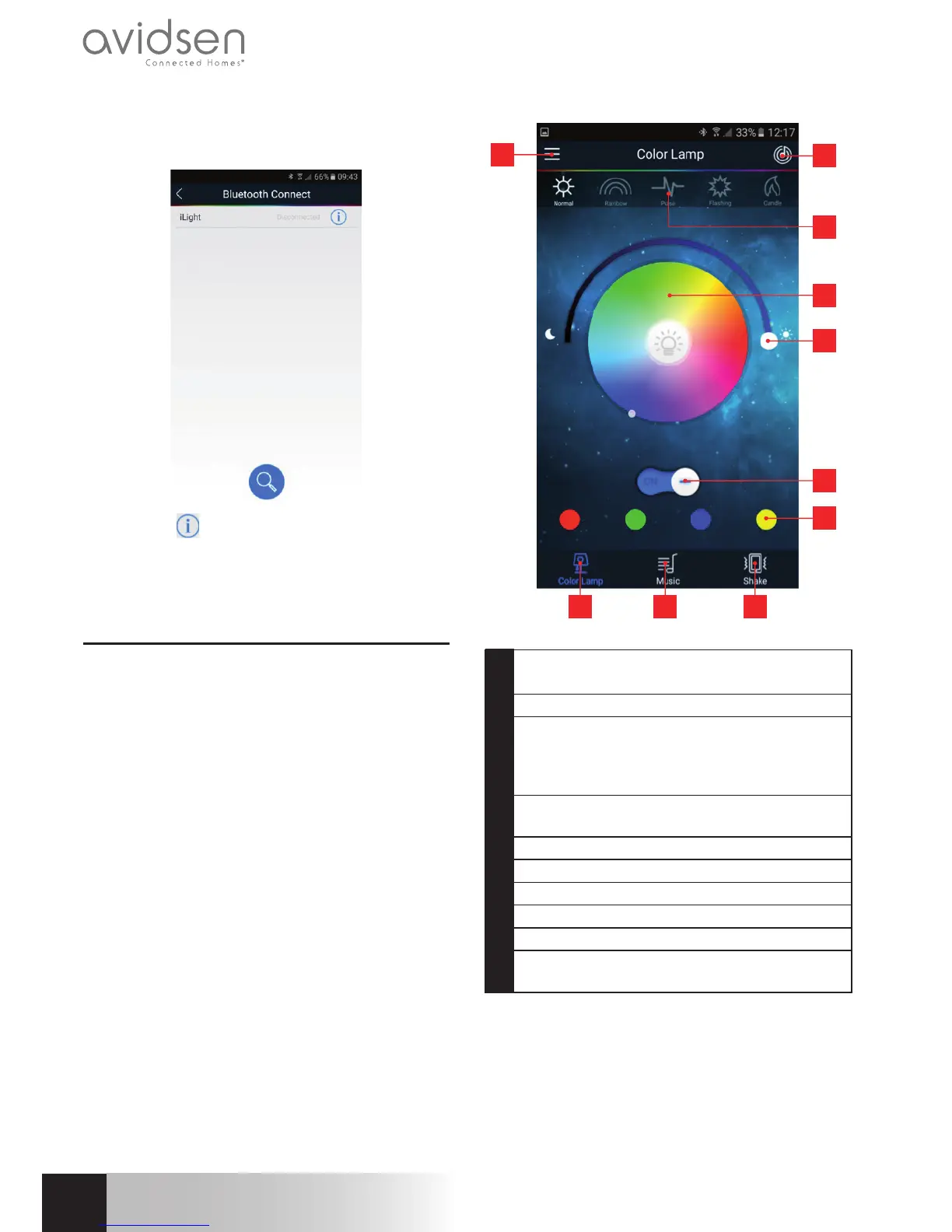
Onceyou’veconnectedtothebulbatleastonce,it
willalwaysappearinthelistofdetectedbulbs:
Clickonthe icontoaccessadditionaloptions:
RENAMEletsyoupersonaliseyourbulb’snamein
thelist(iLightbydefault),DELETEletsyoudeleteit
fromthelist.
2 - USAGE INSTRUCTIONS
Important note: yourbulbmustbepluggedinto
beavailable.Ifthebulbwasturnedoffwithalight
switch,youmustrstturnontheswitch.Thenyou
canshutoffthebulb’slightingifyouonlywanttouse
theBluetooth
®
speaker,forexample.
8 9 10
1
2
4
5
6
7
3
1 Accessadvancedfeaturesandgobackto
thelistofdetectedbulbs
2 Accessapp’sintegratedaudioplayer
3 Lightingmodes:normal,rainbow(with
automaticcolourvariation),pulse(identical
torainbow,withprogressiveintensity
variation),ash,candle
4 Lightingcolour:chooseyourcolour.Bulb’s
whitelightisinthecentre.
5 Illuminationintensity
6 Turnon/off
7 Pre-setcolours
8 Lightingfeature
9 Integratedmusicplayer
10 Shakefeature:letsyoucontrolfeaturesby
shakingyourphone
Note:“normal”,“flash”and“candle”modesuse
thecolouryousetbyclickingonthescreen’scentre
area. “Rainbow” and “pulse” modes periodically
changethebulb’scolour.


 To Next Page