9
EN
C - INSTALLATION
720P WIFI IP CAMERA
3 - INSERTING A MICRO SD CARD (NOT INCLUDED)
Your camera has a micro SD card slot, which gives it an internal storage memory. The maximum size is 64 GB.
This use is optional, but it is necessary if you want the camera to record independently.
Tool needed: Thin, cross-headed screwdriver with PH1 bit holder (Philips).
Carry out the following operations on a flat and well-lit surface:
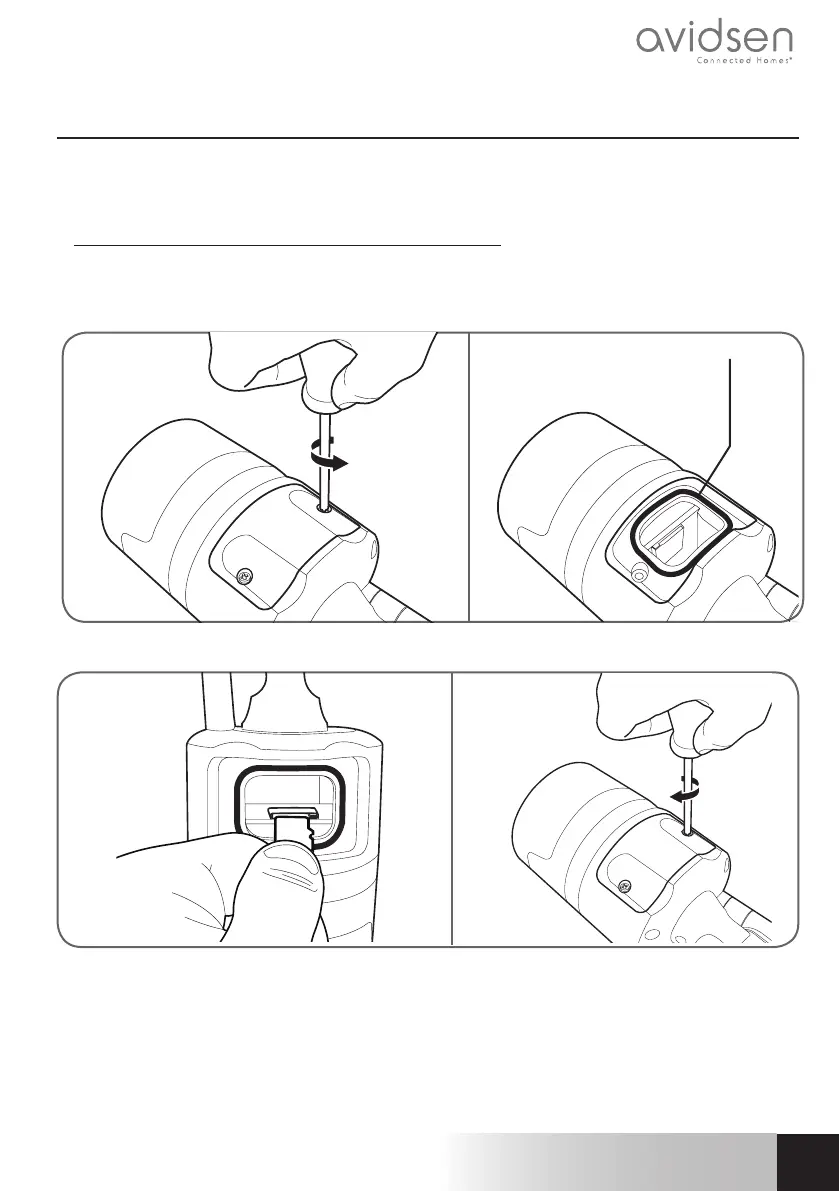
• Remove the two screws from under the camera using your screwdriver.
• Remove the cover, taking care not to lose the black O-ring.
black O-ring
• Please insert the microSD card
• Put the cover back on, making sure that the black O-ring is positioned correctly, and properly tighten
the two external screws to ensure the camera is watertight.
Note: These operations must be carried out with the camera disconnected from the mains power supply.


 To Next Page