15
FRFR
960P WIFI OUTDOOR IP CAMERA
D - CONFIGURATION
1
App notifi cation in the event of an alert: all
devices on which the camera was added to
the Aviwatch app will be notifi ed if there is
movement (the app must be running in the
background on the tablet or smartphone)
2
Saving to SD: if a microSD card was inserted
into the camera, any alert triggers a video,
which is saved to the card. The video can be
viewed remotely (see below)
3
Email with attached photo: if email was set
up (see the previous paragraph), an email will
be sent when movement is detected
4
FTP options, not discussed here
5
Click “Appliquer” (Apply) to save your settings
or “Retour” (Return) on iOS
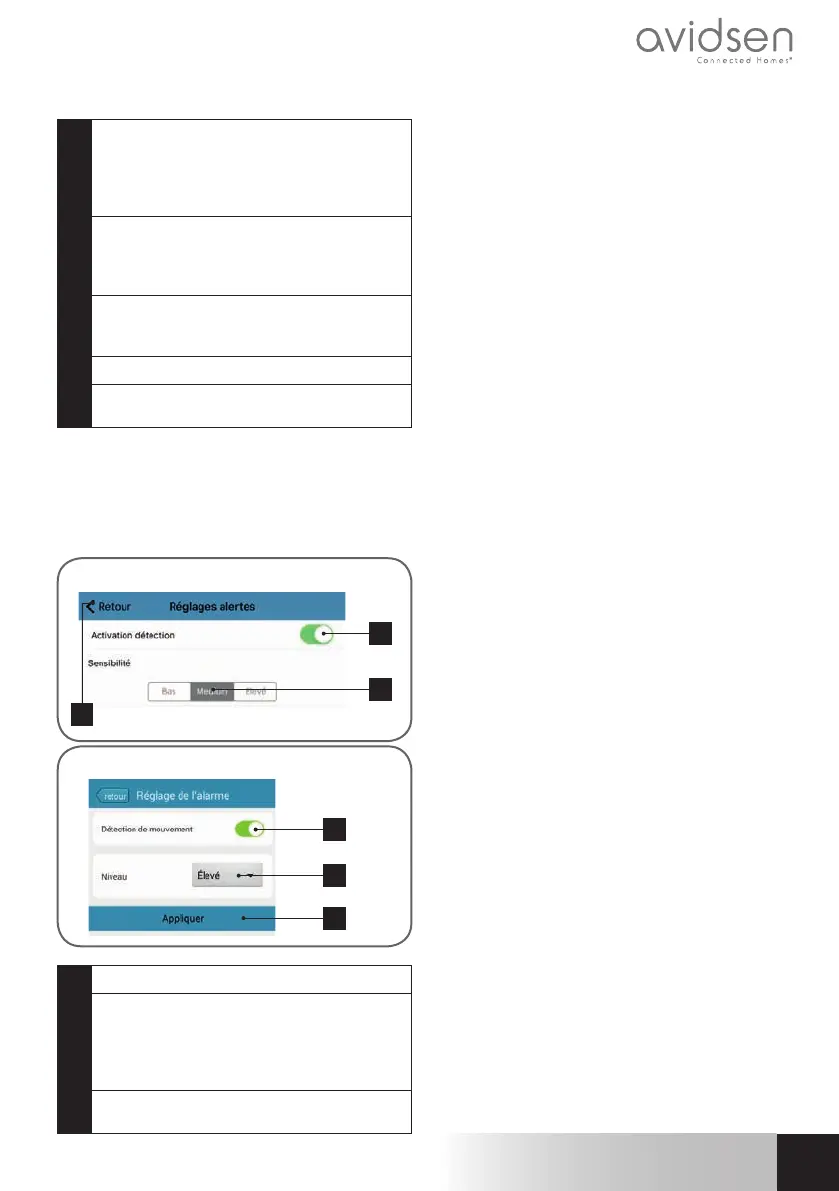
Once this confi guration has fi nished, simply
activate movement detection in the “Réglages
alertes (Set Alerts)” menu:
1
2
3
iOS
1
2
3
Android
1
Click here to activate movement detection
2
Use this to adjust the sensitivity of the
movement detector. When set to high
sensitivity the smallest movement will
send an alert, in low sensitivity, only large
movements on the screen will send an alert
3
Click “Appliquer” (Apply) to save your
settings or “Retour” (Return) on iOS
This completes the confi guration. From this
point on, any movement in front of the camera
will result in an email alert, an Aviwatch app
notifi cation and/or a fi le to be saved to the
memory card, depending on your settings.



 To Next Page