User’s Manual
1-3
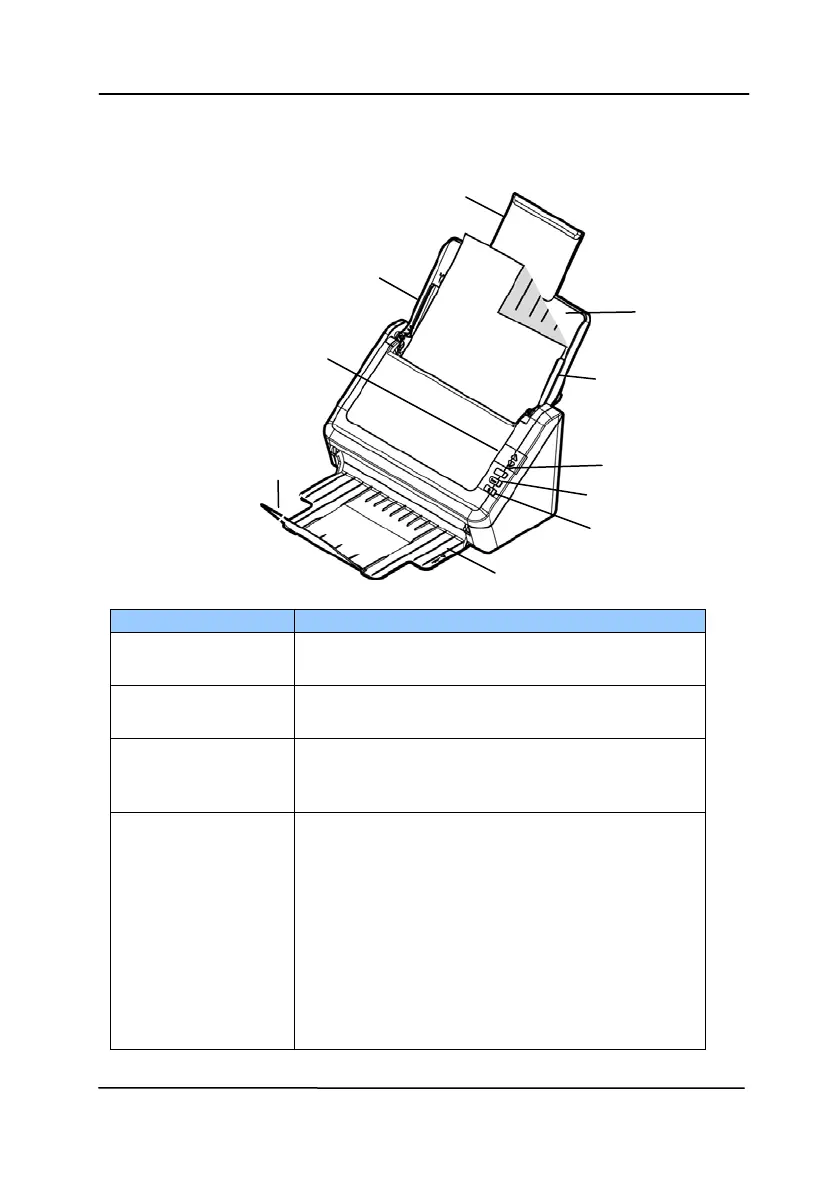
1.2 Front View
Extension
Paper Guide
ADF
Paper Tray
LCD Screen with
Up/Down Buttons
Paper Guide
Cancel Button
Extension
Scan Button
Power Button
Output Tray
Part Name Function
Extension Can be pulled out and adjusted to the
size of the document being scanned.
ADF Paper Tray
Load the document onto this part
when scanning document.
Paper Guides Adjusts to the width of the documents
to prevent skewing of the scanned
pages.
Operation Panel
LCD screen:
Shows a number indicating a scan-to
destination via the Up/Down buttons.
The Power Button:
Press to turn on the power.
The Scan Button:
Press to start a scan.
The Cancel Button:
Press to cancel a scanning job during
operation.


 To Next Page