EasyManua.ls Logo

AVLink 149.505UK - User Manual

AVLink 149.505UK
2 pages
Print Icon
To Next Page IconTo Next Page
Loading...
www.avsl.com 149.505UK User Manual
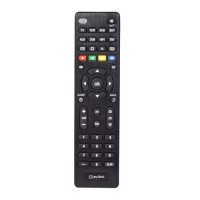
8-in-1 Universal Remote Control
Item ref: 149.505UK
User Manual
A sleek and compact universal remote control, suitable for many brands of TV, DVD, SAT, HiFi and other
devices eliminating the clutter of several remote controls. With 4 simple setup options, this handy remote can
be easily programmed either manually or automatically.
Features:
Ideal to replace lost or broken remote controls.
Can be used to control up to 8 devices simultaneously (TV, DVD, SAT, HiFi etc).
Operates most major control functions.
Uses 2x AAA batteries (not supplied).
NOTE: may not work with some models of smart TV.
Instructions for use:
Before use, insert 2x AAA batteries observing the polarity markings inside the battery compartment.
There are 3 methods of configuring this remote control with your devices as listed below:
1. Direct code set up
Example: Setting up the remote control for your television using the included code list (Codes are listed by
device type and brand name).
Switch your television on (i.e. not on standby) and aim the remote control towards it.
Press the TV button on the remote control and hold it down for 3 seconds until the power button lights
up.
Enter the four-digit device code from the list provided using the number buttons on the remote (the
power button light will go out if the code is valid).
Next aim the remote control at your TV and press the POWER button - if your TV switches off then the
remote control is set to the correct code and is ready to operate your device.
Repeat the above process for all devices that you wish to program i.e. VCR, DVD, etc.
2. Search by brand name
Example: Setting up the remote control by searching for your TV brand code.
Switch your television on (i.e. not on standby) and aim the remote control towards it.
Press and hold the TV button on the remote control along with the corresponding brand number from
the Brand Name Table below.
Keep pressing these 2 buttons until the light in the Power button stays on, then after 2 seconds it will
begin to flash intermittently.
When the TV is switched off release the 2 buttons immediately, the remote control will then save the
relevant code and exit search mode.
Question and Answer IconNeed help?

Do you have a question about the AVLink 149.505UK and is the answer not in the manual?

Summary

Instructions for use

Direct code set up

Setting up the remote using a provided four-digit device code from a list.

Search by brand name

Setting up the remote by searching for your TV brand code using the Brand Name Table.

Auto code search

Finding the correct code for your device by scanning through all codes stored in the remote.

Overview

The 8-in-1 Universal Remote Control (Item ref: 149.505UK) is a sleek and compact device designed to consolidate control over multiple electronic devices, thereby reducing clutter from numerous individual remote controls. It is suitable for a wide range of brands and device types, including TVs, DVDs, SATs, HiFis, and others.

Function Description:

This universal remote control serves as a replacement for lost or broken original remote controls and can operate up to eight different devices simultaneously. It supports most major control functions for these devices. The remote offers four simple setup options, allowing for easy programming either manually or automatically.

Important Technical Specifications:

  • Item Reference: 149.505UK
  • Power Source: 2x AAA batteries (not supplied).
  • Device Compatibility: Controls up to 8 devices (TV, DVD, SAT, HiFi, etc.).
  • Brand Compatibility: Supports most major brands. A comprehensive "Brand Name Table" is provided in the manual, listing index digits for various brands across different device types (TV/RTV, SAT (SKY), DVD, VCR, COMBI, AUX, HIFI/CD, TNT).
    • Index Digit 1: SONY (for TV/RTV, SAT (SKY), DVD, VCR, COMBI, AUX, HIFI/CD, TNT), DENON (for TV/RTV, DVD, VCR, COMBI, AUX, HIFI/CD, TNT), KENWOOD (for TV/RTV, DVD, VCR, COMBI, AUX, HIFI/CD, TNT), ONKYO (for DVD, VCR, COMBI, AUX, HIFI/CD, TNT).
    • Index Digit 2: PANASONIC (for TV/RTV, DVD, VCR, COMBI, AUX, HIFI/CD, TNT), NATIONAL (for TV/RTV), HITACHI (for TV/RTV, DVD, VCR, COMBI, AUX, HIFI/CD, TNT).
    • Index Digit 3: NEC (for TV/RTV, SAT (SKY), DVD, VCR, COMBI, AUX, HIFI/CD, TNT), TOSHIBA (for TV/RTV, SAT (SKY), DVD, VCR, COMBI, AUX, HIFI/CD, TNT), PIONEER (for TV/RTV, SAT (SKY), DVD, VCR, COMBI, AUX, HIFI/CD, TNT).
    • Index Digit 4: SHARP (for TV/RTV, SAT (SKY), DVD, VCR, COMBI, AUX, HIFI/CD, TNT), SANYO (for TV/RTV, SAT (SKY), DVD, VCR, COMBI, AUX, HIFI/CD, TNT), MITSUBISHI (for TV/RTV, SAT (SKY), DVD, VCR, COMBI, AUX, HIFI/CD, TNT).
    • Index Digit 5: JVC (for TV/RTV, SAT (SKY), DVD, VCR, COMBI, AUX, HIFI/CD, TNT), AKAI (for TV/RTV, SAT (SKY), DVD, VCR, COMBI, AUX, HIFI/CD, TNT), FUJITSU (for TV/RTV, SAT (SKY), DVD, VCR, COMBI, AUX, HIFI/CD, TNT).
    • Index Digit 6: SAMSUNG (for TV/RTV, SAT (SKY), DVD, VCR, COMBI, AUX, HIFI/CD, TNT), LG (for TV/RTV, SAT (SKY), DVD, VCR, COMBI, AUX, HIFI/CD, TNT), DAEWOO (for TV/RTV, SAT (SKY), DVD, VCR, COMBI, AUX, HIFI/CD, TNT).
    • Index Digit 7: PHILIPS (for TV/RTV, SAT (SKY), DVD, VCR, COMBI, AUX, HIFI/CD, TNT), THOMSON (for TV/RTV, SAT (SKY), DVD, VCR, COMBI, AUX, HIFI/CD, TNT), EMERSON (for TV/RTV, SAT (SKY), DVD, VCR, COMBI, AUX, HIFI/CD, TNT), LOEWE (for TV/RTV, SAT (SKY), DVD, VCR, COMBI, AUX, HIFI/CD, TNT).
    • Index Digit 8: GE (for TV/RTV, SAT (SKY), DVD, VCR, COMBI, AUX, HIFI/CD, TNT), JERROLD (for TV/RTV), APEX (for TV/RTV, SAT (SKY), DVD, VCR, COMBI, AUX, HIFI/CD, TNT), TEAC (for TV/RTV, SAT (SKY), DVD, VCR, COMBI, AUX, HIFI/CD, TNT).
    • Index Digit 9: NAD (for TV/RTV, SAT (SKY), DVD, VCR, COMBI, AUX, HIFI/CD, TNT), MAGNAVOX (for TV/RTV), MARANTZ (for TV/RTV, SAT (SKY), DVD, VCR, COMBI, AUX, HIFI/CD, TNT), GENERAL (for TV/RTV).
    • Index Digit 0: TECHNICS (for TV/RTV, SAT (SKY), DVD, VCR, COMBI, AUX, HIFI/CD, TNT), ECHOSTAR (for TV/RTV, SAT (SKY), DVD, VCR, COMBI, AUX, HIFI/CD, TNT), YAMAHA (for TV/RTV, SAT (SKY), DVD, VCR, COMBI, AUX, HIFI/CD, TNT), FISHER (for TV/RTV, SAT (SKY), DVD, VCR, COMBI, AUX, HIFI/CD, TNT), SYLVANIA (for TV/RTV, SAT (SKY), DVD, VCR, COMBI, AUX, HIFI/CD, TNT).
  • Limitation: May not work with some models of smart TVs.

Usage Features:

The remote offers three primary methods for configuration:

  1. Direct Code Set Up:

    • Preparation: Switch on the target device (e.g., TV) and aim the remote at it.
    • Initiation: Press and hold the device button (e.g., TV button) on the remote for 3 seconds until the power button lights up.
    • Code Entry: Enter the four-digit device code from the provided code list using the number buttons. The power button light will turn off if the code is valid.
    • Verification: Aim the remote at the device and press the POWER button. If the device switches off, the remote is correctly set.
    • Repetition: Repeat for all other devices (VCR, DVD, etc.) to be programmed.
  2. Search by Brand Name:

    • Preparation: Switch on the target device (e.g., TV) and aim the remote at it.
    • Initiation: Press and hold the device button (e.g., TV button) along with the corresponding brand number from the "Brand Name Table" (e.g., for SONY TV, hold TV button + '1').
    • Search Mode: Continue holding these two buttons until the light in the Power button stays on, then after 2 seconds, it will begin to flash intermittently.
    • Code Saving: When the device switches off, immediately release both buttons. The remote will save the relevant code and exit search mode.
  3. Auto Code Search:

    • This method is useful if direct codes fail or if the brand is not listed. It scans through all codes stored in the remote's memory.
    • Preparation: Switch on the target device (e.g., TV) and aim the remote at it.
    • Initiation: Press and hold the device button (e.g., TV button) for 3 seconds until the light in the Power button stays on.
    • Scanning: Press the Power button on the remote. The LED indicator will flash, signifying that the remote is repeatedly sending power on/off signals for each code in its memory.
    • Code Saving: When the device turns itself off, press the OK button on the remote to save the correct code.
    • Repetition: Repeat for all other devices (VCR, DVD, etc.) to be programmed.

Maintenance Features:

  • Battery Installation: Insert 2x AAA batteries, observing polarity markings, into the battery compartment before first use.
  • Safety Warnings:
    • Never immerse the device in water or expose it to damp conditions or excessive force, for electrical safety reasons.
    • Do not use the device if it is damaged in any way.
    • Only use batteries recommended by the manufacturer.
    • Do not attempt to repair or disassemble the device under any circumstances, as this will invalidate the warranty.
  • Disposal: This product is classified as Electrical or Electronic equipment and must not be disposed of with other household or commercial waste at the end of its useful life. It should be disposed of according to local council guidelines.

The product is manufactured by AVSL Group Ltd. and AVSL (Europe) Ltd., with copyright © 2023. Errors and omissions are excepted.

AVLink 149.505UK Specifications

General IconGeneral
BrandAVLink
Model149.505UK
CategoryRemote Control
LanguageEnglish