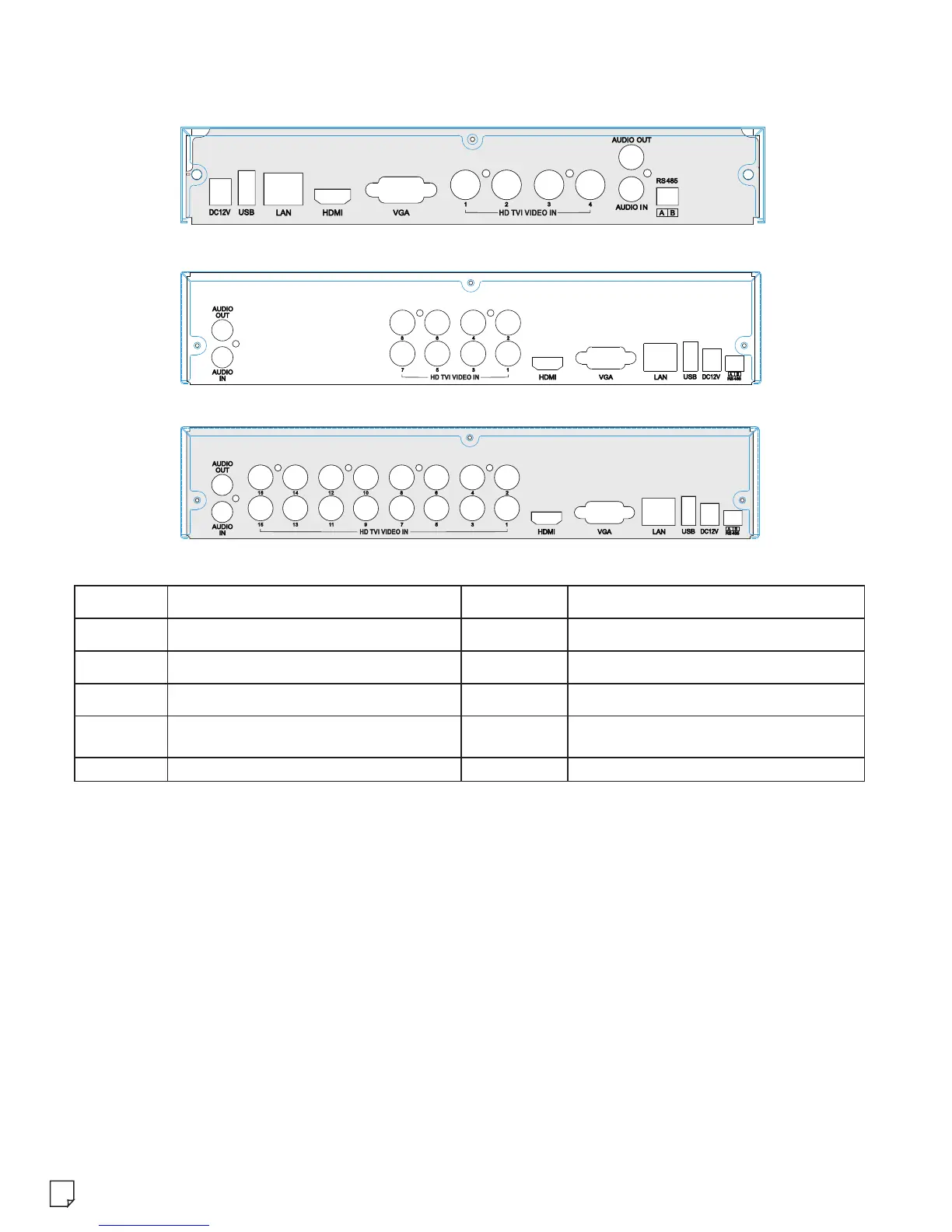
4. Rear Panel Instructions
The interfaces of the rear panels are for reference only.
AUDIO IN
DC12V
AUDIO OUT
DC12V power input
RS 485
Connect to keyboard or speed dome.
A is TX+; B is TX-.
HD TVI
VIDEO IN
VGA
HD-TVI video input
Connect to high-definition display device.
LAN
HDMI
USB
VGA output; connect to monitor.
Name
Name
1 CH audio input; connect to microphone.
Audio output; connect to sound box.
Network port
Connect USB mouse or USB storage devices.
5. Startup & Shutdown
Startup:
① Connect the monitor.
② Connect with the power.
③ The device will boot and the power indicator will turn blue.
④ A Wizard window will pop up.
Shutdown:
By mouse – Enter “Main Menu” and then select “Shutdown” icon. This will bring up a shutdown
window. The device will shut down by clicking “OK” button. Then disconnect the power.
2
Description
Description
Rear Panel for 4 CH
Rear Panel for 8 CH
Rear Panel for 16 CH



 To Next Page