8
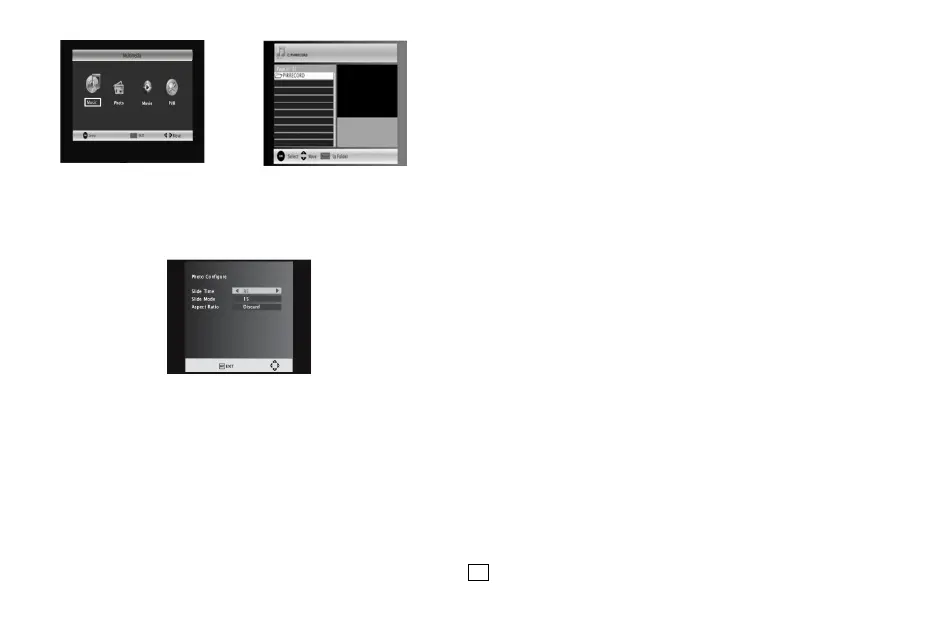
4.7.2 Photo configure:
-Slide Time: adjust slide show interval to 1~8 seconds .
-Slide Mode: adjust slide show effect as mode 0~59 or random.
-Aspect Ratio: Keep displays the picture as its original aspect, Discard displays the
picture in full screen mode.
4.7.3 Movie Configure
- Subtitle Specific:
[Small]: Displays the subtitle as small mode.
[Normal]: Displays the subtitle as normal mode.
[Big]: Displays the subtitle as big mode.
- Subtitle BG:
[White]: Displays the subtitle in white background.
[Transparent]: Displays the subtitle in transparent background.
[Grey]: Displays the subtitle in grey background.
[Yellow green]: Displays the subtitle in yellow green background.
- Subtitle Font Color:
[Red]: Displays Subtitle in red font.
[Blue]: Displays Subtitle in blue font.
[Green]: Displays Subtitle in green font.
Note:
- We cannot guarantee compatibility (operation and/or bus power) with all USB mass
storage devices and assumes no responsibility for any loss of data that may occur when
connected to this unit.
- With large amounts of data, it may take longer for the system to read the contents of a
USB device.
- Some USB devices may not be properly recognized.
- Even when they are in a supported format, some files may not play or display depending
on the content.
4.7.4 PVR Configure
[Record Device]: Select the disk for the record.
[Format]: Format the selected disk.


 To Next Page