Installation
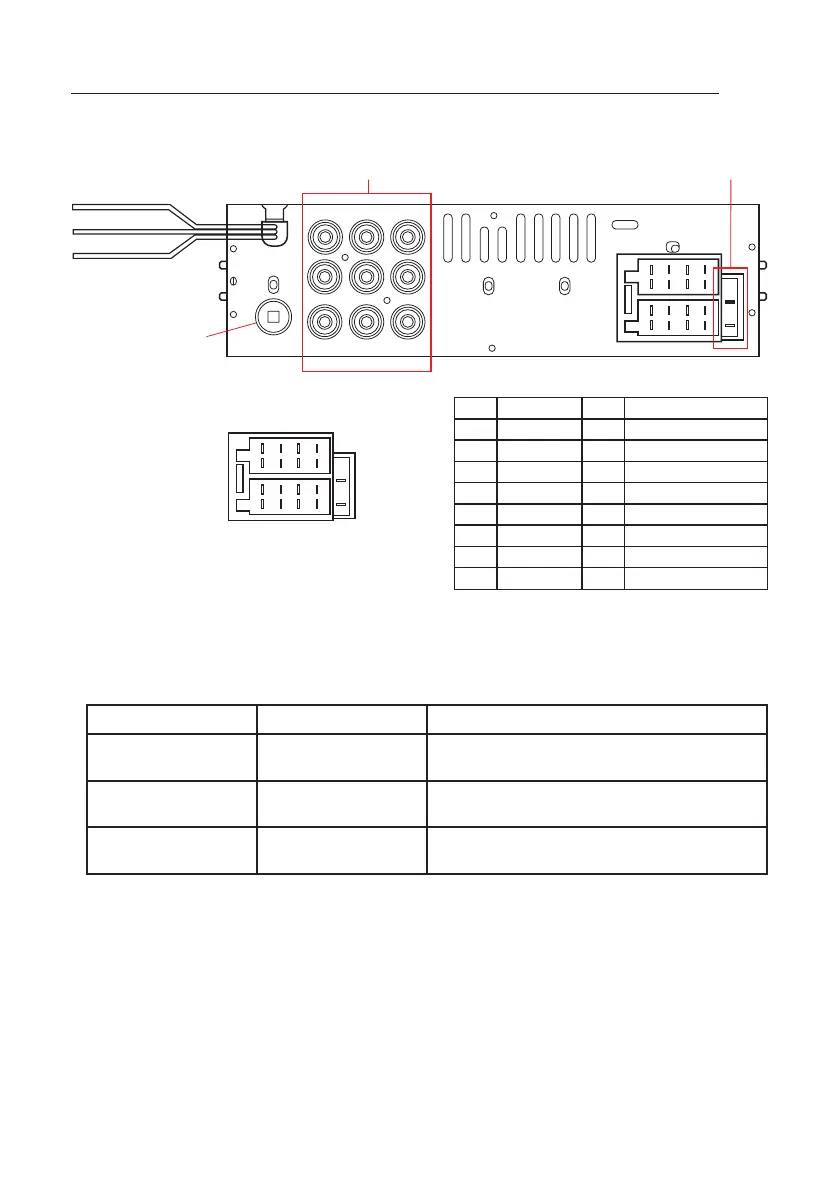
WIRING CONNECTION
1. Do not connect the terminals of the battery until the player is installed.
2. Please connect the yellow wire to the positive of the battery (+).
3. When changing the fuse, ensure the new fuse specification is the same as the current.
Name Colour Description
Back Sight Grey Displays reverse camera.
Connect to reverse lamp positive.
Brake Orange Displays movies.
Connect to hand brake negative.
Tele-Mute Brown Mutes audio input.
Connect to Tele-Mute on UHF/VHF CB.
V-OUT- 1
ANTENNA SOCKET
BRAKEORANGE
TEL-MUTE BROWN
BACK-SIGHTGREY
V-OUT- 2V-IN
R-IN
L-INCAMERAL-OUT
B1
B2
B3
B4
B5
B6
B7
B8
A1
A2
A3
A4
A5
A6
A7
A8
R-OUT NC
ISO
NO NO
A1 B1 REAR-R SPEAKER +
A2 B2 REAR-R SPEAKER -
A3 B3 FRONT-R SPEAKER +
A4 POWER+ B4 FRONT-R SPEAKER -
A5 ANTENNA B5 FRONT-L SPEAKER +
A6 B6 FRONT-L SPEAKER -
A7 ACC B7 REAR-L SPEAKER +
A8 GROUND B8 REAR-L SPEAKER -
*
*
Optional
*
*
*
3


 To Next Page