6
REMOTE CONTROL OPERATION
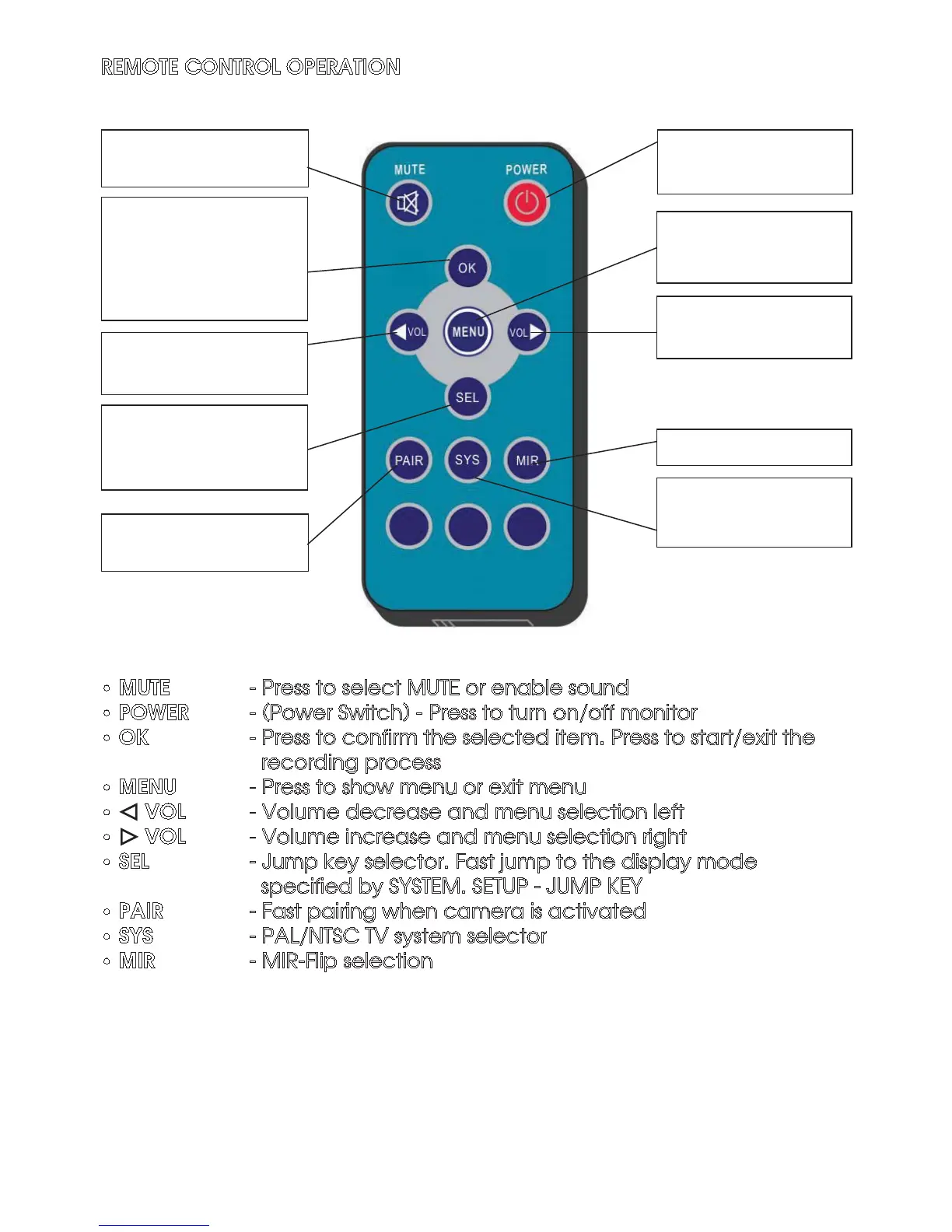
• MUTE - Press to select MUTE or enable sound
• POWER - (Power Switch) - Press to turn on/off monitor
• OK - Press to confirm the selected item. Press to start/exit the
recording process
• MENU - Press to show menu or exit menu
• VOL - Volume decrease and menu selection left
• VOL - Volume increase and menu selection right
• SEL - Jump key selector. Fast jump to the display mode
specified by SYSTEM. SETUP - JUMP KEY
• PAIR - Fast pairing when camera is activated
• SYS - PAL/NTSC TV system selector
• MIR - MIR-Flip selection
Press to select MUTE
or enable sound
Press OK button to enter
menu item or save user
settings.
Press OK button - shortcut
for start/stop recording.
Volume decrease and
menu selection left
Jump key selector. Fast
jump to the display mode
specified by SYSTEM
Press to turn on/off the
monitor
Press to show menu
or exit menu
Volume increase and
menu selection right
MIR- Flip selection
Fast pairing when
camera is activated
PAL / NTSC TV system
selector


 To Next Page