38
Fig 140
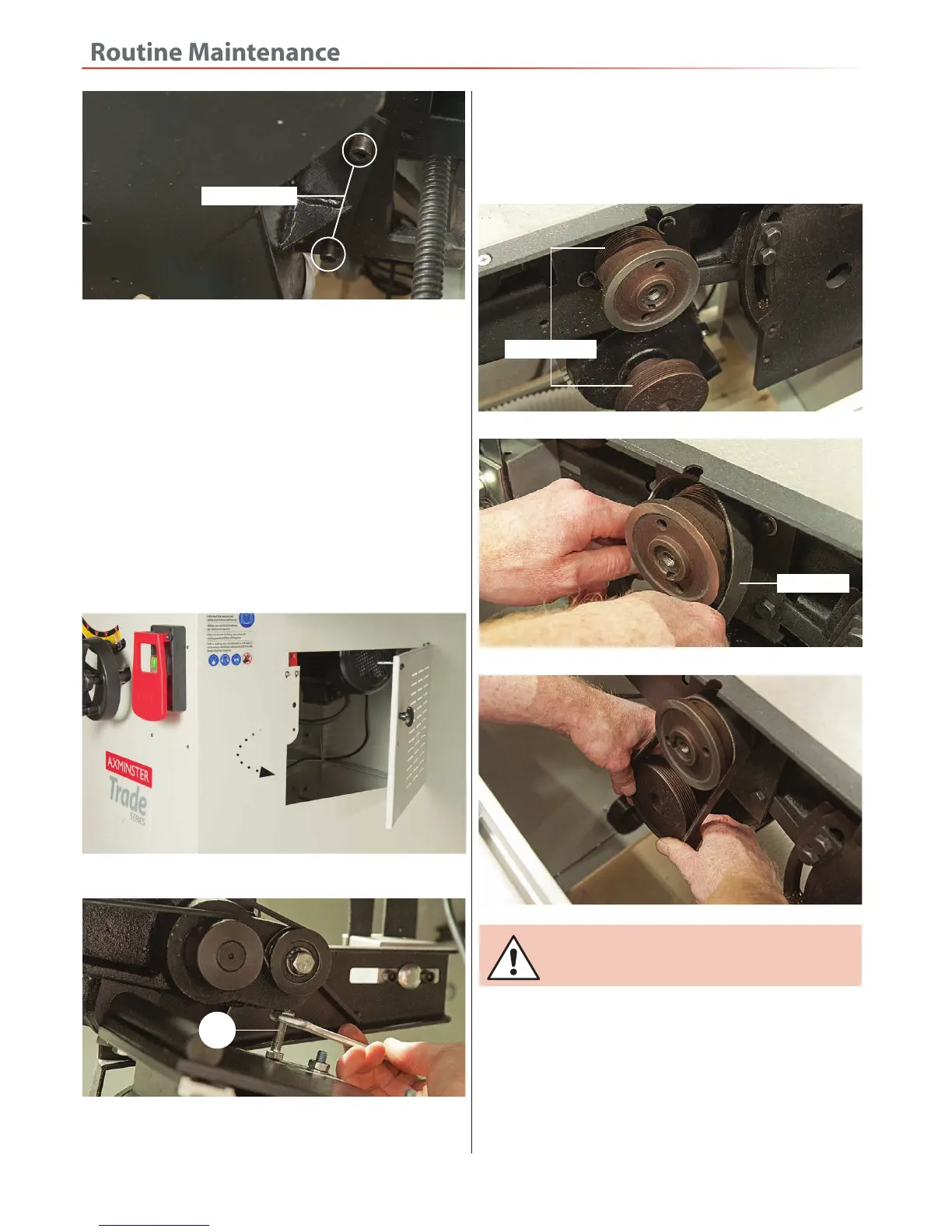
4. Open the side acess door, see fig 140 this gives access
to the motor saw assembly. Loosen the tensioning bolt
(a) on the motor housing to loosen the belt tension, see
fig 141.
5. Remove the belt from the pulleys and check the
condition of the belt. If there are signs of fraying or
stretchinge replace with a new one.
6. Place the new belt over the two pulleys and insert the
belt groove into the grooves on the pulleys, see fig 142-
143-144 Turn the belt by hand to make sure the belt has
seated down properly then re-tension the belt.
Cap head bolts
Fig 141
7. Replace the extractor housing, side panel (9), main
blade, inner guard, crown guard assembly and slide the
table (19) back until it locks in place.
a
Fig 142-143-144
Pulley grooves
Drive belt
8. Give the machine a test run ( i.e. quick ON-OFF)
to ensure everythinge is O.K. If everythinge is satisfactory,
continue to use the panel saw.
RECONNECT THE MACHINE TO THE MAINS!


 To Next Page