33
8) Change Your Stimulation Program
Trial Stimulator Only
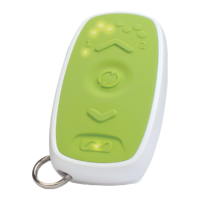
The Remote Control allows you to change the active program
(providing stimulation) if your doctor has set 2 programs to
your external Trial Stimulator. Only change your program if
instructed by your doctor. The Remote Control must be
connected to the Stimulator (see Connect to Your Stimulator).
1
Press and hold the “Connect” button for at least 5 seconds.
2
The Remote Control will vibrate and you will see either:
i. The active program light change from “1” to “2” (or vice
versa) to indicate that the program has changed, or
ii. The currently active program light flashes for 4 seconds
and does not change to the other program. This indicates
that the Stimulator was unable to change programs (see
Troubleshooting)
3
Press and release the “Up” button to turn on stimulation.
You will see one solid stimulation level LED. Continue to turn
up stimulation until you feel the stimulation (the sensation
should not be uncomfortable).


 To Next Page