Need help?
Do you have a question about the Axygen MAXYGENE II and is the answer not in the manual?
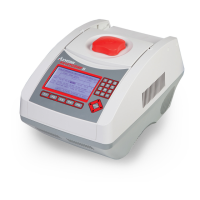
Lists key features of the MaxyGene II thermal cycler, highlighting ease of use and functionality.
Describes the front panel components, including the display and keypad layout.
Lists the items included in the MaxyGene II thermal cycler package and instructions for missing items.
Details the steps for placing, connecting, and powering on the MaxyGene II thermal cycler.
Explains the function of the heated lid and its role in preventing condensation and ensuring sample integrity.
Explains the two methods for opening and closing the thermal cycler's lid and using the lid knob.
Visual representation of the MaxyGene II's operational flow and available functions.
Details the mapping of alphanumeric keys to characters and numbers for inputting data.
Provides recommendations for loading tubes and plates into the sample block for optimal performance.
Instructions on how to select and view the contents of a user folder and its protocols.
Steps for creating a new user folder, including naming and setting a PIN.
Procedure for modifying an existing user folder's name, requiring a PIN.
Steps to delete a user folder, which requires PIN confirmation and may be restricted.
Detailed guide on initiating a protocol run, selecting modes, and starting the process.
Instructions on how to pause a running protocol and resume it later.
How to access and view real-time information about the currently running protocol.
Steps for stopping a protocol run, including confirmation prompts.
Guide on how to adjust temperature and time settings within a protocol segment.
Explains how to add or remove temperature segments from a protocol.
How to modify the number of temperature segments and cycles within a protocol.
Introduction to advanced protocol creation functions like Optimization and Pause.
Detailed steps for setting up temperature gradients across blocks for optimization.
How to apply incremental or decremental changes to temperature or time in protocol steps.
Instructions on how to incorporate a pause into a protocol segment.
Steps for saving a newly created or modified protocol, requiring a name.
Explains the function of the Data Log for recording protocol activity and exporting data.
Instructions on how to change the date type, default date, and time settings.
How to adjust the lid temperature settings, with available ON/OFF options.
Instructions for enabling or disabling the unit's audible beep function.
Information about the Administrator password and its privileges for managing users and protocols.
Notes that Service Mode is restricted to authorized personnel for maintenance.
How to select between high and low ramping speeds for heating and cooling.
Instructions on using the Tm Calculator function with nucleotide sequences.
Guidelines for cleaning the exterior of the thermal cycler and its air vents.
Procedure for safely cleaning the heated lid after it has cooled down.
Step-by-step instructions for replacing a blown fuse in the power socket module.
Detailed process for removing and replacing the thermal block assembly.
 General
| Brand | Axygen |
|---|---|
| Model | MAXYGENE II |
| Category | Laboratory Equipment |
| Language | English |

 To Next Page