68 | 69
GB
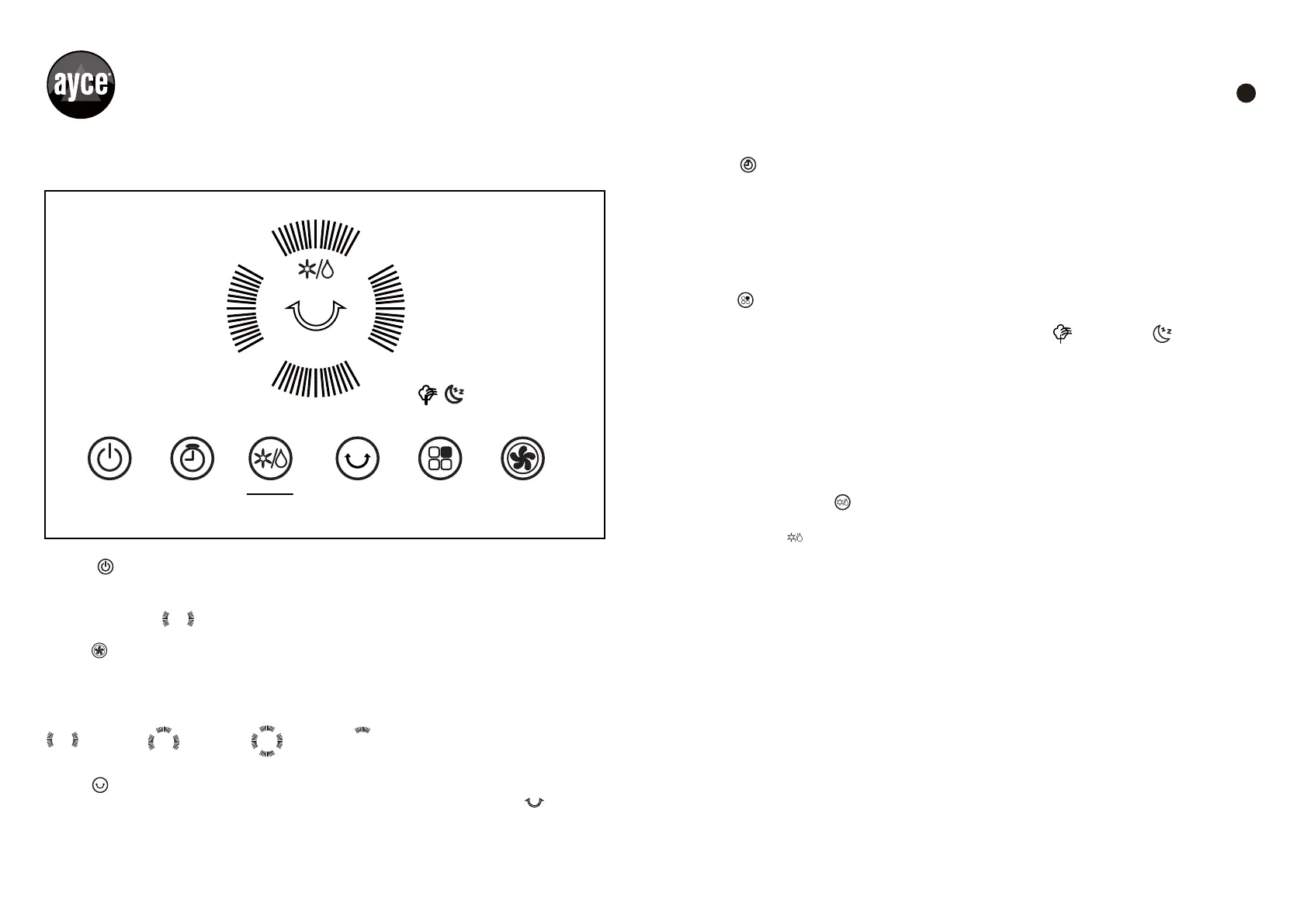
FUNCTION BUTTONS (FIG.2)
Fig. 2
ON/OFF
Press the ON/OFF buttonto turn the unit on or off. When Press the button to start the
cooler, the default fans peed is Low and the fan mode is Normal.
The indicator light is illuminated.
SPEED
Press the SPEED button repeatedly to change the speed between
Low–Medium–High-Silent.
The indicator light will show the selected speed:
SWING
Press the SWING button on the control panel; on pressing the indicator light is
illuminated. The louvers will begin to move left to right automatically. Stop swinging by
pressing the button second time.
Low Medium High Silent
1h 2h 4h 8h
TIMER
Press TIMER button until the desired time duration setting is selected. When the set time
has passed, the unit will automatically turn off (unit remains in Standby mode until power
cord is unplugged from electrical socket). The TIMER function allows you to select 1hour,
2 hours, 4 hours or 8 hours of use.
The indicator light will show the selected time: 1h—2h—4h—8h.
MODE
Press the MODE button to select your desired wind type from Normal—Nature—Sleep and
the indicator light will light up accordingly: Natural mode , sleep wind .
In the Normal mode setting, you can select High, Medium, Low or Silent fans speeds.
The Nature mode setting simulates outdoor breeze. The fan speed changes every once in
awhile, and the cool breeze is blown to every corner.
The Sleep mode is for comfort during the night. The fan automatically sets the soft air
supply program that adapts to the human body during sleep. The wind speed changes at
regular intervals to provide a comfortable sleeping environment. In sleep wind mode,
High, Medium, Low or Silent speeds are also available.
COOLER/HUMIDIFIER
Press the COOLER/HUMIDIFIER button to turn on humidifier function, on pressing the
indicator light is illuminated. This will activate evaporative cooling. The water pump
will operate and distribute water to wet out the cellulose cooling pad located in the rear of
the unit. Press this button again, when the COOL indicator light is switched OFF, the unit
can still function in a fan only mode (without evaporative cooling).
ON/OFF TIMER SWING MODE
SPEED
COOLER
HUMIDIFIER


 To Next Page