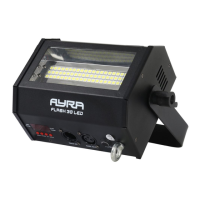
Operation and mounting
To activate the device, plug it into a mains socket. Once it's connected to an active power source, it will turn
on automatically.
During calibration, ‘AYRA’ will be shown on the display, which means the device is not ready to be operated.
Once the device has fully started up, it will jump to the last-used mode. Operation modes and other settings
shown on the display can now be adjusted or changed by means of the menu buttons.
Should the device detect a DMX signal, it will automatically switch to DMX mode and will display the last-
used address. For new devices, this will normally be DMX address 001. Of course, you can change the DMX
address via the display using the menu buttons.
Using the display and the menu buttons, you can adjust the functions and settings of the device. Press
'Enter' to confirm an adjustment or select a function, use ‘Up’ and ‘Down’ to change amounts and ‘Menu’ to
go back to the menu. By holding the ‘Menu’ button down for 2 seconds after saving a specific setting, the
device will return to operation mode and adopt the setting. This will also be done after any changes in the
operation mode or DMX address. This operation is not always necessary, considering the device
automatically does this after a new setting is confirmed.
The menu contains the following options and functions
display Mode Function
ADDR / A001 DMX address configuration Address A001 … A512
SLAV Slave mode SLAV
F-.00 Standalone stroboscope mode Stroboscope speed: F-.00 – F-.99
F-.00 = static mode
D-.00 Standalone dimmer mode Dimmer level: D-.00 – D-.99
D-.00 = dimmer 0%
SU00 Sound-controlled mode +
sensitivity
Adjustable sensitivity: SU00 - SU99
You'll find an explanation of the various functions below:
ADDR: With this function, you can determine the DMX start address of the device. Set it channel 001, and
the device will respond from DMX channel 1. Set it to channel 003, then the device will respond from DMX
channel 3, etc.
SLAV: The master-slave mode is designed to sync multiple devices. A copy of the internal program is sent to
the daisy-chained devices so that each one projects the same effect. The master-slave function works by
means of standard 3-pole XLR cables. The only difference is that the first device in the chain does not
receive DMX input.
F-.00: This function allows you to set the speed of the stroboscope while the device is in standalone mode. It
ranges from 00 to 99 where 00 is static (full-on) mode and 01 to 99 are the increasing flash speeds.
D-.00: This function is to set the intensity of the dimmer while the device is in standalone automatic mode. It
can be combined with the stroboscope speed which ranges from 00 to 99, 00 being completely off.
SU00: This mode allows you to determine the sensitivity of the internal microphone. The further the device is
from the speaker, the higher the sensitivity of the microphone needs to be so it can react properly to the
music. The microphone is built to handle high sound pressure levels, but the louder the signal the higher the
microphone sensitivity level, the more difficulty the device will have detecting the beat of the music.
Experiment with the level of sensitivity and distance/positioning of the device to find the best results.
In sound-controlled mode, the Flash 30 / 60 LED will flash three times in a row at full output at every trigger
(on the beat).
The information in this user manual is subject to change at any time without notice.
Version: 1.0 Date of creation and author's initials:02-02-2017 RV Revision date and author's initials: -


 To Next Page
 Loading...