Operating modes
The following overview is designed to show the differences between the various operation modes that are
supported by the above-mentioned menu functions.
Auto:
In automatic mode, (D-.00 and F-.00)the device is set to a fixed speed and will function according to the
preset parameters. The device does not requite input from the built-in microphone, master-slave signals or
DMX.
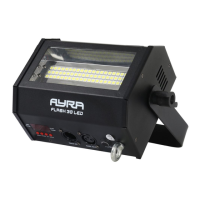
By setting the flashing speed to static (value 00), you can also use the Flash 30 / 60 LED as a static projector
to temporarily light up certain surfaces.
Sound:
The sound-controlled mode uses an internal microphone which detects the music and flashes three times at
full intensity on the beat. This ensures the light effect syncs perfectly with your music.
When no music is detected due to a break in the music or the presence of only high tones, the device will not
flash.
Slave
In Slave mode, you can daisy-chain multiple devices of the same type so they all function a specific way.
This way you can coordinate your light show by having multiple separate devices moving the same way
instead of all different directions, which can be chaotic. Basically, you can connect an unlimited number of
slave devices to a master device, but a DMX booster is required in between. Generally speaking, you can
connect up to four armatures together without the need for a DMX booster.
Be aware that when you attempt to connect devices of different types and brands, they may behave
strangely and you may not get the desired effect because certain functions are linked to the wrong channels.
This is true of DMX lighting of all brands and types.
In case of the FLASH 30 / 60 LED, mixing these units in master or slave mode is possible as they share the
same channel values and controls.
DMX
The DMX mode is the most comprehensive way to maintain ultimate control over all the functions this device
has to offer. It enables you to determine exactly how many functions you want to control via the DMX
controller or DMX software.
2CH mode:
CH Function Values
CH1 Dimmer: 0 - 100% 000-255: 0-100%
CH2 Stroboscope speed slow – fast + sound-controlled option 000-007: Stroboscope blackout
008-247: Stroboscope mode slow - fast
248-255: Sound-controlled mode
Power supply
The Flash 30 / 60 LED is equipped with a power input to supply the device with power, but also an output to
supply power to other devices, which means you won't need power strips or other power distributors.
The power connectors for the Flash 30 / 60 LED have a power capacity of 10A, subtracted by the maximum
power consumption of the device. With a small built-in safety margin, the output on the Flash 30 / 60 LED
should be fed with a maximum of 9 A.
This is more than enough to supply power to multiple devices of the same type via a single power line.
The information in this user manual is subject to change at any time without notice.
Version: 1.0 Date of creation and author's initials:02-02-2017 RV Revision date and author's initials: -


 To Next Page
 Loading...