Need help?
Do you have a question about the Azio MGK L80 MAX RGB and is the answer not in the manual?
Lists the items included in the product package, such as the keyboard and accessories.
Details the necessary hardware and software for the keyboard to function correctly.
Provides technical details including model, interface, switch type, dimensions, and weight.
Instructions on how to connect the keyboard and utilize hotkeys for secondary functions.
Information on how to get help, visit the website for FAQs, and contact support.
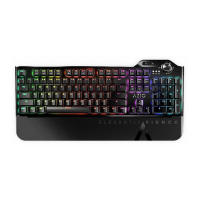
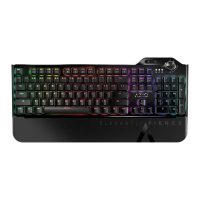
Highlights the customizable RGB backlight with multiple lighting modes.
Details the ability to record and program up to four macro keys on-the-fly.
Specifies the use of industry-standard Cherry MX switches in various options.
Explains the N-Key Rollover feature for simultaneous key presses.
Describes the intuitive volume control wheel for quick adjustments.
Covers shortcuts for productivity, internet, and multimedia functions.
Mentions the premium look and feel provided by the aluminum faceplate.
Notes the magnetic palm rest for enhanced ergonomics and comfort.
Identifies the dedicated keys for macro functions.
Points out keys for accessing productivity functions.
Locates the keys used for media playback control.
Indicates the keys or controls for selecting backlight modes.
Shows the key to activate or deactivate gaming mode.
Identifies the key used for macro recording.
Shows the location of status indicator LEDs.
Highlights the controls for adjusting volume and mute.
Indicates the controls for adjusting backlight brightness and effects.
Points out the controls for changing backlight colors.
Shows the keys for selecting pre-set gaming lighting modes.
Describes the RGB backlight effect that moves across the keyboard in a gradient.
Explains the mode where pressed keys and surroundings light up momentarily.
Details the effect that triggers a horizontal splash wave from the pressed key.
Covers the mode for a constant, set brightness backlight.
Describes the lighting effect that cycles from minimum to maximum brightness.
Explains the single-row linear effect running horizontally and vertically.
Details sectional backlighting shifting colors from left to right or vice versa.
Covers the mode for setting individual key colors and customization.
Describes lights up upon actuation with a momentary trailing effect.
Instructions to increase the brightness of all RGB backlights.
Instructions to decrease the brightness of all RGB backlights.
How to slow down the RGB backlight reaction speed.
How to speed up the RGB backlight reaction speed.
Instructions to change backlight colors in compatible modes.
How to turn off all backlight effects.
How to trigger 9 pre-set custom lighting modes for gaming.
Enables macro key usage and disables the Windows key.
Steps to enter record mode and program macro sequences.
 General
| Backlighting | RGB |
|---|---|
| Key Rollover | N-Key Rollover |
| Connectivity | Wired |
| Number of Keys | 104 |
| Polling Rate | 1000 Hz |
| Anti-Ghosting | Yes |
| Interface | USB |
| Type | Mechanical |
| Keycaps | ABS |
| Actuation Force | 50g |
| Actuation Point | 2mm |
| Total Travel | 4mm |
| Cable Length | 1.8m |

 To Next Page