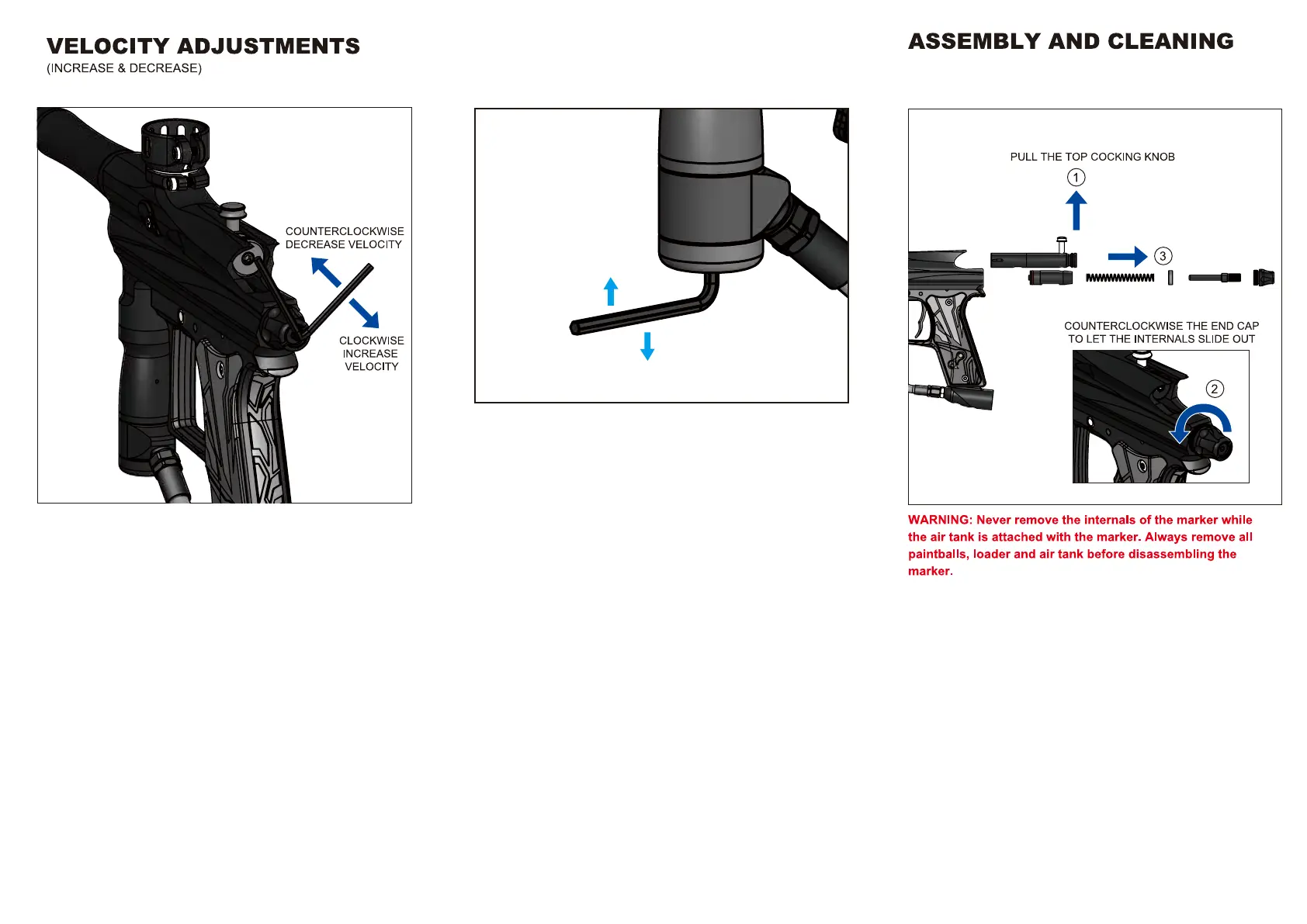
To increase your velocity FPS (Feet Per Second), use the allen
wrench to turn the Velocity adjuster (VA01) clockwise.
To decrease your velocity FPS (Feet Per Second), use the allen
wrench to turn the Velocity adjuster (VA01) anticlockwise.
CLOCKWISE DECREASE
PRESSURE AND VELOCITY
COUNTERCLOCKWISE
INCREASE PRESSURE AND VELOCITY
REGULATOR ADJUSTMENT
(INCREASE & DECREASE AIR PRESSURE)
To increase the input pressure, use the allen wrench to turn the
Rock Steady Seat (RSS3) counterclockwise.
To decrease the input pressure, use the allen wrench to turn the
Rock Steady Seat (RSS3) clockwise.
NOTE: Contact tech@azodin.com for more information.
Always use Velocity Adjuster (VA01) to increse velocity first then
increase input pressure.
RESET THE REGULATOR TO FACTORY PRESSURE
1. Please remove air source and clear the air stored in the marker.
2. Turn the Rocksteady Seat clockwise till it stops
(DO NOT FORCE IT PAST THE STOP POINT).
3. Turn the RockSteady Seat counterclockwise one and half turns.



 To Next Page