MicroSDCardSlot:
TolistentomusicoraudiofilesfromaMicroSDcard(upto64GB).simplyinsertthecardintotheslot
untilyoufeelitclickintoplace.ControltheVolume/Songormediaselection/Play/Pausebyusingthe
appropriatebuttonsonthefrontoftheDockallpanel.ToremovetheMicroSDcard,simplypushinthe
cardtounlockandrelesasethespringloadedcard.
4
Bluetooth:
TouseBluetooth,thefirststepistopairyourdevicetotheDockalldockingstation.Startbyturningon
theBluetoothfunctiononyoursmartphoneortablet,andthenyourdeviceshouldautomaticallysearch
forBluetoothdevicesinyourarea,nopasswordorcoderequired.Ifyourdevicedoesnotautomatically
connect,lookforanoptiontoscantofindthe”DOCKALL”forBluetoothpairing.Once”DOCKall”
appearsonyourdevicescreen,select”connect”andwait3-5secondstocompletethepairingprocess.
Whenyourdeviceispairedandconnected,youcancontrolthevolume/track/play/pauseontheDockallsʼ
frontpaneloronyourcompatibledevice.Additionally,ifusingasmartphoneyouʼrenowsetuptosueand
makeBluetoothphonecalls.Listentocallsthroughthespeakersandspeakthroughtheuseoffthe
Microphone.Note:SinceBluetoothtypicallycausesbatteriestpdrainatahigherrate.insureyourdeviceI
sfullychargedforoptimumperformance.
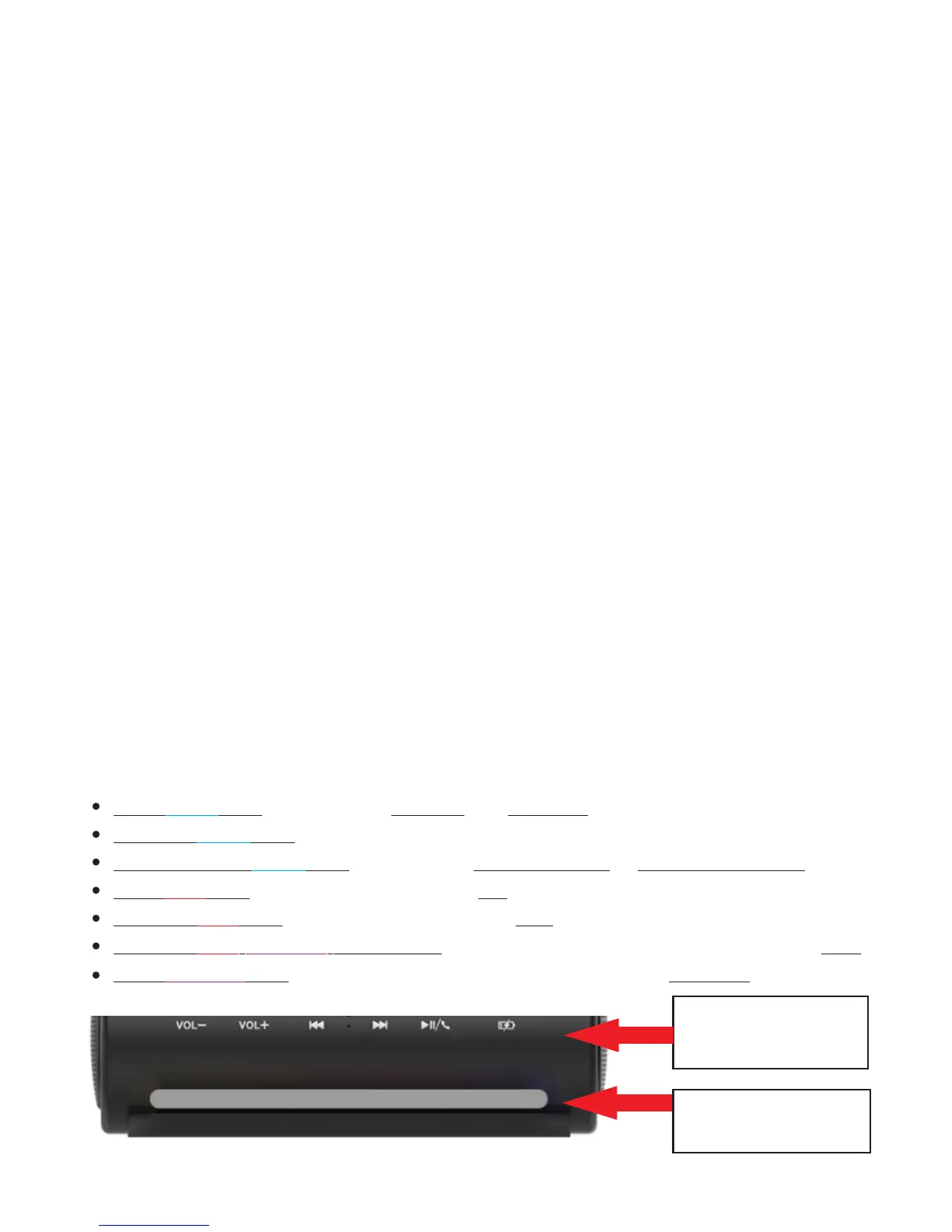
LEDLightIndicator&Functionselection:
TheDockallmustbepoweredontodisplaytheLEDLightIndicator.EachoftheLEDLightcolors
representsafunctionasreferencedbelow.Tochangeafunction,simplytapthe”ModeSelection”
buttonwhichlookssimilarlytpabattery,locatedonthefrontpanelandthencyclethrougheachlight
colortoselectyourpreferredBluetoothorchargingoption.ThefunctionandcorrespondingLightswill
remainONthroughthedurationofthatfunctionuntilmanuallyturnedoff.ToturnofftheLEDLight
Indicatorand/orcloseallfunctions,simpleholdtheModeSelectionbuttonuntilthelightsareoff
Solid light: Bluetooth is PAIRED and PAUSEDBLUE
Flashing light: Bluetooth ON.BLUE
FAST Flashing light: Bluetooth in PAIRING Mode or DISCONNECTED.BLUE
Solid light: Qi Wireless Charging is ON.RED
Flashing light: Qi Wireless Charging is OFF.RED
Flashing / /WHITE light: Bluetooth and, Qi Wireless Charging are OFFRED PURPLE
Solid light: Qi Wireless Charging is ON, Bluetooth is PAUSED PURPLE
“MODE SELECTION
BUTTON”
“LED LIGHT
INDICATOR”


 To Next Page
 Loading...