Home
AZZA
Enclosure
Celesta 340
Page 11 (ARGB Connection Guide)
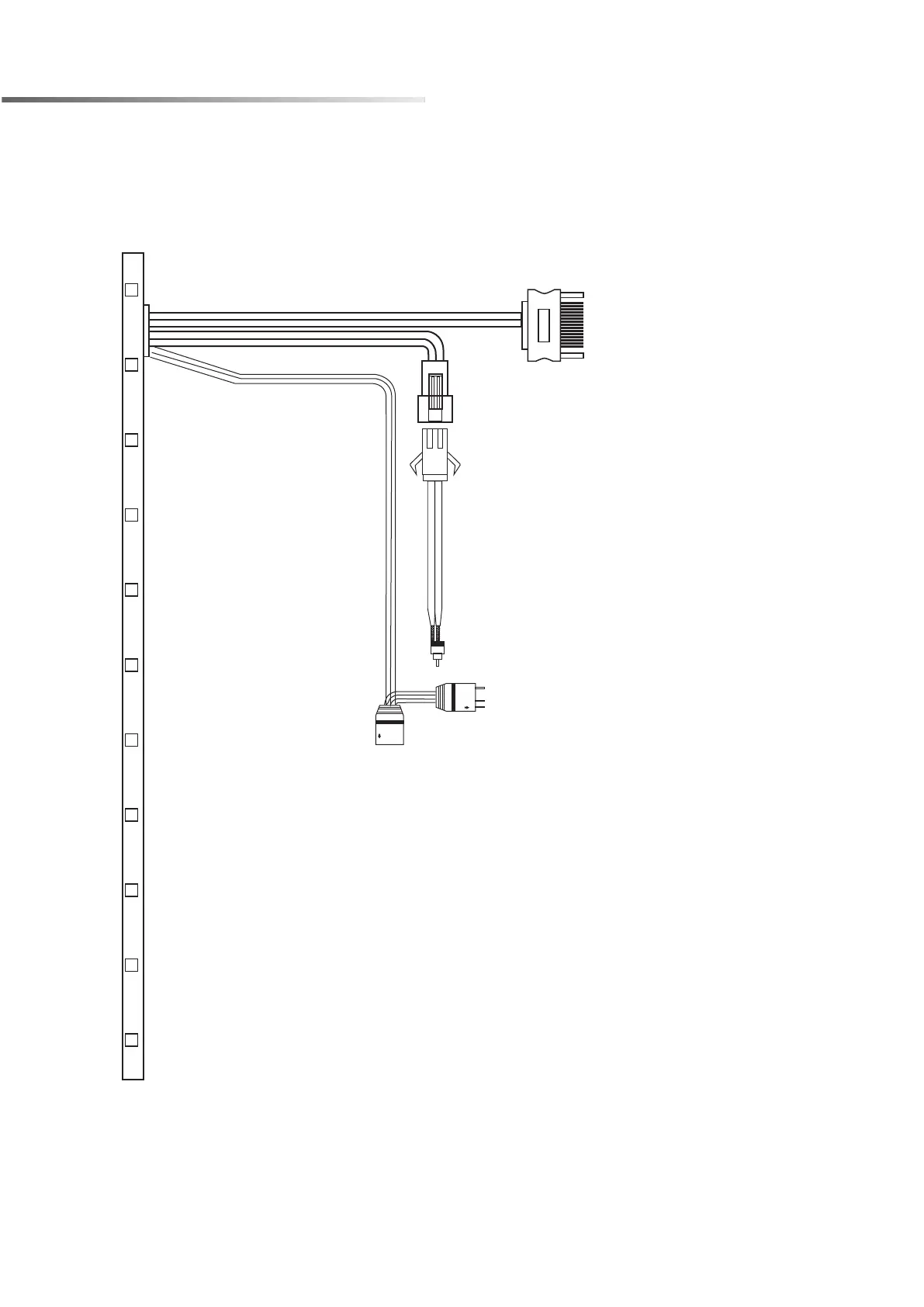
AZZA Celesta 340 - ARGB Connection Guide
12 pages
Manual
Save Page as PDF
To Next Page
To Next Page
To Previous Page
To Previous Page
Loading...
ARGB Control Modes Switching
※
T
o synchronize all addressable RGB light devices,
it needs to be switched to be controlled only by the
motherboard.
▪
SA
T
A
connector plug to Power Supply
.
▪
ARGB 3pin connector plug to the 5V
ARGB port of the motherboard.
10
12
Table of Contents
Main Page
Specifications
3
Chassis Parts
4
Control Panel Functions
5
Cooling System Installation
9
Related product manuals
AZZA Pyramid CSAZ-804V
14 pages
AZZA PYRAMID MINI 806
11 pages
AZZA Regis
11 pages
AZZA BLAZE 231
12 pages
AZZA Prime
12 pages


 To Next Page