B-52 ACTPRO Active Systems - Instruction Manual
THE BEAUTY OF POWER
ACTPRO
17
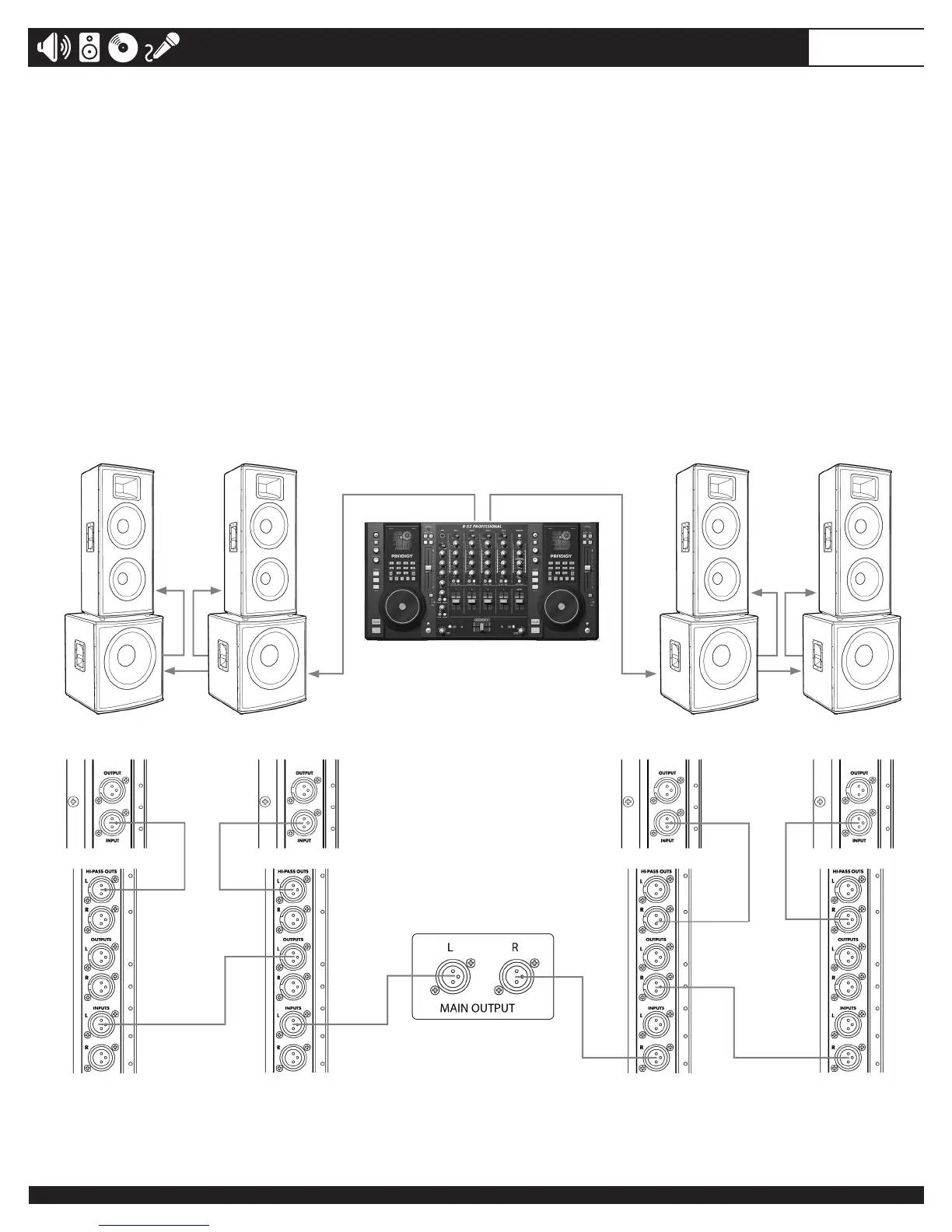
Example#4
This example shows a two-channel (stereo) setup utilizing multiple subwoofers and multiple full-range cabinets.
To connect to additional full-range loudspeakers, connect a cable from the last full-range cabinet’s OUTPUT to
the INPUT connector of next full-range cabinet on the same side. Up to 10 additional speakers can be “daisy-
chained”withoutlossofsignalquality.
Note: If you are using subwoofers other than ACTPRO18S for your setup, set the 100 Hz FILTER on your
ACTPRO Full-range cabinets to the ON position.
Note: If using connection set-up below, set the LOW-CUT switches on the Full-range speakers to the OFF
position. The signal is processed by the ACTPRO18S subwoofers.


 To Next Page