Need help?
Do you have a question about the B. Braun Omnitest 5 and is the answer not in the manual?
Read manual for correct use and consult physician for treatment changes. Do not alter treatment based on readings without medical advice.
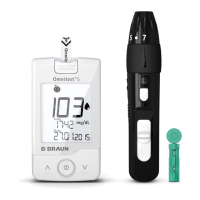
Details the components included in the Omnitest® 5 Set, such as the meter, test strips, and lancing device.
Identifies key components on the front of the Omnitest® 5 meter, including ports, buttons, and display.
Details the components on the back of the Omnitest® 5 meter, such as the product label and battery cover.
Details the features and parts of the Omnitest® 5 test strip, including the opening, confirmation window, and contacting leads.
Identifies the key components of the Omnican® Lance lancing device, such as the dialable tip, grips, and release button.
Details the importance of washing hands and ensuring the puncture site is clean and dry before taking a blood sample.
Instructions on preparing the lancing device and using a new sterile lancet for each blood sample collection.
Step-by-step guide on preparing the lancing device by inserting a new lancet and removing its protective cap.
Procedure for releasing the lancing device onto the fingertip to obtain a blood sample, emphasizing painless puncturing.
Instructions on safely removing and disposing of the used lancet from the lancing device to prevent cross-contamination.
How to correctly insert a test strip into the meter unit, ensuring it is undamaged and fully inserted for automatic power-on.
Explanation of the meter's self-test sequence upon inserting a test strip to verify display elements are functioning correctly.
Details the automatic code detection process and the importance of matching the code on the test strip vial with the display.
Indicates when the Omnitest® 5 meter is ready to measure, showing the flashing blood symbol and displayed date/time.
Instructions on how to apply a blood sample to the test strip, ensuring correct volume and avoiding squeezing the fingertip.
Describes the measurement process, the beep signal, and the importance of removing the finger from the test strip after the beep.
Explains how blood glucose readings are displayed in mg/dL, the measurement range, and unit of measure settings.
Procedure for removing the used test strip from the meter using the ejector button and proper disposal.
How to select and enter markers (e.g., control solution, pre/post-meal) to categorize blood glucose readings.
Explains how to view the target blood glucose level and deviations from it using meter settings and physician consultation.
Information on how the display and test strip port lighting activates, turns off to save power, and can be switched back on.
Instructions on how to access and view stored blood glucose readings on the meter, including memory capacity and replacement of old data.
How to view average blood glucose levels for 7, 30, and 90-day periods using the meter's average function.
Details on transferring stored readings to a computer for further analysis using a PC connection cable and compatible software.
Guide on how to enter and navigate the device settings menu to adjust various parameters like time, date, and alarms.
Instructions for setting the correct time and date on the Omnitest® 5 meter using the device buttons.
How to enable or disable the acoustic (beep) signals on the Omnitest® 5 meter.
Using the timer as a mealtime reminder for follow-up tests, including setting the alarm time in 15-minute intervals.
Instructions on displaying and setting the target blood glucose level and adjusting it in consultation with a healthcare professional.
How to switch all alarms on or off, and how to set individual alarms for reminders.
Procedure for exiting the settings menu, which automatically switches off the Omnitest® 5 meter.
How to use a check strip to verify the proper functioning of the Omnitest® 5 meter before performing blood glucose tests.
Understanding the outcomes of a check strip test, distinguishing between a properly working meter and a defective one.
Details on using Omnitest® 5 Control solution to verify the system's proper functioning, especially after suspected malfunctions or drops.
Instructions for preparing control solution tests, including temperature requirements and inserting a test strip into the meter.
Step-by-step guide on applying control solution to a test strip, including shaking the solution and discarding the first drop.
How to mark a reading obtained with control solution using the meter's symbols and confirmation button.
Reasons why control solution results may fall outside the specified range and recommended actions to take.
Lists common error messages (Er1-Er5) displayed by the meter and their potential causes.
Provides recommended actions to resolve common error messages (Er1-Er5) encountered with the Omnitest® 5 meter.
Lists error messages (Er6, Sun) related to automatic code detection, temperature, and sunlight exposure.
Provides recommended actions for resolving errors related to code detection, temperature, and sunlight.
Lists error messages indicating high (Hi) or low (Lo) readings, and low battery voltage indicators.
Recommended actions for high/low readings and low battery status, including meter checks and battery replacement.
Addresses issues like different readings compared to other devices and the meter not turning on, with causes and solutions.
Provides solutions for tests not starting after sample application and for doubtful results, including checking test strips and codes.
Instructions on cleaning the Omnitest® 5 meter, emphasizing avoiding chemical solvents and using moistened tissues.
Guidance on proper storage of the meter and test strips, avoiding extreme temperatures, electromagnetic fields, and direct sunlight.
Step-by-step instructions for replacing the meter's batteries, including battery type and correct insertion direction.
Covers infection prevention, system limitations, test principle, disposal, technical specifications, and symbols.
Provides a conversion table to convert blood glucose levels between mg/dL and mmol/L units.
 General
| Brand | B. Braun |
|---|---|
| Model | Omnitest 5 |
| Category | Blood Glucose Meter |
| Language | English |

 To Next Page