6
SCREEN AND CONTROL ELEMENTS
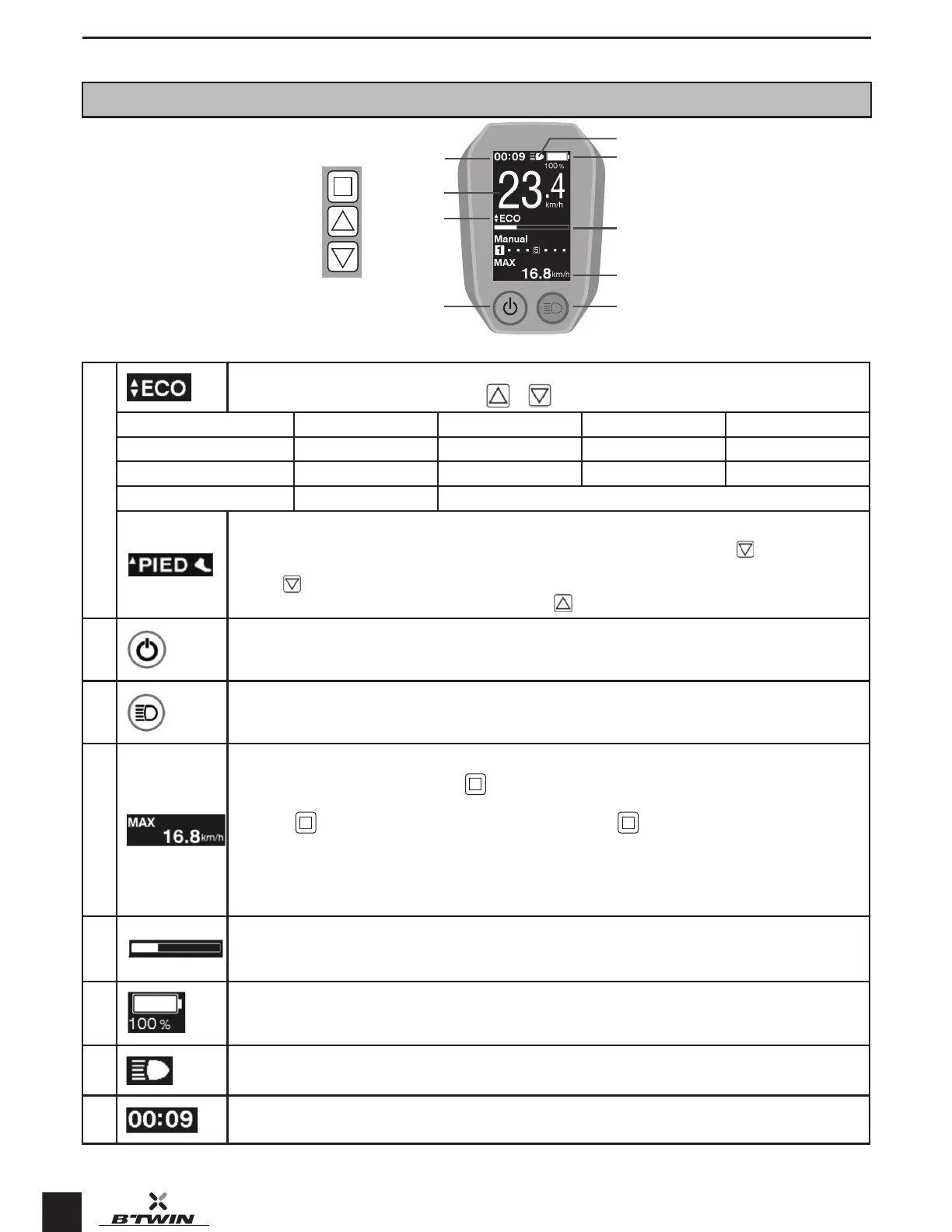
Screen data and function
8
7
9
6
1
5
4
2 3
1
Power assiance mode (OFF <=> ECO <=> NORMAL <=> HIGH).
Switch from one mode to the next by pressing the or buttons
Mode O Eco Norm High
Power assiance level None Economical Normal High
Battery consumption / Low Medium High
Average battery life* / 50-90km
»Walk assi» assiance mode:
This mode is used when the rider is walking beside the bicycle. Set the mode to «OFF» and hold the
button down to
select the walk assi mode.
Hold the button down to use the walk assi mode.
To op the walk assi mode, let go of the button and press the button to return to the andard power assiance modes.
2
ON/OFF button:
Switch the electrically-assied bicycle on and o by holding the button down for a few seconds.
3
Lighting button
The lights on the bicycle can be switched on and o by holding this button down for a few seconds
4
Journey data:
Scroll through the data by briey pressing the
button.
DST: Diance travelled. The reading can be reset to zero when the DST data is displayed on the screen. This is done by
holding the button down for a few seconds and then briey pressing the
button when the DST reading ashes.
ODO: Total diance travelled
MODE: Remaining battery life for each power assiance mode
TIM: Journey time
AVG: Average speed
MAX: Maximum speed
5
Power assiance gauge:
Indicates the level of power assiance delivered depending on the pedalling power provided. The higher the pedalling power,
the higher the power assiance delivered.
6
Battery charge level:
6 levels and a percentage reading of the remaining capacity
7
Lights icon:
Appears on the screen when the lights are on
8 Time


 To Next Page