EasyManua.ls Logo

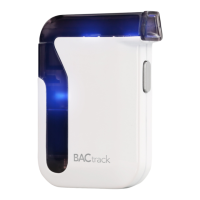
BACtrack Mobile Breathalyzer - User Manual

BACtrack Mobile Breathalyzer
3 pages
Print Icon
To Next Page IconTo Next Page
Loading...
Step 1. Step 2.
®
Mobile Breathalyzer: Getting Started
The BACtrack Mobile Breathalyzer is a quick, convenient and reliable tool for
estimating the level of alcohol in your blood. When paired with a Bluetooth
4.0-enabled Apple mobile device, it can estimate your blood alcohol content (BAC)
with professional-grade accuracy and deliver an unrivaled amount of information
regarding your drinking habits.
Step 1: Pair Your Breathalyzer
Download the free BACtrack app at bactrack.com/app or the Apple App Store.
Go to the Settings on your mobile device and if needed, turn on Bluetooth.
Turn on your BACtrack Mobile Breathalyzer.
Go to the BACtrack app, and from the app screen, click “Pair Your BACtrack.”
The app will automatically connect to BACtrack via Bluetooth.
Step 2: Take a Reading
Click “Take a Reading.”
To ensure accurate results, it is important to wait at least 15 minutes after
smoking, eating or drinking before testing.
Step 3: Prepare Device
A countdown clock appears while
the sensor in your BACtrack
Mobile Breathalyzer warms up.
Step 4: Blow into Breathalyzer
When the screen reads “Blow Now,”
take a deep breath and blow into your
breathalyzer firmly and continuously
until all the bars on screen are
illuminated. You will be blowing for
about five seconds.
Step 5: View Results
Once your BACtrack Mobile Breathalyzer
has analyzed the breath sample, it
will communicate the reading to your
mobile device, and your Blood Alcohol
Content (BAC) estimate will be displayed
on screen.
®®
www.BACtrack.com/mobile
Question and Answer IconNeed help?

Do you have a question about the BACtrack Mobile Breathalyzer and is the answer not in the manual?

Summary

Getting Started with BACtrack Mobile

Pair Your Breathalyzer

Download the app, turn on the device, and pair via Bluetooth.

Take a Reading

Initiate a reading and follow pre-test instructions for accuracy.

Prepare Device

The sensor warms up as indicated by a countdown clock.

Blow into Breathalyzer

Blow continuously into the device until all screen bars illuminate.

View Results

The app displays the BAC estimate after analysis.

BACtrack Mobile Breathalyzer Features

Tracking Graph

View historical BAC results and drinking habits over time.

ZeroLine Feature

Estimate when your BAC will return to 0.000%.

BACtrack WorldView

Explore real-time BAC results shared by users globally.

Information and Settings

Access user manual, sharing, and account preferences.

Sharing and Privacy Controls

Share BAC Results

Share readings via text, Facebook, or Twitter with a unique URL.

BACtrack WorldView Contribution

Contribute anonymously to a global map of BAC results.

BACtrack Mobile Breathalyzer Specifications

General IconGeneral
BrandBACtrack
ModelMobile Breathalyzer
CategoryTest Equipment
LanguageEnglish

Related product manuals