Need help?
Do you have a question about the BACtrack Keychain and is the answer not in the manual?
Explains how alcohol is absorbed and detected in the breath due to its presence in the bloodstream.
Slight euphoria, loss of shyness; depressant effects not apparent. Impairment possible in some.
Feeling of well-being, relaxation, lower inhibitions. Minor impairment of reasoning, caution.
Slight impairment of balance, speech, vision, judgment, self-control. Driving skills always impaired.
Significant impairment of motor coordination, judgment. Slurred speech, impaired balance, vision, reaction time.
Gross motor impairment, lack of physical control, blurred vision, loss of balance. Euphoria reduces, dysphoria appears.
Dysphoria predominates. Nausea may appear.
Need for assistance walking, total mental confusion, dysphoria, nausea, vomiting.
Loss of consciousness, onset of coma, possible death due to respiratory arrest.
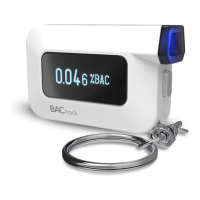
Results displayed directly on the BACtrack screen. No saving or transmission.
Results sent to a smartphone app, allowing results to be saved.
Install one AAA alkaline battery in the battery compartment to power the device.
Attach a mouthpiece to the breathalyzer if desired; using a mouthpiece is optional.
Press the Power Button for one second to turn on the device; the front blue LED will illuminate.
Device displays 'Warming Up' and counts down; inhale deeply before it reaches two.
Blow steadily for six seconds when 'BLOW' flashes; stop when beeping stops.
Device analyzes sample, displays BAC value, and turns off automatically in 10 seconds.
Install one AAA alkaline battery in the battery compartment to power the device.
Attach a mouthpiece to the breathalyzer if desired; using a mouthpiece is optional.
Download the BACtrack App from the App Store or Google Play.
Ensure Bluetooth is enabled on your mobile device for pairing.
Open the BACtrack App and press the Power Button on BACtrack to pair the device.
Tap the BAC Test circle in the app to start the testing process; 'Guess Your BAC' is optional.
Blow into BACtrack until blue segments are orange when prompted 'Blow Now'.
Reading transmits to mobile device; press OK to view estimated time to 0.00% BAC (ZeroLine®).
Indicates the need to install a new AAA alkaline battery.
Testing cannot be performed if the unit is outside the acceptable temperature range.
Requires pressing the power button to restart if blow is not steady for 6 seconds.
Requires pressing the power button to restart if no breath sample is detected.
Indicates the BAC exceeds the maximum measurable level of 0.30%.
Instructs user to blow steadily and consistently, not forcefully.
Explains the rear blue LED indicates BACtrack App mode; holding the power button switches modes.
Indicates the device is not in Standalone mode; holding power button switches modes.
States the BACtrack is not in BACtrack App mode; holding power button switches modes.
Wait 20 minutes after drinking, eating, or smoking to avoid inaccurate readings or sensor damage.
Do not blow smoke, food, or liquids into the breathalyzer to prevent sensor damage.
Do not test in strong winds, smoke, or areas with high alcohol consumption.
Avoid testing in presence of methyl alcohol, isopropyl alcohol, or acetone as they interfere.
Replace AAA battery when indicator shows one bar; use correct type to avoid explosion risk.
Send BACtrack for periodic calibration service as required.
Device designed for use in temperature range of 32-104 °F (0-40 °C).
BAC results from this product are not admissible in a court of law.
Do not use BACtrack to determine operating vehicles or performing dangerous acts.
Do not drink and drive; always have a designated driver.
Recalibrate every 6-12 months or if results are inconsistent, high, or low.
Visit website or call for information on getting your BACtrack recalibrated.
KHN Solutions Inc. disclaims liability for misuse or consequences of use.
Product use is at user's risk; BAC correlation depends on many variables.
Warranty does not apply to damage from accident, abuse, tampering, or unauthorized service.
Follow instructions: obtain RA number, package product carefully, and ship via major carrier.
Include RA number, name/address/phone, and a copy of the original sales receipt with returned product.
 General
| Power Source | 1 AAA battery |
|---|---|
| Warm-up Time | 10-20 seconds |
| Type | Personal Breathalyzer |
| Blowing Time | 5 seconds |
| Accuracy | +/- 0.01% BAC |
| Battery Life | 150 tests |
| Warranty | 1 year |
| Sensor Technology | Semiconductor |
| Response Time | 5 seconds |
| Technology | Semiconductor sensor |
| Range | 0.00 - 0.40% BAC |
| Operating Temperature | 32°F to 104°F (0°C to 40°C) |

 To Next Page